
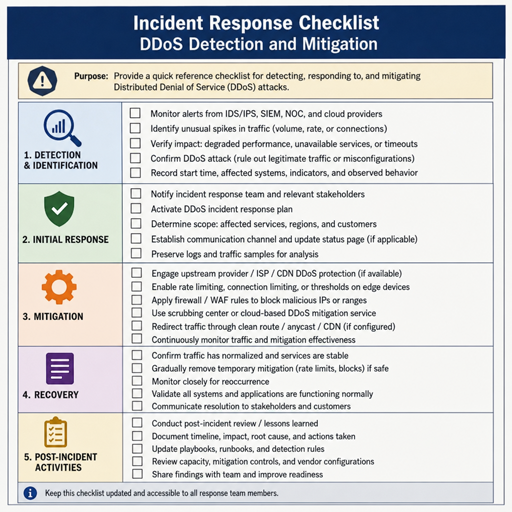
Distributed denial-of-service attacks are usually aimed at public-facing services, but the damage is often felt first inside the local network: slow applications, saturated internet links, unstable firewalls, dropped VoIP calls, and users who “can’t get online.” Effective DDoS attack detection starts with knowing what normal traffic looks like, watching the right points in the network, and having a response plan before the link is overwhelmed. This guide explains practical ddos detection methods, the tools that help, and the mitigation decisions that matter when your local network is under pressure.
What does a DDoS attack look like on a local network?
A DDoS attack on a local network usually appears as an abnormal flood of traffic that overwhelms the internet connection, firewall, router, server, or a specific application. From the user’s perspective, it may look like ordinary slowness; from the network team’s perspective, the signs are more specific: traffic spikes, connection table exhaustion, unusual packets, repeated requests, high CPU on edge devices, or inbound bandwidth pinned near capacity.
The important distinction is that a DDoS attack is distributed. Instead of one noisy source, traffic may come from many IP addresses, regions, autonomous systems, or compromised devices. That makes simple blocking less effective and pushes detection toward behavior, volume, protocol patterns, and service impact.
On a local network, DDoS visibility is often indirect. You may not see every attacking system if the internet circuit is already saturated before traffic reaches your firewall. You might only see symptoms: VPN sessions dropping, DNS failing, web servers becoming unreachable, or monitoring alerts showing packet loss at the WAN edge. That is why ddos attack prevention and detection should cover both internal telemetry and external dependencies such as ISP support, cloud scrubbing, and upstream filtering.
Common local-network warning signs include:
- Sudden bandwidth saturation with no matching business activity, backup job, patch deployment, or media event.
- Firewall or router resource exhaustion, especially high CPU, memory pressure, or full connection tables.
- Repeated connection attempts to one public IP, port, domain, VPN gateway, DNS server, or web application.
- Unusual protocol imbalance, such as a sharp rise in UDP, SYN packets, DNS queries, ICMP, or application-layer requests.
- Service-specific failure, where one public service becomes unreachable while other internal systems remain healthy.
- Widespread user impact, including slow browsing, poor call quality, failed authentication, or unstable remote access.
Not every spike is malicious. A misconfigured device, loop, broadcast storm, infected internal host, cloud sync tool, or legitimate surge can produce similar symptoms. Good ddos attack detection is not about assuming every anomaly is an attack; it is about quickly narrowing the cause and deciding whether mitigation needs to happen locally, upstream, or both.
The local network visibility problem
Local networks are not always designed with denial-of-service visibility in mind. Many organizations can tell when the internet is “down,” but they cannot immediately tell whether the issue is inbound saturation, outbound abuse, firewall exhaustion, DNS overload, a provider outage, or an internal device causing noise. That gap slows response.
A useful detection setup observes traffic at several layers. The WAN edge shows what enters and leaves the organization. Firewalls reveal session counts, blocked traffic, NAT pressure, and policy hits. Switches and wireless controllers show whether the problem is spreading internally. Servers and applications show whether the target is a network device, a public service, or an application endpoint.
For smaller environments, this does not require a massive security operations platform. It does require baseline data, log retention, alerting, and someone who knows what normal looks like. Without that baseline, a graph showing “high traffic” has limited meaning.
Where to monitor first
Start at the points where congestion and attack traffic are most likely to be visible:
- Internet edge router or firewall Watch inbound and outbound throughput, packet rate, session count, dropped packets, CPU, memory, and interface errors. This is usually the first place a volume-based attack becomes obvious.
- Public-facing services Monitor VPN concentrators, web servers, DNS servers, email gateways, remote desktop gateways, and any application exposed to the internet. These systems often show application-layer attacks before the network link is fully saturated.
- Core switches and aggregation points Use interface counters, flow data, and error logs to determine whether the issue is external or internal. If internal east-west traffic is also abnormal, the problem may not be a classic inbound DDoS.
- DNS and identity infrastructure DNS failures and authentication delays can make the whole network feel broken. Query volume, failed lookups, and unusual request patterns are valuable signals.
- Endpoint and server logs These logs help separate network overload from application abuse, malware activity, or misconfiguration.
Baselines make alerts meaningful
A baseline is a realistic picture of normal behavior. It should include business-hour patterns, weekend patterns, known backup windows, patch schedules, seasonal traffic changes, and expected usage for remote access or public applications. If you only alert when bandwidth hits a fixed threshold, you may miss attacks during quiet periods or trigger false alarms during legitimate peaks.
Useful baselines include:
- Average and peak bandwidth by interface.
- Normal packets per second at the WAN edge.
- Typical TCP, UDP, and ICMP distribution.
- Expected top talkers and destinations.
- Normal firewall session counts.
- Normal DNS query rates.
- Usual application request rates.
- Expected VPN login and connection patterns.
Baselines do not need to be perfect to be useful. Even a week or two of clean data can help reveal what is unusual. The key is to update baselines when the network changes, such as after adding a new SaaS platform, opening a new branch, moving services to the cloud, or changing backup behavior.
Core DDoS detection methods
DDoS detection methods usually combine traffic volume, protocol behavior, source distribution, target concentration, and service health. No single method catches every attack. A layered approach helps you detect both obvious floods and slower application-layer attacks.
Volume-based detection
Volume-based detection watches for abnormal traffic levels. This includes bandwidth usage, packets per second, connections per second, and request rates. It is useful for identifying floods that aim to consume the internet circuit or overwhelm network hardware.
Examples include:
- Inbound bandwidth rising sharply without a matching business reason.
- Packets per second increasing while total bandwidth stays moderate.
- A sudden increase in connection attempts to one public IP.
- Firewall session tables growing quickly and staying near capacity.
- Dropped packet counters increasing on the WAN interface.
The practical value of volume detection is speed. If the internet link is saturated, local controls may be too late because unwanted traffic has already reached your circuit. In that situation, upstream help from an ISP or ddos protection services may be necessary.
Protocol and packet-pattern detection
Protocol-based detection looks for suspicious behavior in traffic types. Attacks may target TCP connection handling, flood UDP ports, abuse DNS, or use ICMP to consume resources. The goal is to identify traffic that does not match normal protocol behavior.
Signals may include:
- High SYN traffic with few completed TCP handshakes.
- UDP floods toward ports that are rarely used.
- Excessive DNS queries for unusual names or repeated records.
- ICMP spikes outside normal troubleshooting activity.
- Fragmented packets or malformed traffic hitting the edge.
Protocol analysis is especially useful when bandwidth is not fully consumed but devices are struggling. A firewall may be overwhelmed by connection tracking even if the raw bandwidth number looks manageable.
Flow-based detection
Flow data, such as NetFlow, sFlow, IPFIX, or vendor-specific equivalents, summarizes conversations across the network. It helps answer critical questions: Who is talking? To what destination? Using which protocol? For how long? At what volume?
Flow-based detection is valuable because it can show patterns without capturing every packet. During a suspected DDoS event, flow records help identify whether traffic is concentrated on one destination, spread across many services, or coming from many sources with similar behavior.
A useful flow investigation asks:
- Which destination IP is receiving the most traffic?
- Which ports or protocols dominate the spike?
- Are sources widely distributed or concentrated in a few networks?
- Is the traffic inbound, outbound, or both?
- Did the pattern start suddenly or build over time?
- Does the traffic match any known business event?
Application-layer detection
Application-layer DDoS attacks are harder to spot because the traffic may look like legitimate requests. Instead of flooding the network link, the attacker targets expensive application functions: login pages, search, checkout, API endpoints, file downloads, or dynamic content.
Detection requires application logs and performance metrics, not only network graphs. Look for request rates, error rates, response times, repeated user agents, unusual referrers, repeated paths, failed authentication patterns, and sudden traffic to costly endpoints.
Application-layer attacks often need different ddos mitigation strategies than network floods. Rate limiting, caching, web application firewalls, bot management, challenge pages, and endpoint-specific controls may be more useful than blocking traffic at the router.
Reputation and threat-intelligence signals
Reputation data can support detection, especially when many requests come from known malicious networks, open proxies, anonymization services, or previously observed bot infrastructure. However, reputation should not be the only basis for action. DDoS sources may include compromised residential devices, cloud systems, or networks that are not consistently malicious.
Use reputation as a confidence booster, not a replacement for local evidence. If traffic is abnormal, service health is degraded, and many sources also have poor reputation, the case for mitigation becomes stronger.
DDoS detection tools for local networks
DDoS detection tools range from built-in device monitoring to specialized network detection platforms. The best choice depends on your network size, exposed services, staff capacity, and risk tolerance. The goal is not to collect every possible metric; it is to collect the signals that let you detect, triage, and escalate quickly.
Built-in firewall and router monitoring
Most business firewalls and routers provide interface graphs, session counts, CPU usage, dropped traffic logs, and security events. These are often the fastest source of truth during an incident because they sit at the internet edge.
Use these features to track:
- Interface utilization and packet rate.
- Top source and destination addresses.
- Top ports and protocols.
- NAT and state table usage.
- Denied traffic and policy hits.
- Device health metrics.
The limitation is that edge devices can become overloaded during an attack. If logging is too heavy, it may worsen performance. Keep logging useful, but avoid turning the firewall into the only place where all analysis must happen.
Flow collectors and traffic analyzers
Flow collectors aggregate traffic metadata from routers, switches, and firewalls. They are among the most practical ddos detection tools because they show patterns without needing full packet capture.
A flow collector can help confirm whether a traffic spike is caused by one internal host, one attacked public service, many external sources, or a specific protocol. It also supports post-incident review, which is essential for improving ddos attack prevention.
Intrusion detection and network detection systems
Intrusion detection systems and network detection tools inspect traffic for suspicious behavior, known attack patterns, and policy violations. They may identify scanning, malformed packets, suspicious DNS behavior, or repeated connection attempts.
These tools work best when tuned to the environment. If alerts are too noisy, teams may ignore them. If inspection coverage is too narrow, attacks may be missed. Start with high-value network segments and public-facing services, then tune alerts around actual risk.
Log management and SIEM platforms
A SIEM or log management platform helps correlate events across firewalls, servers, DNS, identity systems, applications, and cloud services. This is useful when the attack is not obvious from a single dashboard.
For example, a SIEM can show that firewall session counts rose at the same time web errors increased, DNS queries spiked, and VPN logins failed. That correlation helps distinguish a network attack from a server outage or ordinary congestion.
Packet capture tools
Packet captures provide detailed evidence, but they should be used carefully during high-volume events. Capturing too much traffic can overload storage and analysis systems. Use targeted captures around the affected interface, service, or time window.
Packet-level analysis is most useful when you need to confirm protocol behavior, inspect malformed packets, or provide evidence to a provider or security partner. It is not always the first tool to use when the link is saturated.
A practical DDoS detection workflow
A good workflow helps teams move from symptoms to evidence without wasting time. The steps below are designed for local network administrators, IT teams, and security teams that need a repeatable process.
1. Confirm the impact
Start by identifying what is actually failing. Is the entire internet connection slow, or only one application? Are internal systems affected, or only remote users? Can users reach external websites? Can external users reach your public service?
Impact scoping prevents overreaction. If only one application endpoint is slow, the issue may be application-layer abuse. If all internet traffic is affected and the WAN link is full, the problem is more likely network saturation.
2. Check edge device health
Review firewall and router metrics. Look at bandwidth, packet rate, CPU, memory, session count, dropped packets, and interface errors. If the device is overloaded, preserve access carefully and avoid making unnecessary changes.
If the WAN interface is saturated inbound, local blocking may not restore service because traffic has already crossed the provider circuit. You may need upstream filtering.
3. Identify the target
Determine whether traffic is aimed at a specific public IP, port, domain, VPN gateway, DNS server, or application. DDoS attacks usually have a target, even when traffic sources are distributed.
Flow data, firewall logs, load balancer metrics, and application logs can help identify the destination under pressure. Once you know the target, you can choose more precise mitigation.
4. Identify the pattern
Classify the traffic pattern before acting:
- Bandwidth flood: High inbound traffic consumes the internet link.
- Packet flood: High packet rate stresses devices even if bandwidth is moderate.
- Connection flood: Many attempted sessions exhaust firewall, server, or application capacity.
- Protocol abuse: Suspicious TCP, UDP, DNS, ICMP, or fragmented traffic patterns appear.
- Application-layer attack: Legitimate-looking requests overwhelm expensive functions.
This classification guides the response. Blocking a few IPs may help with concentrated abuse, but it rarely solves a large distributed flood. Rate limiting may help applications but not a saturated circuit.
5. Compare against normal activity
Check scheduled tasks, marketing campaigns, software updates, cloud backups, vulnerability scans, and business events. Ask whether anything changed just before the incident. A legitimate traffic surge can look alarming if nobody expected it.
At the same time, do not delay escalation while searching for a perfect explanation. If services are failing and attack indicators are strong, begin mitigation while continuing investigation.
6. Escalate to the right party
If the local internet circuit is saturated, contact the ISP or connectivity provider. If a public web application is targeted, involve the hosting provider, cloud platform, CDN, or ddos protection services. If internal systems are generating traffic, involve endpoint, server, or incident response teams.
Escalation works best when you provide concise evidence: affected IPs, start time, traffic volume if available, top protocols, top ports, symptoms, and steps already taken.
Prevention measures that improve detection
DDoS attack prevention is not only about stopping every attack before it starts. In many environments, prevention means reducing exposure, increasing resilience, and making attacks easier to detect and mitigate.
Reduce unnecessary exposure
Every public service is a potential target. Review what is reachable from the internet and remove anything that does not need to be exposed. Place administrative interfaces behind VPNs or zero-trust access controls. Restrict management ports, disable unused services, and keep public DNS records accurate.
Reducing exposure improves ddos attack prevention and detection because there are fewer targets to monitor and fewer confusing signals during an incident.
Harden public services
Public services should be designed to fail gracefully under pressure. Use sensible connection limits, request limits, timeouts, caching, queue controls, and resource protections. Keep applications from allowing one client or one endpoint to consume disproportionate resources.
For web applications, consider caching static content, protecting login and search functions, and separating critical services from less important workloads. For VPNs, monitor login attempts, concurrent sessions, and gateway health closely.
Build upstream relationships before an incident
Many DDoS events cannot be solved entirely on the local network because traffic may overwhelm the circuit before local equipment can filter it. Know how to contact your ISP, hosting provider, cloud provider, or mitigation partner. Document support numbers, contract details, escalation paths, and what evidence they require.
This preparation is a practical part of ddos mitigation strategies. During an incident, time spent searching for the right contact is time the business remains disrupted.
Segment and protect critical internal systems
Local segmentation does not stop a large inbound flood, but it can limit secondary damage. If one public-facing server is under attack, the rest of the internal network should not become unstable. Use network segmentation, firewall rules, and access controls to protect DNS, identity systems, backups, monitoring, and administrative networks.
Segmentation also helps detection. If abnormal traffic is contained to one segment, the investigation is faster and the blast radius is smaller.
Mitigation strategies once an attack is detected
DDoS mitigation strategies should match the attack type and the point of congestion. Acting quickly matters, but acting blindly can make outages worse. The right response depends on whether the attack is saturating the circuit, overwhelming a device, targeting a protocol, or abusing an application.
Local filtering and rate limiting
Local controls can help when traffic reaches your equipment and the circuit still has capacity. Firewall rules, access control lists, geo-based restrictions, protocol filtering, and rate limits may reduce load. These measures are most effective against smaller attacks, misbehaving sources, or traffic aimed at unnecessary ports.
Be careful with broad blocking. Blocking entire regions, protocols, or networks can disrupt legitimate users. Document every emergency rule and remove or refine it after the incident.
Upstream filtering and scrubbing
If the internet link is saturated, mitigation must happen before traffic reaches the local circuit. ISPs and ddos protection services may offer filtering, traffic scrubbing, blackholing, or routing changes. Scrubbing attempts to remove malicious traffic while forwarding legitimate traffic; blackholing drops traffic to a target to protect the wider network but makes that target unreachable.
Upstream mitigation works best when you can clearly identify the attacked IPs, protocols, and business priority. If you do not know what must remain online, providers may have fewer safe options.
CDN, WAF, and application-layer protections
For web applications, a content delivery network, web application firewall, bot controls, caching, and challenge mechanisms can reduce application-layer pressure. These tools can absorb requests, serve cached content, block known bad patterns, and enforce request limits closer to the user.
They are not a complete replacement for network-level protection. If attackers target your origin IP directly or flood non-web services, you may still need firewall rules, provider filtering, or architectural changes.
Temporary service changes
Sometimes the fastest way to preserve critical operations is to temporarily reduce exposed functionality. This may include disabling expensive endpoints, requiring authentication, restricting access to business regions, moving a service behind a protected gateway, or pausing nonessential public features.
These decisions should be planned in advance. During an outage, it is much harder to decide which services can be degraded safely.
Incident checklist for local network teams
Use this checklist as a practical starting point for ddos attack detection and response:
- Confirm affected services, users, and locations.
- Check WAN bandwidth, packet rate, firewall health, and session counts.
- Identify whether traffic is inbound, outbound, or internal.
- Determine the likely target IP, port, domain, or application endpoint.
- Review top protocols, top destinations, and top sources using flow or firewall data.
- Compare the traffic spike with known business activity or scheduled tasks.
- Preserve key logs, graphs, timestamps, and screenshots.
- Apply safe local filtering only when it will not worsen the outage.
- Escalate to the ISP, hosting provider, cloud provider, or mitigation partner if the circuit is saturated.
- Notify internal stakeholders with impact, status, and next update time.
- Track all emergency changes for later review.
- After service stabilizes, review what worked, what failed, and what should be automated.
Common mistakes that slow DDoS detection
The most common mistake is waiting too long to involve upstream providers. If inbound traffic fills the circuit, firewall rules may not help because the unwanted packets have already consumed the bandwidth. Local action has limits.
Another mistake is relying only on bandwidth graphs. Packet rate, connection rate, device health, DNS behavior, and application errors can reveal attacks that bandwidth alone does not explain. A modest-looking traffic increase can still overwhelm stateful devices or expensive application functions.
Teams also lose time when monitoring tools are not synchronized. If firewall logs, server logs, and application monitoring use inconsistent timestamps, correlation becomes harder. Use consistent time settings across systems so incident review is reliable.
Finally, many organizations fail to document emergency changes. A temporary block or rate limit may remain in place long after the attack ends, causing future support issues. Treat DDoS response like any other incident: record actions, owners, timestamps, and rollback steps.
Building a long-term DDoS readiness plan
Long-term readiness brings ddos attack prevention, ddos attack detection, and response planning together. The plan should define what must be protected, how attacks will be detected, who makes decisions, and when outside help is required.
A practical readiness plan includes:
- Asset inventory: Public IPs, domains, services, providers, and business owners.
- Monitoring coverage: Edge devices, flow data, DNS, applications, servers, and provider portals.
- Detection thresholds: Baselines, anomaly alerts, packet-rate alerts, session alerts, and application health alerts.
- Response roles: Network, security, application, communications, executive, and provider contacts.
- Mitigation options: Local filtering, rate limits, CDN/WAF controls, ISP escalation, ddos protection services, and service degradation plans.
- Communication templates: Internal updates, customer-facing status language, and provider escalation notes.
- Review process: Post-incident analysis, tuning, and documentation updates.
Readiness does not guarantee that every attack will be invisible to users. It does increase the chance that your team detects the problem quickly, chooses the right mitigation path, and restores service with less confusion.
Turning detection into resilience
Detecting DDoS attacks on local networks is about more than spotting a traffic spike. It requires visibility at the edge, context from applications and servers, clear baselines, and a response process that recognizes when local tools are enough and when upstream help is required. The strongest programs combine ddos detection tools, tuned alerts, practical playbooks, and provider relationships.
Start with the basics: monitor the WAN edge, collect flow data, baseline normal behavior, and document who to call when the circuit is under attack. Then improve application-layer visibility, test escalation paths, and review each incident for lessons. Over time, ddos attack prevention and detection becomes less reactive and more operational: not a panic button, but a practiced capability that protects availability when the network is under stress.
