
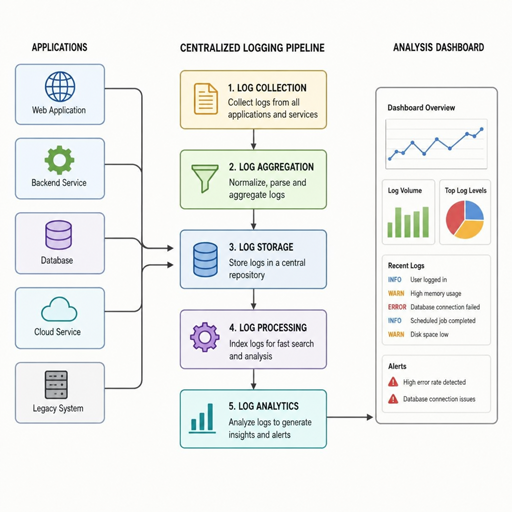
Logs are the running record of what your systems, applications, devices, and users are doing. Open-source log management systems help teams collect those records in one place, search them, monitor patterns, and investigate incidents without locking every workflow inside a proprietary platform. The best setup is not always the biggest stack; it is the one that matches your scale, team skills, retention needs, and response process.
What are open-source log management systems?
Open-source log management systems are log monitoring solutions built on open-source software that help teams ingest, store, search, analyze, and visualize log data. Instead of checking individual servers or application consoles, teams use centralized logging to bring events into a shared environment where developers, operations, security, and support can work from the same evidence.
A complete logging system usually includes several parts. Agents or collectors gather logs from hosts, containers, applications, databases, firewalls, cloud services, and Kubernetes clusters. A processing layer parses, filters, enriches, or routes events. A storage and indexing layer makes logs searchable. A user interface, alerting engine, or dashboard turns raw entries into practical signals.
That combination is why open-source logging is attractive. Teams can inspect how tools work, extend them, self-host them, and avoid being limited to one vendor’s packaging. At the same time, “open source” does not mean “no cost.” You still need people, compute, storage, governance, upgrades, and a clear operating model.
Centralized logging turns noise into shared context
Modern environments produce logs from many places at once. A single customer request may touch a browser, load balancer, API gateway, service mesh, container, queue, database, payment service, and identity provider. If every component stores logs separately, troubleshooting becomes a scavenger hunt.
Centralized logging solves that problem by giving teams one place to ask better questions. Which service started returning errors? Did the issue affect one region, one customer segment, or every deployment? Did a security event appear before, during, or after an application failure? With consistent timestamps, fields, labels, and retention policies, log analysis software can reveal patterns that are almost impossible to see in isolated files.
The value is not just technical. Centralized logs reduce back-and-forth during incidents because teams can share searches, dashboards, and timelines. They also improve post-incident reviews by replacing guesswork with an evidence trail. When logs are structured well, they become a common language across engineering, operations, and security.
Core capabilities to look for
The right log management tools should make everyday investigation faster without creating a system that is difficult to maintain. Before choosing a stack, look beyond the homepage and map each capability to a real workflow your team performs.
Key capabilities include:
- Reliable ingestion: Collect logs from files, syslog, containers, Kubernetes, cloud platforms, APIs, and application frameworks without frequent data loss.
- Parsing and enrichment: Convert messy text into searchable fields such as service, environment, user ID, request ID, status code, host, and severity.
- Search and query language: Support fast filtering, aggregation, and time-based investigation in a syntax your team can learn.
- Dashboards and visualization: Turn repeated searches into operational views for deployments, errors, performance symptoms, and security events.
- Alerting and routing: Trigger notifications when meaningful conditions occur, not whenever one noisy line appears.
- Retention controls: Keep high-value logs long enough while limiting storage growth from verbose or low-value data.
- Access control: Separate sensitive logs from general operational data and support least-privilege access.
- Operational simplicity: Provide clear upgrade paths, backup patterns, monitoring, and failure recovery.
A useful test is to replay a recent incident against the tool. If the team cannot quickly locate the right events, correlate them with a deployment, and share findings, the system may look impressive but still fail in practice.
Popular open-source logging building blocks
Most real-world open-source log management systems are assembled from several projects rather than purchased as one fixed product. Some tools focus on storage and search, others on collection, routing, visualization, or observability correlation. Understanding those roles helps you avoid mismatched expectations.
Elastic Stack and OpenSearch-style search platforms
Search-centered stacks are a common choice when teams need rich indexing, flexible dashboards, and broad log analytics. Elastic describes the Elastic Stack as products such as Elasticsearch, Kibana, Elastic Agent, and Logstash working together to ingest, store, search, and visualize data; Kibana is used to explore, manage, and visualize data stored in Elasticsearch.
OpenSearch is often considered when teams want a search and observability platform with open-source roots. Its documentation describes tools for exploring and analyzing observability data, including application analytics and data preparation that can transform unstructured log data into structured data for querying and filtering.
These platforms are strong when you need detailed log exploration, text search, structured fields, dashboards, and analytics-like workflows. They can also require careful storage planning, index lifecycle management, and query governance, especially when log volume grows quickly.
Grafana Loki for label-based log aggregation
Grafana Loki takes a different approach from systems that index the full content of every log line. Loki is built around indexing metadata labels, while log data is compressed and stored in chunks, and teams query it with LogQL.
This design can fit teams already using Grafana, Prometheus-style labels, and service-oriented observability. It works best when labels are chosen carefully, because the label model shapes how efficiently teams narrow down streams before searching log content. Grafana’s documentation also notes that labels are intended for low-cardinality values and that frequently searched high-cardinality data should be handled as structured metadata.
Graylog for centralized log management workflows
Graylog is commonly used by teams that want a more packaged centralized logging experience. Graylog describes its open option as providing core centralized log management functionality to collect, enhance, store, and analyze data.
That positioning matters because some teams do not want to assemble every piece from scratch. A workflow-oriented interface, inputs, pipelines, search, and role-based usage patterns can be helpful when logs serve operations, security, and compliance-adjacent needs. As with any platform, the practical fit depends on deployment model, storage backend, licensing needs, and how much customization the team expects.
Fluent Bit, Fluentd, and OpenTelemetry Collector
Collectors are the quiet foundation of open-source logging. Fluent Bit is documented as a lightweight telemetry agent for logs, metrics, and traces across major operating systems, with parsing, buffering, routing, plugin, and output capabilities.
OpenTelemetry Collector also plays an important role in modern telemetry pipelines. The OpenTelemetry project describes the Collector as a vendor-agnostic implementation for receiving, processing, and exporting telemetry, deployable as an agent or collector with support for traces, metrics, and logs.
These tools are not always the final place where logs are searched, but they determine whether the right data arrives in the right shape. A strong collector strategy can reduce duplicate agents, standardize metadata, filter noise at the edge, and make future backend changes less painful.
How should you choose the right open-source log management stack?
Choose the stack that fits your data volume, query style, operational capacity, and incident workflow. If your team needs deep text search and analytics, a search-centered platform may be best; if you primarily need service-level troubleshooting with Grafana dashboards, a label-based system may be simpler; if you need an integrated operational interface, a packaged log management tool may reduce assembly work.
Use a decision checklist before committing:
- Define the main use case. Troubleshooting, security investigation, audit support, product analytics, and compliance monitoring have different log requirements.
- Estimate volume and growth. Include application logs, infrastructure logs, debug bursts, Kubernetes churn, and retention periods.
- List required sources. Confirm support for Linux, Windows, containers, Kubernetes, syslog, cloud services, network devices, and custom applications.
- Decide what must be searchable. Full-text search, structured fields, labels, traces, and metrics correlation all influence the architecture.
- Model storage costs. Open-source software can still consume significant disk, object storage, memory, and compute.
- Test common investigations. Run realistic searches, alerts, and dashboards before rolling out broadly.
- Plan ownership. Decide who maintains collectors, schemas, access control, backups, upgrades, and incident runbooks.
The best proof is not a feature matrix. It is whether a developer on call can find the cause of an error at 2 a.m. without needing three separate experts and five browser tabs.
Good logging starts before the tool
Even the strongest log analysis software cannot fix poor logging habits. If applications emit inconsistent, vague, or excessive logs, the platform becomes expensive storage for confusing text. Teams should treat logs as a product of engineering design, not as leftovers from debugging.
Start by standardizing log levels. “Info,” “warn,” and “error” should mean something consistent across services. Then standardize fields such as timestamp, service name, environment, version, request ID, trace ID, customer or tenant reference where appropriate, and error category. Structured logs in formats such as JSON are often easier to parse than free-form strings.
Avoid logging secrets, credentials, tokens, payment details, or unnecessary personal data. Open-source logging does not remove privacy and security obligations. The safer pattern is to log identifiers that support investigation while keeping sensitive values out of the pipeline entirely.
A practical rollout plan
A successful rollout usually starts narrow and expands. Trying to centralize every log source on day one can overwhelm the team with noisy data, unclear ownership, and storage surprises. A phased approach creates confidence and gives you time to refine naming, parsing, and retention.
A simple rollout might look like this:
- Phase 1: Pick one high-value service. Choose an application that has real incidents, known owners, and clear log sources.
- Phase 2: Define fields and retention. Agree on which fields matter, how long logs should be kept, and what should be filtered.
- Phase 3: Add dashboards and alerts. Focus on error rates, failed jobs, authentication issues, deployment symptoms, and customer-impacting events.
- Phase 4: Expand to related systems. Add dependencies such as databases, queues, ingress controllers, and background workers.
- Phase 5: Operationalize the stack. Monitor the logging platform itself, document common searches, and assign maintenance responsibilities.
This approach keeps the project grounded in real outcomes. It also helps teams learn where logs are too noisy, where fields are missing, and where alerts need better thresholds.
Common mistakes to avoid
The first mistake is collecting everything forever. Unlimited ingestion feels safe, but it can create cost, performance, and privacy problems. Keep what helps the business operate and investigate; reduce or discard what only creates noise.
The second mistake is over-indexing or over-labeling. Every searchable field has tradeoffs, and high-cardinality values can create operational problems in systems that rely on indexes or labels. Be intentional about what becomes a field, label, or structured attribute.
The third mistake is treating alerts as the main value of logging. Alerts matter, but logs are also for exploration, explanation, and learning. If every warning becomes a page, teams will ignore the system. Design alerts around user impact, service health, security relevance, and actionable ownership.
The fourth mistake is forgetting access control. Logs can contain sensitive operational and user context. Even when data is collected for legitimate reasons, access should be limited, reviewed, and aligned with internal policies.
The long-term value of open-source logging
Open-source log management systems give teams flexibility in how they collect, route, store, and analyze operational data. They can support experimentation, self-hosting, hybrid architectures, and migration paths that are harder with closed platforms. They also encourage teams to understand their telemetry pipeline instead of treating it as a black box.
The tradeoff is responsibility. Someone must maintain the stack, tune performance, secure access, manage storage, and keep the logging strategy aligned with the systems it observes. Open-source software gives you control, but control only creates value when it is paired with disciplined operations.
For many teams, the best path is a balanced one: use open-source logging tools where flexibility matters, standardize log structure early, keep the architecture as simple as possible, and expand only when the use case is clear. Do that, and centralized logging becomes more than a place to store messages. It becomes a practical system for finding problems faster, understanding behavior, and improving reliability over time.
