
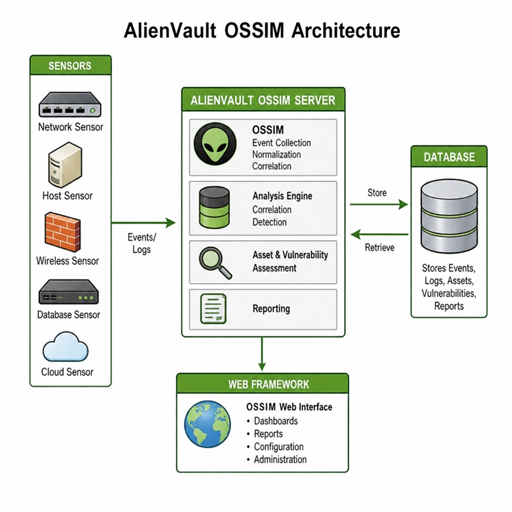
AlienVault OSSIM is an open-source SIEM-style platform used to collect security events, organize assets, correlate activity, and give teams a central place to investigate alarms. The practical value of understanding AlienVault OSSIM architecture is simple: if you know how sensors, the server, the database, and the web framework work together, your AlienVault setup is easier to plan, tune, and troubleshoot. This guide explains the OSSIM framework in plain English, with a realistic deployment path for labs and small environments.
What is AlienVault OSSIM architecture?
AlienVault OSSIM architecture is a layered security monitoring design built around event collection, normalization, correlation, storage, and analyst-facing visibility. In its classic form, AlienVault OSSIM monitors networks and systems, reports attacks or compromises, and correlates events from multiple sensors to reduce false positives; it is not designed to automatically block attacks on its own.
That distinction matters. OSSIM is best understood as a visibility and correlation platform, not as a firewall, endpoint protection suite, or fully automated response tool. It can help you notice suspicious behavior, prioritize what deserves attention, and connect separate pieces of evidence, but humans still need to validate findings and respond.
In many deployments, the same appliance hosts several OSSIM components together. Larger or more segmented environments may place sensors closer to monitored networks while centralizing correlation and management elsewhere. LevelBlue documentation for the related USM Appliance describes a similar deployment model: the platform can be installed as a single appliance or distributed across multiple servers for scalability and availability.
The main OSSIM components
The core ossim components are easier to understand when you map them to the life of an event. A log line, IDS alert, vulnerability result, or network observation is collected at the edge, normalized into a format the system can use, compared against policies and correlation rules, stored, and finally presented to an analyst.
Sensors collect and normalize security data
Sensors are the collection layer of the alienvault architecture. They sit where security data is produced: near network segments, log sources, infrastructure systems, and monitored assets. A sensor may receive syslog, inspect network traffic, run discovery tasks, or process plugin output depending on how the appliance is configured.
The practical placement question is visibility. A sensor can only analyze the traffic and logs it can actually see. For a lab, one sensor on a mirrored interface may be enough. For a multi-site environment, you may need sensors in each important network zone so events are captured before routing, NAT, or segmentation hides useful context.
The server correlates and prioritizes events
The server is the analytical center of the OSSIM framework. It receives normalized data, evaluates correlation directives, applies policy context, and turns raw activity into alarms or risk indicators. Without this layer, you have many isolated logs; with it, you can begin to ask whether several low-level signals point to the same incident.
This is where asset value becomes important. A failed login against a test machine is not equal to the same activity against a domain controller, database server, or VPN gateway. Strong correlation depends on accurate assets, networks, priorities, and expectations.
The database stores events and configuration
The database supports both investigation and configuration. It stores security events, asset information, policy data, and the historical material needed for reporting. When the database is undersized, poorly maintained, or filled with noisy sources, the whole platform can feel slow and unreliable.
Plan retention realistically. Keeping every event forever sounds attractive, but SIEM storage grows quickly. Decide which sources are high value, how long you need searchable history, and what should be archived outside the appliance if long-term compliance storage is required.
The web framework gives analysts a working console
The framework is the web interface used to configure assets, review alarms, examine vulnerabilities, manage policies, and run reports. The older OSSIM overview shows interface areas for metrics, alarms, alerts, vulnerabilities, anomalies, policies, reports, monitors, tools, and configuration, which reflects the broad operational scope of the platform.
This interface is where tuning becomes visible. If the console is flooded with low-value alarms, the issue is rarely the dashboard itself. It usually means log sources, priorities, correlation rules, or asset definitions need refinement.
How does event flow work in the OSSIM framework?
Event flow in the OSSIM framework starts with collection, moves through normalization and correlation, and ends with alarms, reports, and investigation views. In simple terms, sensors gather activity, the server decides what matters, the database preserves the evidence, and the web framework lets a person investigate it.
A typical flow looks like this:
- Data is generated by a firewall, server, endpoint, application, vulnerability scanner, or network sensor.
- The sensor receives or observes it through syslog, traffic monitoring, plugin parsing, or an integrated tool.
- Events are normalized so different source formats become usable inside the platform.
- Correlation logic evaluates context such as source, destination, asset priority, event type, and related activity.
- Alarms and dashboards surface findings so analysts can investigate and decide what to do next.
- Reports and historical searches support review after the immediate triage work is complete.
This flow also shows why “more logs” is not always better. A noisy log source can increase storage usage, hide meaningful alerts, and make correlation less useful. A good AlienVault OSSIM architecture starts with the data that supports real detection goals.
A practical AlienVault setup plan
A successful alienvault setup should begin with scope, not installation media. Before deploying anything, decide which network segments, assets, and use cases matter most. For example, a home lab might focus on firewall logs, a Windows server, and a vulnerable test host, while a small business might prioritize VPN, domain authentication, endpoint alerts, and internet-facing systems.
Use this checklist before you install or expand AlienVault OSSIM:
- Define your monitoring goal: intrusion detection, centralized logging, vulnerability visibility, compliance support, or analyst training.
- List critical assets: identity systems, firewalls, servers, databases, cloud connectors, and administrative workstations.
- Choose sensor locations: place sensors where they can see the relevant logs or network traffic.
- Plan IP addressing and DNS: inaccurate hostnames and duplicate assets make investigations harder.
- Confirm resource capacity: CPU, memory, disk speed, and storage retention all affect usability.
- Separate lab from production first: test plugins, scans, and correlation changes before using them broadly.
- Document credentials and integrations: record what each connector can access and who owns it.
After installation, resist the urge to enable everything at once. Add sources in phases and verify that each one creates useful, understandable events. When a new source creates too much noise, tune it immediately rather than letting bad data become normal.
Asset discovery and vulnerability scanning need boundaries
AlienVault OSSIM and related USM Appliance documentation notes that built-in tools for asset discovery, enumeration, and vulnerability scanning can generate traffic that resembles the behavior they are meant to detect. The same guidance warns users to check legal, hosting, and provider restrictions before scanning systems outside internal network space.
That warning is not just legal housekeeping. Scans can disrupt fragile systems, trigger security controls, or alarm third parties. Keep scans targeted, scheduled, and approved. In production, start with a small range, validate results, then expand only when stakeholders understand the impact.
A sensible scanning approach includes:
- scanning internal assets you own or are authorized to test;
- excluding sensitive systems until maintenance windows are approved;
- labeling scan traffic so your team recognizes it;
- reviewing vulnerability findings before treating them as confirmed risk;
- linking scan results to asset priority so remediation work is ranked properly.
Tuning turns OSSIM from noisy to useful
The difference between a frustrating OSSIM deployment and a useful one is usually tuning. AlienVault OSSIM can collect many signals, but correlation only helps when assets, policies, and event priorities match your environment. If everything is critical, nothing is critical.
Start with asset values. Give higher priority to systems that store credentials, process payments, host public services, or support business-critical operations. Then review which alarms are repeating. Some repeated alarms indicate real unresolved risk; others point to benign admin activity, duplicate logs, or overly broad rules.
A simple weekly tuning routine can keep the platform healthy:
- Review the top recurring alarms and classify them as useful, noisy, or unresolved.
- Validate that high-priority assets are correctly defined.
- Remove or adjust log sources that provide no detection value.
- Check storage growth and retention expectations.
- Confirm sensors are online and receiving events.
- Update documentation when policies, networks, or integrations change.
Where does AlienVault OSSIM fit today?
AlienVault OSSIM is most useful today as a learning platform, lab SIEM, or lightweight open-source monitoring option for teams that understand its limits. LevelBlue’s Success Center still references a community area for installing, configuring, and troubleshooting the free AlienVault OSSIM Appliance, while LevelBlue blog listings also indicate OSSIM is no longer the focus as the company emphasizes newer solutions.
That means production teams should evaluate support expectations carefully. If you need vendor-backed operations, modern cloud integrations, managed detection, or guaranteed support paths, confirm whether a newer platform is a better fit. If you need hands-on SIEM practice and want to understand how collection, correlation, and triage work, alienvault ossim can still be valuable in the right context.
It is also worth noting the licensing model. LevelBlue’s Success Center states that OSSIM is released under the GNU GPL v2 license, which is relevant for teams reviewing open-source obligations or building lab environments.
Key takeaways for a cleaner deployment
A strong alienvault ossim architecture is not about installing every feature. It is about placing sensors wisely, collecting meaningful data, maintaining accurate asset context, and tuning correlation until the alerts support real decisions.
Keep the design simple at first. Start with your most important assets, prove that events are flowing correctly, and build use cases one at a time. With that approach, AlienVault OSSIM becomes more than a dashboard full of alerts; it becomes a practical way to learn SIEM operations and improve security visibility.
