
Automated alert triage helps security teams sort, enrich, prioritize, and route security alerts without relying on analysts to manually review every signal from scratch. It improves alert management by applying consistent rules, context, and decision logic to separate noise from issues that may require incident response. This guide explains how the triage process works, where automation fits, and how to design an alert system that supports faster, more reliable security operations.
What does automated alert triage mean?
Automated alert triage is the use of software-driven workflows to assess incoming security alerts, add relevant context, determine urgency, and recommend or trigger next steps. Instead of treating every notification as equal, the system evaluates available evidence: source, asset importance, user behavior, detection type, threat intelligence, past activity, and business impact. The goal is not to remove humans from security operations, but to make sure analysts spend their time on decisions that actually require judgment.
In a traditional triage process, an analyst may open an alert, check the affected endpoint or account, look up logs, search for related activity, decide whether it is suspicious, and then escalate or close it. Automated alert triage compresses many of those repetitive steps into seconds. It can enrich alerts, suppress duplicates, group related signals, assign severity, open tickets, and escalate likely incidents to the right queue.
This matters because modern security teams often receive more automated alerts than they can review manually with equal care. A well-designed triage layer helps reduce fatigue, improves consistency, and creates a clearer path from detection to incident response.
Why alert triage is difficult in modern security operations
Alert triage sounds simple: look at an alert and decide what to do. In practice, it is one of the most demanding parts of security operations because each alert arrives with incomplete context. A login from a new location may be harmless travel, credential misuse, or a sign of compromised access. A malware detection may be blocked and contained, or it may be one signal in a wider intrusion.
Security teams also face different sources of noise. Some tools generate low-fidelity alerts. Others produce useful detections but lack business context. Cloud, identity, endpoint, network, email, and application systems may all create their own signals, often with different severity models. Without effective alert management, analysts must mentally normalize this information while under pressure.
Common triage challenges include:
- Alert volume: Too many signals compete for analyst attention, including duplicates and low-risk events.
- Context switching: Analysts move between multiple consoles, logs, tickets, and communication channels.
- Inconsistent decisions: Different analysts may classify similar alerts differently when procedures are unclear.
- Slow enrichment: Gathering asset, identity, and threat context manually delays decisions.
- Escalation uncertainty: Teams may lack a clear threshold for moving from alert review to incident response.
- Burnout risk: Repetitive reviews of low-value alerts can reduce focus when serious activity appears.
Automation helps by making the first pass more consistent. It does not magically make every alert accurate, but it can bring structure to a process that otherwise depends heavily on individual analyst experience.
The automated triage process from signal to action
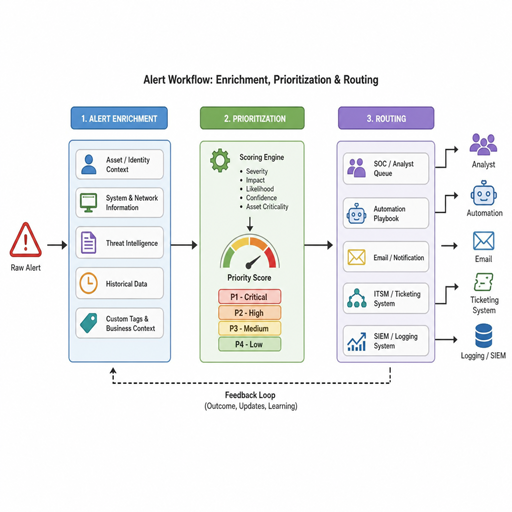
A strong triage process follows a logical path: receive the alert, enrich it, assess it, prioritize it, route it, and record what happened. Automation can support each stage, but the workflow should remain understandable. If analysts cannot see why a decision was made, they will not trust the system.
1. Alert intake and normalization
The process begins when an alert system receives signals from security tools such as endpoint detection, identity monitoring, cloud security, email security, vulnerability platforms, or SIEM rules. These alerts often use different fields and severity labels. Normalization converts them into a common format so they can be compared, searched, and acted on consistently.
For example, one tool may call an event “high,” another may use a numerical score, and another may provide only a rule name. Normalization helps the security operations team evaluate these signals using shared fields such as affected user, asset, detection source, timestamp, observed behavior, and initial severity.
2. Context enrichment
Enrichment adds information that helps determine whether an alert is important. This may include asset criticality, user role, geolocation, vulnerability status, threat intelligence, recent authentication history, endpoint health, known business processes, or previous alerts involving the same entity.
Context is what turns an isolated signal into an actionable decision. A failed login may be routine noise for a public-facing service, but it may be more concerning for a privileged administrator account. An endpoint alert on a test device may not carry the same urgency as the same alert on a server that supports a critical business function.
3. Correlation and grouping
Many alerts are related but arrive separately. Automated alert triage can group signals that involve the same user, device, IP address, file hash, or timeframe. This helps analysts understand the pattern instead of reviewing each alert as a disconnected event.
Correlation also reduces duplicate effort. If ten alerts point to the same suspicious email campaign, the team should investigate the campaign rather than open ten separate investigations. Grouping makes the work more efficient and gives incident response teams a clearer view of scope.
4. Scoring and prioritization
Once the alert has context, automation can assign or adjust priority. This may be based on detection confidence, asset value, user privilege, known attacker behavior, exposure level, recurrence, and potential impact. The best scoring models are transparent enough for analysts to understand and flexible enough to improve over time.
Priority should reflect both likelihood and impact. A highly suspicious alert on a low-value system may need attention, but a moderately suspicious alert involving a privileged identity may deserve faster escalation. Automated alert triage works best when it accounts for both technical severity and business relevance.
5. Routing and response
After prioritization, the workflow should route the alert to the right destination. Low-risk events may be closed with documentation, moved to a review queue, or used to tune detection logic. Medium-risk alerts may become tickets with recommended investigation steps. High-risk alerts may trigger incident response, notify on-call personnel, isolate an endpoint, disable a session, or request approval for containment.
The action should match the confidence level. Over-automation can create business disruption if containment is triggered too aggressively. Under-automation leaves analysts buried in repetitive tasks. The right balance depends on risk tolerance, tooling maturity, and the quality of available data.
Core components of an effective alert management system
Automated triage depends on more than a single rule or tool. It needs a connected alert management foundation that receives signals, enriches them, applies logic, and keeps a record of decisions. The components below help make the system useful and auditable.
|
Component |
Purpose |
Practical benefit |
|---|---|---|
|
Alert intake |
Collects automated alerts from security tools |
Centralizes review and reduces missed signals |
|
Data normalization |
Converts alerts into consistent fields |
Enables reliable sorting, searching, and routing |
|
Enrichment sources |
Adds asset, identity, vulnerability, and threat context |
Helps determine real urgency |
|
Correlation logic |
Links related alerts across systems |
Reduces duplication and reveals attack patterns |
|
Prioritization model |
Scores alerts by confidence, impact, and urgency |
Focuses analysts on the highest-value work |
|
Workflow automation |
Creates tickets, escalates, or triggers approved actions |
Speeds handoff and response |
|
Analyst feedback |
Captures outcomes and classification decisions |
Improves rules, tuning, and future triage |
|
Reporting |
Tracks volume, closure reasons, and response performance |
Supports operational improvement |
A mature alert system should also make exceptions visible. If an alert is suppressed, downgraded, or automatically closed, the reason should be recorded. This protects the team from hidden blind spots and helps leaders understand whether automation is reducing risk or simply hiding work.
Where should humans stay involved?
Humans should stay involved wherever context is uncertain, business impact is meaningful, or an action could disrupt users, systems, or operations. Automated alert triage is strongest when it handles repetitive collection and classification, then presents analysts with a clearer decision. It should support expert judgment rather than replace it completely.
Human review is especially important for ambiguous alerts, high-impact systems, executive or privileged accounts, novel attack patterns, and containment actions that could interrupt service. Analysts are also needed to interpret business context that may not be visible in logs. For example, a bulk data transfer may be suspicious, or it may be part of an approved migration.
A practical model is to divide tasks by confidence and consequence:
- Automate fully when the event is low-risk, well understood, and the action is reversible or purely administrative.
- Automate with review when the system can gather evidence and recommend a decision, but an analyst should approve the outcome.
- Escalate immediately when the alert involves high-value assets, privileged access, confirmed malicious activity, or signs of active compromise.
- Route for tuning when repeated alerts are consistently benign, poorly scoped, or missing useful context.
This approach keeps analysts in control of important decisions while still reducing the manual burden of incident triage.
Best practices for designing automated alert triage
Effective automation starts with process design, not tooling. Before building workflows, define what the team means by severity, escalation, closure, and incident response. If those decisions are unclear in a manual process, automation will only make confusion happen faster.
Start with high-volume, low-complexity use cases
Begin with alerts that are frequent, well understood, and supported by reliable data. Examples may include duplicate detections, known false positives, policy violations with clear handling steps, or enrichment-heavy workflows where analysts repeatedly gather the same information. These are good candidates because automation can save time without taking on excessive decision risk.
Avoid starting with complex, high-impact containment workflows unless your data quality and approvals are strong. A phased approach builds trust and gives analysts a chance to validate how the system behaves.
Define severity with business context
Severity should not rely only on the label assigned by the source tool. A medium alert involving a domain administrator, production database, or sensitive application may be more urgent than a high alert on an isolated test endpoint. Build prioritization around the asset, identity, exposure, and likely impact.
This requires maintaining useful asset and identity context. If the system does not know which users are privileged or which systems are critical, prioritization will be limited.
Keep triage decisions explainable
Analysts need to understand why an alert was escalated, downgraded, grouped, or closed. Include the key factors used in automated decisions, such as matched rule, asset value, user role, related alerts, or threat intelligence source. Clear explanations improve trust and help analysts identify bad logic quickly.
Explainability also matters for reporting and post-incident review. If a serious alert was missed, the team needs to know whether the issue came from detection, enrichment, scoring, routing, or human decision-making.
Build feedback loops into the workflow
Automated alert triage should improve as analysts classify alerts and incidents. Capture whether an alert was true positive, false positive, benign true positive, duplicate, or informational. Use those outcomes to tune rules, adjust thresholds, update suppression logic, and improve escalation paths.
Feedback should be easy to provide. If analysts must leave the workflow or write long notes for every classification, the data will be inconsistent. Structured closure reasons make trend analysis and continuous improvement much easier.
Measure quality, not just speed
Faster triage is valuable only if decisions remain accurate. Track operational metrics that reveal whether automation is helping the team manage risk, not merely closing more alerts. Useful measures include:
- Alert volume by source and severity
- Percentage of alerts enriched automatically
- Duplicate or correlated alert reduction
- Time from alert creation to initial review
- Time from confirmed issue to incident response
- False positive trends by rule or source
- Escalation accuracy and closure reasons
- Analyst overrides of automated decisions
These measures help identify where automation is working, where detection logic needs tuning, and where the process may be creating blind spots.
Common mistakes to avoid
Automated alert triage can fail when it is treated as a shortcut instead of an operating model. The biggest risk is building workflows that close or suppress alerts without enough context, documentation, or review. Automation should reduce unnecessary effort, not reduce visibility.
Watch for these pitfalls:
- Automating unclear processes: If analysts disagree on how to handle an alert manually, document the decision logic before automating it.
- Trusting source severity blindly: Tool-generated severity can be useful, but it may not reflect business impact.
- Ignoring data quality: Poor asset inventory, stale user data, or missing log fields can weaken every triage decision.
- Suppressing too broadly: Broad suppression rules may hide early signs of real incidents.
- Skipping audit trails: Every automated closure, escalation, or action should leave a record.
- Failing to revisit rules: Threats, systems, and business priorities change, so triage logic needs regular review.
- Overloading analysts with enriched noise: Adding more context is not enough if the alert still lacks a clear decision path.
A useful test is simple: can an analyst open the alert and understand what happened, why it was prioritized, what evidence was added, and what should happen next? If not, the workflow needs refinement.
How does automated triage improve incident response?
Automated triage improves incident response by shortening the path between detection and informed action. It gives responders cleaner context, clearer priority, and better grouping of related activity before an incident is formally escalated. That means the response team can begin with a stronger understanding of scope, affected assets, and likely impact.
For incident response, speed matters, but so does accuracy. A poorly triaged alert can waste time or send responders in the wrong direction. A well-triaged alert includes the evidence needed to decide whether to contain, investigate further, notify stakeholders, or close the issue as benign.
The strongest connection between triage and response is continuity. The information gathered during triage should flow into the incident record instead of being recreated later. Related alerts, enrichment results, analyst notes, containment actions, and decision history should all be available to the responders who take over.
A practical implementation checklist
Use this checklist to plan or improve automated alert triage without overcomplicating the program:
- Identify the alert sources that create the most volume or the most critical detections.
- Standardize alert fields so analysts can compare events across tools.
- Map critical assets, privileged identities, and sensitive applications.
- Define severity levels and escalation criteria in plain language.
- Choose initial automation use cases with predictable logic and low disruption risk.
- Add enrichment for identity, asset, threat, vulnerability, and historical activity.
- Group related alerts by entity, timeframe, and behavior where possible.
- Document automated decisions, including closure and suppression reasons.
- Keep humans in the loop for high-impact or uncertain actions.
- Review analyst feedback regularly and tune workflows based on outcomes.
- Measure both efficiency and decision quality.
- Reassess triage logic as environments, tools, and threats change.
This checklist is not a one-time setup task. Treat it as an operating rhythm. Automated alert triage becomes more valuable when the team continuously tunes detections, updates context, and aligns workflows with real incident response needs.
Building a more reliable triage process
Automated alert triage is most effective when it is transparent, measured, and connected to the way the security team actually works. It should reduce repetitive effort, improve alert management, and help analysts focus on the alerts that matter most. When designed carefully, it creates a stronger bridge between automated alerts and confident incident response.
The best place to start is not with the most advanced automation. Start with clear definitions, reliable context, and a few workflows that remove obvious friction from the triage process. From there, refine the alert system step by step until automation becomes a trusted partner in security operations rather than another source of noise.
