
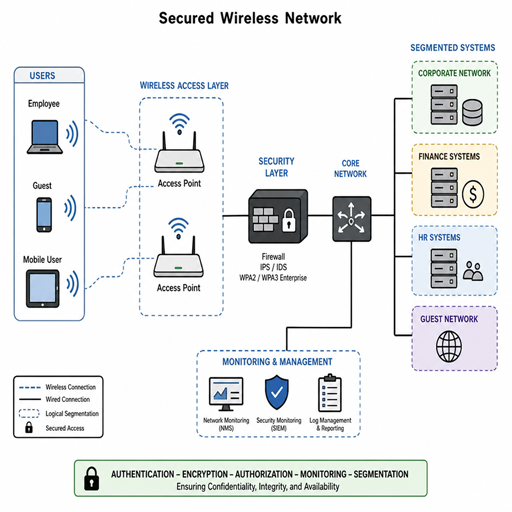
Wireless networks make modern work flexible, but they also expand the places where attackers can listen, impersonate, disrupt, or gain unauthorized access. Strong wireless security depends on more than a good password; it requires secure configuration, continuous visibility, wireless threat detection, and disciplined network security management. This guide explains the practical controls, monitoring habits, and wireless security tools that help organizations reduce risk without making connectivity unnecessarily difficult.
What does strong wireless network security require?
Strong wireless network security requires layered protection: secure authentication, encrypted traffic, controlled access, regular configuration reviews, and active monitoring for suspicious behavior. No single setting can protect a wireless environment on its own, because risks can come from weak credentials, rogue access points, misconfigured devices, outdated firmware, interference, or compromised user endpoints.
The goal is to make wireless access both usable and accountable. Every device that connects should be expected, authenticated, assigned the right level of access, and monitored for behavior that does not fit normal operations. When security teams combine preventive controls with Wireless network security monitoring, they can detect issues earlier and respond before a minor misconfiguration becomes a serious breach.
A strong program usually includes:
- Modern encryption to protect data moving over the air.
- Centralized authentication so users and devices can be identified reliably.
- Network segmentation to limit what each device group can reach.
- Wireless intrusion detection to spot rogue devices, spoofing attempts, and suspicious traffic.
- Ongoing network security analysis to turn logs and alerts into meaningful action.
The wireless risk landscape is broader than passwords
Many organizations still treat wireless security as a setup task: choose a network name, create a password, and move on. That approach leaves gaps because wireless signals extend beyond walls, devices move constantly, and users often connect from laptops, phones, tablets, printers, sensors, and guest devices. Each connection is an opportunity for convenience, but also an opportunity for exposure.
Common wireless risks include unauthorized devices joining the network, attackers setting up lookalike networks, employees connecting personal equipment without approval, and outdated access points running vulnerable firmware. Even when encryption is enabled, poor access control can allow too many users to reach sensitive systems. A guest device should not have the same reach as an employee workstation, and a building sensor should not be able to communicate with finance applications.
Interference and denial-of-service activity can also affect availability. A wireless network that is technically secure but unreliable can still disrupt operations. That is why network monitoring solutions should track performance and security together, giving teams a view of signal quality, device behavior, connection failures, authentication events, and unusual traffic patterns.
Secure configuration is the foundation
Before advanced detection matters, the wireless environment needs a secure baseline. Start by reviewing every access point, wireless controller, cloud-managed network setting, and authentication method. Remove defaults, retire unused networks, and document what each SSID is for. If a network does not have a clear business purpose, it should be disabled or consolidated.
Use strong encryption standards supported by your devices, and avoid outdated security modes where possible. Shared passwords may be acceptable for a simple guest network, but business-critical access usually needs identity-based authentication. Centralized identity controls make it easier to remove access when a user leaves, apply role-based policies, and investigate activity tied to a specific account or device.
Configuration best practices include:
- Separate business, guest, and device networks. Keep employees, visitors, and specialized equipment in distinct segments with different permissions.
- Disable unused services. Turn off legacy protocols, unused radios, open management interfaces, and unnecessary administrative features.
- Change default credentials. Access points, controllers, and management portals should never use factory passwords.
- Limit administrative access. Only authorized personnel should manage wireless infrastructure, and admin activity should be logged.
- Keep firmware current. Updates often address security and stability issues, so patching should be part of routine network security management.
- Use clear naming internally. Avoid SSID names that reveal sensitive business details, network purpose, or equipment type.
These controls reduce the number of preventable problems your monitoring system has to chase later.
How does wireless network security monitoring work?
Wireless network security monitoring works by collecting information from access points, controllers, sensors, authentication systems, endpoint records, and network traffic, then analyzing it for signs of risk. Instead of waiting for users to report problems, monitoring provides continuous visibility into who is connecting, where they are connecting, what devices are present, and whether activity looks normal.
Effective monitoring does not mean drowning in alerts. It means identifying the events that matter and giving teams enough context to act quickly. For example, one failed login may not be important, but repeated failures from multiple locations could indicate credential abuse. A new device may be harmless, but a device broadcasting a network name similar to yours may indicate an evil twin attack or careless shadow IT.
Useful monitoring signals include:
- New or unknown access points appearing nearby.
- Devices connecting outside expected hours or locations.
- Repeated authentication failures or unusual roaming behavior.
- Sudden increases in traffic from a single client.
- Clients connecting to unapproved SSIDs.
- Changes in access point configuration.
- Attempts to spoof a known device or network.
Wireless threat detection improves when this information is correlated with broader network data. If wireless logs show a new device joining and network traffic shows that same device scanning internal systems, the combined evidence is stronger than either signal alone.
Wireless intrusion detection adds a critical layer
Wireless intrusion detection focuses on identifying attacks and policy violations specific to wireless environments. A wireless intrusion detection system can help detect rogue access points, unauthorized clients, spoofed management frames, suspicious deauthentication activity, and attempts to impersonate legitimate networks. It gives security teams a way to see risks that traditional wired monitoring may miss.
Detection should be tuned carefully. Wireless environments are noisy, especially in shared buildings, campuses, retail spaces, and urban offices. Nearby networks may be legitimate neighbors, not threats. The value of wireless intrusion detection comes from distinguishing normal radio activity from activity that affects your users, your devices, or your network identity.
A practical approach is to classify findings by severity. A nearby unknown access point may be low priority until it uses your company name, appears inside your facility, connects to your wired network, or attracts your clients. By building clear response rules, teams can avoid alert fatigue and focus on the events that present real risk.
Choosing the right wireless security tools
Wireless security tools should match the size, complexity, and risk profile of the environment. A small office may need managed access points with built-in alerts, while a multi-site organization may need dedicated sensors, centralized dashboards, automated policy enforcement, and integration with security operations tools. The right choice is the one your team can actually operate consistently.
Look for capabilities that support both prevention and investigation:
|
Capability |
Why it matters |
|---|---|
|
Device discovery |
Helps identify unknown clients, rogue access points, and unmanaged equipment. |
|
Authentication visibility |
Shows who connected, when they connected, and whether access attempts succeeded or failed. |
|
Wireless threat detection |
Flags suspicious wireless behavior before it becomes a broader incident. |
|
Configuration monitoring |
Detects unauthorized or accidental changes to wireless settings. |
|
Traffic analysis |
Supports network security analysis by showing patterns, anomalies, and possible misuse. |
|
Alert prioritization |
Helps teams focus on high-risk events rather than every minor signal. |
|
Reporting |
Supports audits, internal reviews, and ongoing improvement. |
Network monitoring solutions are most useful when they integrate with existing workflows. If alerts remain trapped in a separate dashboard that no one checks, their value drops. Integration with ticketing, identity, endpoint, or security information systems can help turn findings into assigned tasks and measurable remediation.
Segmentation limits the impact of compromise
Segmentation is one of the most practical ways to reduce wireless risk. It assumes that not every device deserves the same level of trust. Instead of placing all wireless clients on one flat network, organizations can create separate zones for employees, guests, contractors, point-of-sale systems, operational technology, cameras, printers, and IoT devices.
The benefit is containment. If a guest device is compromised, it should not be able to reach internal file shares. If a smart display behaves suspiciously, it should not have access to administrative systems. If an employee laptop is infected, segmentation can limit lateral movement while security teams investigate.
Good segmentation requires more than separate SSIDs. Firewall rules, access control lists, identity policies, and routing decisions must support the design. Teams should periodically test whether the restrictions work as intended, because policy drift can slowly weaken even a well-designed network.
Access control should follow identity and device trust
Wireless access is strongest when it considers both the user and the device. A trusted employee on a managed laptop may receive broad access to business applications, while the same employee on an unmanaged phone may receive limited access. This approach reduces risk without forcing every connection into the same rigid category.
Identity-based access also improves accountability. When activity is tied to a user, group, device, and policy, investigations become faster and less speculative. Security teams can answer basic questions: who connected, what device was used, what network segment was assigned, and what resources were available?
Device trust can include management status, operating system version, certificate presence, security posture, or enrollment in an approved platform. The exact criteria will vary, but the principle is consistent: wireless access should reflect current risk, not just a password entered months ago.
Network security analysis turns data into decisions
Collecting logs is not the same as understanding risk. Network security analysis is the process of reviewing events, traffic patterns, configuration changes, and alerts to identify what needs attention. It helps teams move from raw data to prioritized decisions.
For wireless networks, analysis often answers questions such as: Are users connecting to the right networks? Are any devices bypassing normal controls? Are access points overloaded or misconfigured? Are there signs of spoofing, scanning, or unusual data transfer? The answers help improve both security and performance.
A simple review rhythm can make analysis manageable:
- Daily: Check high-priority alerts, failed authentication spikes, and rogue device warnings.
- Weekly: Review new devices, policy violations, firmware status, and unusual traffic trends.
- Monthly: Validate segmentation rules, review access privileges, and evaluate recurring incidents.
- Quarterly: Reassess wireless architecture, tool performance, and response procedures.
This cadence supports proactive network security management without requiring every team to run a full investigation every day.
Incident response should be planned before alerts arrive
A monitoring program is only as strong as the response behind it. When wireless security tools detect a threat, teams need to know who investigates, who can disable access, who communicates with affected users, and how evidence is preserved. Waiting to define those steps during an incident increases confusion and delays containment.
A basic wireless incident workflow should include:
- Validate the alert. Confirm whether the signal is a real threat, a benign neighbor network, or a configuration issue.
- Identify affected assets. Determine which users, devices, access points, or segments are involved.
- Contain the risk. Block suspicious clients, disable rogue connections, isolate a segment, or adjust access policies.
- Investigate root cause. Review authentication records, traffic patterns, configuration changes, and endpoint activity.
- Remediate. Patch systems, update credentials, change policies, remove unauthorized hardware, or retrain users.
- Document lessons learned. Use the incident to improve detection rules, response steps, and preventive controls.
Prepared response turns wireless threat detection into real risk reduction.
User behavior remains part of security
Even well-managed wireless networks depend on user decisions. Employees may connect to public Wi-Fi, approve unknown certificate prompts, share passwords, or bring unauthorized devices into the workplace. Clear guidance helps reduce those mistakes.
Training should be practical, not fear-based. Explain how to recognize approved wireless networks, why guest access exists, when to report suspicious connection prompts, and why personal routers or hotspots can create risk. The more understandable the rules are, the more likely users are to follow them.
Security teams should also make the secure path easy. If official wireless access is unreliable or overly restrictive, users will look for workarounds. Usability is not separate from security; it is part of whether the control succeeds.
A practical wireless security checklist
Use this checklist to review your current environment and identify next steps:
- Inventory all access points, SSIDs, controllers, and management platforms.
- Confirm that encryption and authentication settings meet current policy.
- Remove unused SSIDs and disable legacy or unnecessary features.
- Segment guests, employees, IoT devices, and sensitive systems.
- Enable Wireless network security monitoring across key locations.
- Deploy or tune wireless intrusion detection for rogue devices and spoofing attempts.
- Review logs for failed authentications, unusual traffic, and configuration changes.
- Keep access point firmware and management software updated.
- Integrate alerts with existing network monitoring solutions where possible.
- Define incident response roles before a wireless alert occurs.
- Educate users on approved networks, reporting steps, and risky behaviors.
- Review policies regularly as devices, locations, and business needs change.
Building a sustainable wireless security program
Wireless security is not a one-time project. It is an ongoing practice that combines secure design, monitoring, analysis, response, and improvement. As devices multiply and work patterns change, the wireless environment will keep evolving, so the security program must evolve with it.
Start with the basics: know what you have, control who connects, separate what should not mix, and monitor what changes. Then mature the program with stronger wireless security tools, better alert tuning, and deeper network security analysis. The result is a wireless network that supports productivity while giving security teams the visibility and control they need to manage risk confidently.
