
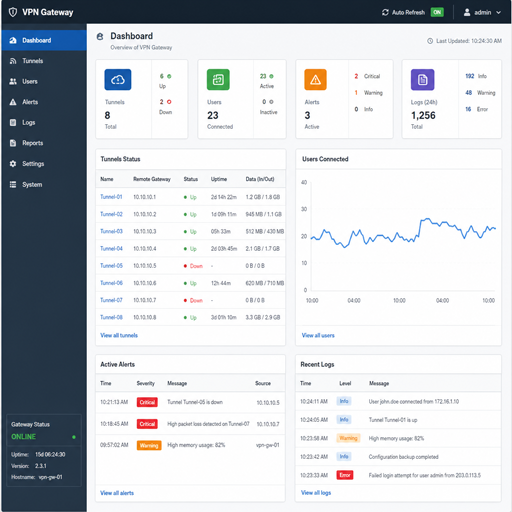
VPN gateway monitoring helps teams understand whether remote users, branch sites, and cloud networks can connect securely and reliably. A strong monitoring approach combines live VPN connection status, gateway health metrics, logs, alerts, and network security monitoring so issues can be found before they become outages. This guide explains what to monitor, which logs matter, and how Azure VPN Gateway monitoring fits into a practical operations workflow.
What should VPN gateway monitoring show?
VPN gateway monitoring should show whether the gateway is available, whether tunnels and users are connected, how much traffic is moving through the gateway, and whether authentication or security events need attention. At minimum, it should help answer three questions quickly: is the VPN up, who or what is connected, and why did a connection fail?
For cloud and hybrid environments, monitoring also needs to connect VPN activity with the wider network picture. A gateway may be healthy while a route table, firewall rule, DNS setting, certificate, or identity provider causes the real user problem. That is why effective vpn gateway monitoring combines infrastructure metrics with diagnostic logs and security context.
The most useful views usually include:
- Gateway availability: whether the VPN gateway is reachable and operating normally.
- VPN connection status: connected, disconnected, reconnecting, or failed states for tunnels and users.
- Tunnel health: site-to-site tunnel state, packet flow, and recurring drops.
- Point-to-site activity: active remote users, assigned client IPs, authentication outcomes, and session changes.
- Traffic volume: ingress and egress trends that may reveal saturation, unusual behavior, or routing mistakes.
- Error and failure logs: failed negotiation, certificate, authentication, authorization, or configuration events.
- Security signals: suspicious access attempts, unexpected source locations, repeated failures, and policy violations.
Why logs matter more than a green status light
A green gateway status is helpful, but it rarely tells the full story. VPN logs explain what happened before, during, and after a connection event. They show failed attempts, tunnel negotiation problems, authentication issues, and configuration mismatches that may not appear in a simple uptime check.
Logs are especially important when issues are intermittent. A user may report that the VPN “keeps dropping,” but by the time support investigates, the session may already be restored. Historical logs allow the team to identify patterns such as drops during peak traffic, failures after certificate renewal, or repeated attempts from unauthorized sources.
For network security monitoring, logs also create accountability. They help security teams identify who connected, from where, when the session started, and whether access looked normal. When VPN logs are retained and searchable, they become useful for incident response, compliance reviews, and post-incident analysis.
Operational logs
Operational logs focus on reliability and troubleshooting. They help network teams diagnose gateway configuration, tunnel negotiation, routing, and connectivity issues. These logs are most useful when paired with metrics because they explain the reason behind a visible change in gateway behavior.
Common operational log categories include connection events, tunnel state changes, packet drops, gateway diagnostics, and routing-related messages. In Azure VPN Gateway monitoring, these logs are commonly sent to a centralized workspace or log analytics platform so teams can search and correlate them with other Azure network resources.
Security logs
Security logs focus on access and risk. They show authentication attempts, successful sign-ins, failed sign-ins, policy decisions, and unusual access behavior. For point-to-site VPNs, these events are particularly valuable because users may connect from many devices and locations.
Security logs should not sit in isolation. They become far more useful when correlated with identity, endpoint, firewall, and DNS activity. If a remote user authenticates successfully but then triggers unusual network behavior, security teams need a way to follow that chain of events across systems.
Core metrics for VPN gateway health
Metrics provide the fast, measurable view of gateway performance. They help teams spot degradation, capacity concerns, and outage conditions without reading raw logs first. The best monitoring dashboards show both current status and trends over time.
A practical VPN gateway monitoring dashboard should include these metric groups:
|
Metric area |
What it tells you |
Why it matters |
|---|---|---|
|
Gateway availability |
Whether the gateway is reachable and functioning |
Confirms whether the VPN service itself appears operational |
|
Tunnel status |
Whether site-to-site tunnels are connected |
Helps isolate branch or partner connectivity failures |
|
User sessions |
How many point-to-site users are connected |
Shows remote access demand and possible usage spikes |
|
Bandwidth usage |
Traffic flowing in and out of the gateway |
Reveals congestion, abnormal transfers, or growth trends |
|
Packet drops or errors |
Traffic that fails to pass cleanly |
Helps detect misconfiguration, routing issues, or instability |
|
Authentication failures |
Failed connection attempts |
Supports security monitoring and user support |
|
Reconnect patterns |
Repeated disconnects and reconnects |
Highlights unstable networks, client problems, or gateway strain |
Metrics should be monitored against a baseline. Without a normal range, it is difficult to know whether a spike is harmless business activity or a sign of trouble. Baselines also help teams tune alerts so they catch meaningful incidents without overwhelming responders.
Azure VPN Gateway monitoring in practice
Azure VPN Gateway monitoring typically uses a combination of platform metrics, diagnostic settings, logs, alerts, and dashboards. The goal is not just to see the gateway, but to understand how it behaves as part of the full Azure network. That includes virtual networks, network security groups, firewalls, route tables, private endpoints, and identity controls.
For site-to-site VPNs, monitoring should focus on tunnel status, data transfer, negotiation errors, and changes in connectivity between Azure and on-premises environments. For point-to-site VPNs, monitoring should focus on user sessions, client connection status, authentication outcomes, and failed attempts.
An azure p2s vpn gateway monitoring tool may be a native Azure dashboard, a log analytics query set, a SIEM integration, or a third-party platform that collects VPN and identity data in one place. The right choice depends on how many users connect, how complex the environment is, and how quickly the team needs to detect and investigate issues.
Point-to-site monitoring
Point-to-site monitoring is centered on remote users. Support teams need visibility into whether a specific user connected successfully, whether authentication failed, and whether the client received the expected access. This helps distinguish between gateway problems, user device issues, and identity-related failures.
For security teams, P2S monitoring also shows whether remote access patterns look normal. Repeated failed attempts, unexpected locations, or unusual session timing may indicate credential misuse or policy gaps. These events should feed into broader network security monitoring rather than staying buried in gateway logs.
Site-to-site monitoring
Site-to-site monitoring is centered on tunnels between networks. Teams need to know whether the tunnel is established, whether traffic is passing, and whether the route path is working as expected. A connected tunnel does not always mean applications are reachable, so VPN monitoring tools should be paired with application and network path checks.
When a site-to-site VPN fails, logs can reveal negotiation mismatches, shared key issues, certificate problems, or changes on the peer device. Monitoring should capture both tunnel state and the surrounding events that explain why that state changed.
How do you choose the right VPN monitoring tools?
Choose vpn monitoring tools based on the visibility you need, the systems you must integrate, and the speed at which your team must respond. A small environment may only need native cloud metrics and basic alerts, while a larger hybrid network may require centralized log analytics, SIEM integration, automated alert routing, and long-term reporting.
Use this checklist when evaluating tools:
- Connection visibility: Can the tool show live and historical VPN connection status for tunnels and users?
- Log depth: Does it capture diagnostic, operational, and security logs with enough detail for troubleshooting?
- Azure support: Does it support Azure VPN Gateway monitoring, including point-to-site and site-to-site scenarios?
- Alerting: Can alerts be based on tunnel drops, authentication failures, traffic anomalies, or repeated reconnects?
- Correlation: Can VPN events be connected with firewall, identity, endpoint, and cloud network logs?
- Retention and search: Can the team search past events quickly during investigations?
- Dashboards: Does it provide views that network, security, and support teams can all understand?
- Automation: Can alerts trigger workflows, tickets, notifications, or response actions?
The best tool is the one your team will actually use during a live incident. A feature-rich platform is less valuable if responders cannot quickly find the tunnel, user, error message, or timeline they need.
Alerting that reduces noise
Alerts should be specific enough to drive action. If every minor fluctuation creates a notification, teams eventually ignore the signal. Effective alerting focuses on symptoms that require investigation, such as a critical tunnel going down, a sudden increase in authentication failures, or a sharp change in traffic volume.
A good alert includes context. Instead of only saying that a VPN connection failed, it should identify the affected gateway, tunnel, user group, region, time window, and likely log source to review. This shortens the path from detection to diagnosis.
Useful VPN alert examples include:
- A site-to-site tunnel changes from connected to disconnected.
- A point-to-site user group shows a spike in failed authentication.
- Gateway bandwidth approaches an expected operating threshold.
- Reconnect events increase over a short period.
- Traffic patterns change outside normal business behavior.
- VPN logs show repeated access attempts from unexpected sources.
Alert tuning should be reviewed after incidents. If an alert was too late, too vague, or too noisy, improve the rule rather than accepting the same problem next time.
A practical monitoring workflow
A reliable workflow gives teams a repeatable way to move from symptom to cause. It also helps separate network issues from identity, device, DNS, routing, and application problems.
Start with this investigation sequence:
- Confirm the reported impact. Identify whether the issue affects one user, one site, one application, or the entire VPN gateway.
- Check VPN connection status. Review current gateway, tunnel, and user session state.
- Compare with recent changes. Look for configuration, routing, certificate, firewall, or identity policy changes.
- Review metrics. Check traffic, errors, reconnects, and bandwidth trends around the incident time.
- Search logs. Look for authentication failures, negotiation errors, disconnect events, or denied traffic.
- Correlate across systems. Compare VPN logs with firewall, identity, endpoint, and application logs.
- Document the cause. Record the timeline, fix, and any alert improvements needed.
This workflow keeps troubleshooting focused. It prevents teams from assuming the gateway is the problem when the real issue may be a client certificate, route, conditional access rule, or downstream firewall.
Best practices for cleaner logs and stronger security
Good monitoring starts with good logging design. Enable the logs you actually need, send them to a searchable location, and apply consistent naming so teams can understand what they are seeing. If gateways, tunnels, and resource groups have unclear names, investigations take longer than necessary.
Retention should match operational and security needs. Short retention may be enough for basic troubleshooting, but security investigations often require a longer lookback. Keep retention practical, cost-aware, and aligned with internal requirements.
Strong practices include:
- Standardize gateway, tunnel, and connection names.
- Centralize VPN logs instead of leaving them scattered.
- Separate operational dashboards from security investigation views.
- Build baseline traffic and session patterns.
- Review failed authentication trends regularly.
- Test alerts before relying on them in production.
- Include VPN events in incident response playbooks.
- Revisit monitoring after architecture, identity, or routing changes.
Turning visibility into action
VPN gateway monitoring is most valuable when it leads to faster decisions. Dashboards help teams see what is happening, logs explain why it happened, and alerts make sure the right people know when action is needed. Together, these capabilities support better uptime, stronger access control, and more confident troubleshooting.
Whether you use native Azure capabilities, third-party vpn monitoring tools, or a combination of both, the objective is the same: make VPN behavior visible, searchable, and actionable. When Azure VPN Gateway monitoring is connected to broader network security monitoring, teams can protect remote access while keeping users and sites connected.
