
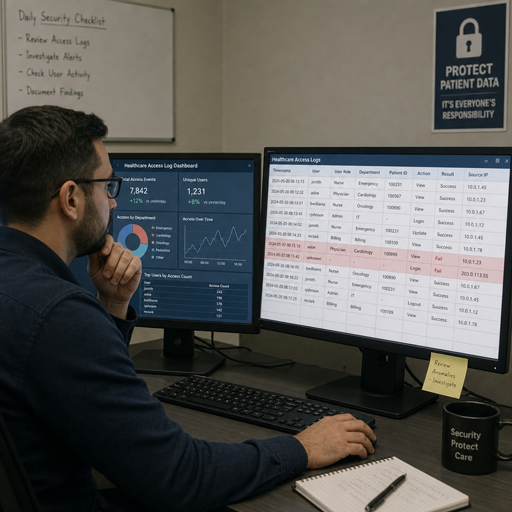
HIPAA compliance log management is the practice of collecting, protecting, reviewing, and retaining system activity records for environments that create, receive, maintain, or transmit electronic protected health information. Done well, it supports health data security, helps teams detect suspicious access, and creates evidence that security procedures are more than written policy. This guide explains what to log, how to monitor it, and how to choose log management tools without turning compliance into unmanageable noise.
What does HIPAA require from log management?
HIPAA does not prescribe one specific software product or a universal log-retention architecture. It does require regulated organizations to implement audit controls that record and examine activity in systems containing or using ePHI, and to regularly review information system activity such as audit logs, access reports, and security incident tracking reports.
That distinction matters. Keeping logs is only the first step; hipaa log management also needs documented procedures for review, investigation, escalation, and evidence preservation. If a system records access but no one reviews anomalies, the organization may have data but not meaningful compliance monitoring.
HIPAA record keeping also intersects with documentation duties. HHS materials describe six-year documentation-related time frames in the Privacy Rule context, while also noting that HIPAA itself does not create a broad medical-record retention rule. For logs, organizations should align retention with their risk analysis, policies, state requirements, contractual obligations, and legal advice rather than guessing.
The role of logs in health data security
Logs show who did what, when they did it, where the activity came from, and whether it matched normal behavior. In healthcare, that visibility is especially important because sensitive information moves across EHR platforms, billing systems, patient portals, identity providers, cloud services, endpoints, and third-party applications.
A practical HIPAA compliance log management program connects security, privacy, IT operations, and compliance teams. Security teams need alerts for unusual access. Privacy teams need evidence for investigations. IT teams need operational context when systems fail or accounts behave unexpectedly. Compliance teams need documented proof that required procedures are happening consistently.
Strong logging also improves incident response. When an account is compromised, logs can help identify the first suspicious login, the records viewed, the systems touched, and the actions taken afterward. Without that trail, teams often lose time reconstructing events from incomplete sources.
Core log sources for HIPAA environments
The right logging scope depends on where ePHI lives and how it flows. A small clinic and a large health system will have different architectures, but both need visibility into systems that store, process, transmit, or protect ePHI.
Common log sources include:
- EHR and clinical applications: patient chart access, record edits, exports, failed access attempts, break-glass events, and privileged activity.
- Identity and access systems: successful and failed logins, MFA events, password resets, role changes, account creation, deactivation, and privilege elevation.
- Endpoints and servers: malware detections, administrative actions, configuration changes, file access, service changes, and abnormal process activity.
- Network and security tools: firewall events, VPN activity, intrusion detection alerts, proxy logs, DNS activity, and data loss prevention events.
- Cloud and SaaS platforms: API activity, administrative console changes, access from new locations, storage permissions, downloads, and sharing events.
- Databases and storage systems: queries against ePHI repositories, backup activity, permission changes, encryption status events, and deletion attempts.
- Ticketing and incident systems: security incidents, access requests, approvals, remediation notes, and evidence of follow-up.
The goal is not to collect every possible event forever. The goal is to collect enough trustworthy activity records to detect inappropriate access, support investigations, and demonstrate that policies are being followed.
A practical HIPAA log management lifecycle
HIPAA-friendly logging works best as a lifecycle, not a one-time software deployment. Each stage should have an owner, a documented process, and a clear reason for existing.
1. Identify systems that touch ePHI
Start with an inventory. Map applications, databases, devices, cloud services, vendors, and integrations that create, receive, maintain, or transmit ePHI. NIST’s HIPAA Security Rule guide emphasizes using the Security Rule as part of a broader cybersecurity risk management approach, which makes asset and data-flow understanding essential.
For each system, define what activity should be logged and why. A billing platform may need user-access and export logs; an identity provider may need authentication and privilege-change logs; a database may need query and administrative logs.
2. Standardize collection and normalization
Logs from different systems often use different formats, timestamps, user identifiers, and severity labels. Centralized collection helps teams search across sources and correlate related events. Normalization makes it easier to compare activity across EHR, cloud, endpoint, and network tools.
Time synchronization is also important. If one system records an event at 10:03 and another records the related event at 10:11 because clocks are misaligned, investigations become harder. Consistent timestamps make the audit trail more defensible.
3. Protect log integrity
Logs are valuable evidence, so they need protection. Limit who can modify or delete them. Separate administrative duties where practical. Use secure transmission, access controls, tamper-resistant storage, and backups based on risk.
Integrity controls matter because an attacker with elevated privileges may try to erase traces of activity. They also matter for internal investigations, where reviewers need confidence that records have not been altered after the fact.
4. Review, alert, and investigate
Compliance monitoring should include both automated alerts and human review. Automated rules can flag impossible travel, repeated failed logins, unusual after-hours access, bulk exports, dormant account use, and privilege changes. Human reviewers add context: was the access related to care, billing, support, training, or something unexplained?
Document what was reviewed, who reviewed it, what exceptions were found, and what actions were taken. This turns log review from an informal habit into a repeatable control.
5. Retain and dispose according to policy
Retention should be long enough to support incident response, investigations, audits, and applicable obligations. It should also be realistic, secure, and documented. Retaining logs indefinitely can create cost, privacy, and discovery burdens if the organization has no reasoned policy.
When logs reach the end of their approved retention period, disposal should be controlled. Deleting old logs casually or inconsistently can create gaps and undermine trust in the program.
Which events deserve priority?
The most important events are the ones that reveal inappropriate access to ePHI, changes to safeguards, or activity that could affect confidentiality, integrity, or availability. Because every environment is different, priority should come from the organization’s risk analysis, system inventory, and incident history.
A useful starting checklist includes:
- New user accounts, disabled accounts, and reactivated accounts
- Role, group, and privilege changes
- Failed login spikes and successful logins after repeated failures
- Access from unfamiliar devices, networks, geographies, or impossible travel patterns
- Break-glass or emergency access events
- Patient-record access by users without an obvious operational need
- Bulk viewing, printing, downloading, exporting, or emailing of records
- Administrative configuration changes in EHR, cloud, database, firewall, or identity tools
- MFA changes, bypasses, resets, or suspicious push activity
- Creation, deletion, failure, or restoration of backups
- Security tool disablement, policy changes, or missing telemetry
- Vendor, service account, and API activity involving ePHI
This list should be tuned. Too few events create blind spots; too many untuned alerts create fatigue. The best programs review alert quality regularly and adjust thresholds as workflows, staffing, and systems change.
How do you choose log management tools for HIPAA?
Choose log management tools by matching them to your compliance obligations, technical environment, and review process rather than by feature volume alone. The best log management solutions enterprise compliance GDPR HIPAA PCI programs usually support centralized collection, strong access controls, alerting, retention policies, reporting, integrations, and defensible evidence workflows.
Evaluate tools against practical criteria:
|
Capability |
Why it matters for HIPAA compliance log management |
|---|---|
|
Centralized ingestion |
Brings EHR, identity, endpoint, network, cloud, and database activity into one searchable place. |
|
Role-based access |
Limits who can view, edit, export, or administer sensitive log data. |
|
Tamper resistance |
Helps preserve the evidentiary value of audit records. |
|
Correlation and alerting |
Connects related events and reduces manual review burden. |
|
Retention controls |
Supports policy-based storage, archival, and deletion. |
|
Reporting |
Produces evidence for internal review, audits, and investigations. |
|
Integration support |
Connects with SIEM, SOAR, ticketing, EDR, IAM, cloud, and EHR ecosystems. |
|
Scalability |
Handles growth in log volume without forcing teams to drop important sources. |
Avoid choosing a tool that only stores logs but does not help reviewers act on them. Also avoid assuming that a vendor’s compliance claim automatically makes your implementation compliant. Configuration, scope, policies, staff training, and review discipline still belong to the organization.
Common mistakes that weaken HIPAA log management
Many logging programs fail because they are technically present but operationally thin. Logs are collected, yet no one can explain which systems are covered, how often reviews happen, or what happens when suspicious activity appears.
Common mistakes include:
- Logging without ownership. If no team owns review and escalation, alerts become background noise.
- Missing high-risk systems. EHR activity may be monitored, while cloud storage, APIs, or service accounts are overlooked.
- Over-retention without policy. Keeping everything forever can create cost and governance problems.
- Under-retention without analysis. Deleting logs too soon can weaken investigations and audit readiness.
- Shared accounts. If multiple people use one account, logs cannot reliably identify individual activity.
- No evidence of review. A dashboard view is not the same as documented compliance monitoring.
- Untested incident workflows. Teams should know how to preserve logs, open tickets, notify stakeholders, and document findings before a real event occurs.
Fixing these issues often requires process improvement more than new tooling. A clear schedule, documented procedures, and accountable reviewers can dramatically improve the value of existing logs.
Building a sustainable compliance monitoring routine
A sustainable routine should be specific enough to prove it happened but flexible enough to adapt to risk. Define daily, weekly, monthly, and event-driven review activities. For example, high-severity security alerts may require same-day review, while broader access trend reports may be reviewed on a scheduled basis.
A workable routine includes:
- Daily or near-real-time triage for critical authentication, malware, privilege, and data-export alerts.
- Scheduled access reviews for privileged users, terminated workforce members, dormant accounts, and unusual patient-record access.
- Monthly control checks confirming that expected log sources are still sending data.
- Quarterly rule tuning to reduce false positives and add new risk scenarios.
- Incident-driven preservation when suspicious activity, complaints, or breach concerns arise.
- Management reporting that summarizes trends, exceptions, remediation, and open risks.
Document exceptions carefully. If a clinician accessed many records during a legitimate shift, note the context. If a vendor account changed permissions during a planned upgrade, connect the event to the approved change ticket. Context turns raw logging into usable governance.
A simple implementation roadmap
Organizations that are starting or modernizing their program can use a phased approach:
- Map ePHI systems and data flows. Identify where protected data lives and which tools control access.
- Define logging requirements. Specify required events, owners, retention, review frequency, and escalation paths.
- Centralize priority sources first. Start with EHR, IAM, endpoint, firewall, VPN, cloud, and high-risk databases.
- Create alert rules. Focus on access anomalies, privilege changes, large exports, disabled safeguards, and service account misuse.
- Document review evidence. Use tickets, reports, sign-offs, and investigation notes.
- Test the workflow. Run tabletop exercises and confirm that logs can answer real incident questions.
- Improve continuously. Update coverage when systems, vendors, regulations, or risks change.
The outcome: defensible visibility, not just stored data
HIPAA compliance log management is strongest when it produces defensible visibility: the organization knows which systems are monitored, what events matter, who reviews them, and how suspicious activity is handled. That visibility supports health data security, improves incident response, and makes HIPAA record keeping more reliable.
The right program combines policy, people, and technology. Log management tools provide the foundation, but disciplined review and documented follow-through make the program credible. For healthcare organizations and business associates, that is the difference between having logs and being able to prove that those logs protect ePHI.
