
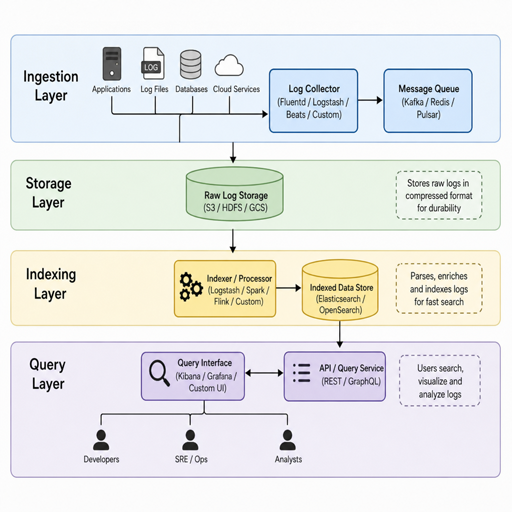
Logs are one of the fastest-growing data sets in modern systems, and they can quietly turn a healthy database into a bottleneck. Optimizing database performance for logs means designing the storage model, ingestion path, indexes, retention rules, and queries so teams can write large volumes of events while still searching them quickly. This guide explains practical optimization techniques for log-heavy databases, with a focus on resource management, load balancing, query optimization, and the performance metrics that show whether your changes are working.
Why do logs create database performance problems?
Logs create database performance problems because they combine high write volume, unpredictable bursts, time-based access patterns, and frequent filtering across large data sets. A normal application database may handle reads and writes that follow user activity, but a logging database often receives events from every service, worker, job, device, and integration at once. If the database is not designed for that shape of data, ingestion slows down, queries become expensive, and storage grows faster than teams can manage.
The challenge is not only the size of the data. Logs are usually semi-structured, which means one event may contain a timestamp, service name, severity, trace ID, region, host, message, and nested attributes. Teams want flexible search, but flexibility can become expensive when every query scans huge volumes of text or JSON. Database performance optimization for logs is about making the common paths fast without trying to make every possible search equally cheap.
Logs also have a different value curve than transactional data. Recent logs are often critical for debugging incidents, while older logs are usually needed for audits, trend analysis, or rare investigations. Treating all log data the same way wastes resources. A strong design separates hot, warm, and cold access patterns so the database spends the most effort where the data is most useful.
Start with the workload, not the database engine
The best optimization plan begins with the workload you actually have. Before changing indexes or adding hardware, define how logs arrive, how they are queried, how long they must be retained, and which searches matter most during real operations. This prevents teams from tuning around assumptions and helps connect performance enhancement work to measurable outcomes.
A log database normally has several competing jobs. It must accept incoming events without dropping data, compress and store those events efficiently, support real-time or near-real-time search, and preserve older records for the required retention period. Each job has a cost. If you improve one area without understanding the tradeoff, you may simply move the bottleneck somewhere else.
Create a short workload profile before making major changes:
- Ingestion rate: average events per second, peak events per second, and burst duration.
- Event size: typical and maximum payload size, including metadata and structured fields.
- Query patterns: common filters, time ranges, aggregations, full-text searches, and dashboards.
- Retention needs: how long logs remain searchable, archived, or deleted.
- Freshness expectations: whether logs must be available immediately or after a short delay.
- Failure tolerance: what happens when the database, network, or collector slows down.
- Compliance requirements: fields that must be protected, retained, masked, or removed.
This profile turns vague performance goals into concrete design choices. For example, if most investigations look at the last 30 minutes of errors by service, then time partitioning, service-level indexes, and fast recent storage matter more than optimizing rare searches across a year of logs.
Design the data model for fast ingestion and useful search
Log schemas should be simple enough to ingest quickly and structured enough to query predictably. The common mistake is storing logs as one large text field and hoping search can solve everything later. Another mistake is extracting too many fields and indexing them all, which slows writes and increases storage. The better path is to identify the fields that drive operational queries and make those fields first-class.
At minimum, most log records benefit from a consistent timestamp, severity level, source or service name, environment, host or container identifier, message, and correlation fields such as trace ID or request ID. These fields let teams narrow searches before scanning verbose message content. If you use structured logging, keep field names consistent across services so dashboards and alerts do not need special handling for every application.
Time is the primary access path
Most log queries start with time: “show me what happened in the last 15 minutes,” “compare this deployment window,” or “find errors overnight.” That makes time-based partitioning one of the most important optimization techniques for log storage. Partitions by hour, day, or another interval allow the database to skip irrelevant data and make retention easier because old partitions can be archived or dropped in bulk.
The right partition size depends on volume and query behavior. Very large partitions can still be slow to scan, while very small partitions create management overhead. Choose a size that aligns with typical search windows and operational maintenance. For high-volume systems, smaller recent partitions and larger archived segments may provide a better balance.
Index only what earns its cost
Indexes speed up reads, but they are not free. Every index consumes storage and adds work during ingestion because the database must update index structures as new logs arrive. Over-indexing is one of the most common causes of poor write performance in log-heavy systems.
Start with indexes that match frequent filters and high-value investigations. Common candidates include timestamp, service name, severity, environment, tenant, trace ID, request ID, and host. Avoid indexing fields with extremely high randomness unless those fields are used for precise lookups. Review index usage periodically and remove indexes that do not support meaningful queries.
Query optimization for log-heavy databases
Query optimization is the process of writing and supporting searches that read the smallest useful amount of data. In logging systems, the difference between a good query and a bad query can be enormous: one query touches a few recent partitions and targeted fields, while another scans months of raw messages. Good query habits protect both user experience and infrastructure cost.
The most important rule is to narrow by time first. Even when searching for a specific error message, include a realistic time window. Then filter by structured fields before searching unstructured text. A query that filters by environment, service, severity, and timestamp before matching message content gives the database more opportunities to skip unnecessary records.
Useful query optimization practices include:
- Set default time windows. Dashboards and search tools should default to recent data, not all available logs.
- Filter on structured fields before message text. Structured filters are usually easier to optimize than broad text searches.
- Avoid leading wildcards when possible. Pattern searches that start with unknown text often prevent efficient index use.
- Limit returned fields. Fetching full payloads for every result wastes memory and network bandwidth when a summary is enough.
- Use aggregations carefully. Grouping high-cardinality fields across long periods can be expensive.
- Paginate deep searches thoughtfully. Deep offsets may force the database to process many skipped rows.
- Save common queries. Standardized queries reduce accidental full scans during incidents.
Dashboards deserve special attention because they run repeatedly. A dashboard with ten panels can create ten expensive queries every refresh interval. If multiple teams keep the same dashboard open, the load multiplies quickly. Use pre-aggregations, materialized summaries, caching, or narrower panels for high-traffic dashboards.
Resource management keeps ingestion and search stable
Resource management for log databases means controlling how CPU, memory, disk, network, and connection capacity are used under normal load and during spikes. Without active limits, a sudden burst of logs or a single broad query can consume shared resources and degrade the entire system. Stability comes from designing safe paths for both writing and reading.
Ingestion should be buffered whenever possible. A queue, log collector, or streaming layer can absorb bursts and protect the database from sudden overload. Buffers also allow backpressure, retries, and controlled batching. Batching is especially useful because many databases write more efficiently when events are grouped instead of inserted one at a time.
Read workloads also need boundaries. Set query timeouts, result limits, memory limits, and role-based permissions for expensive searches. Engineers investigating incidents need powerful tools, but not every user or dashboard should be able to scan the full retention period by default. Guardrails reduce the chance that routine analysis affects ingestion or alerting.
Storage layout matters
Logs are storage-intensive, so disk performance and capacity planning are central to database performance optimization. Fast storage is valuable for hot data because recent logs are searched frequently and written continuously. Older data can often move to cheaper storage if query latency expectations are lower.
Compression can reduce storage cost and improve scan performance by reading fewer bytes from disk, though it may add CPU overhead. The best choice depends on whether your bottleneck is disk throughput, CPU, or memory. Measure before and after changing compression settings so you know whether the tradeoff helps.
Memory should serve the hot path
Memory is most useful when it keeps active indexes, recent partitions, and common query data close to the database engine. If the working set is much larger than available memory, the system may spend too much time reading from disk. This shows up as rising query latency, cache misses, and uneven performance during busy periods.
Do not assume that simply adding memory will fix every problem. If queries scan too much data or indexes are poorly chosen, extra memory may only delay the bottleneck. Use memory improvements alongside better partitioning, indexing, and query design.
Load balancing prevents hot spots
Load balancing distributes work so no single node, shard, partition, or disk carries too much of the logging workload. In log systems, hot spots often appear around the current time period because most writes target the newest partition and most queries inspect recent events. If all new data lands in one place, the rest of the system may sit underused while one component struggles.
A balanced architecture spreads ingestion across collectors, brokers, database nodes, or shards. It also routes queries in a way that uses replicas or read nodes when appropriate. The goal is not just equal distribution on a diagram; it is consistent performance under the workload’s real shape.
Watch for common load balancing issues:
- Hot partitions: current time partitions receive too much write traffic.
- Uneven shard keys: one service, tenant, or region produces most of the logs.
- Read concentration: dashboards repeatedly query the same node or replica.
- Collector imbalance: some agents or pipelines send more traffic than others.
- Large tenants or services: a few producers dominate shared database resources.
Choosing a shard key or distribution strategy requires care. A key based only on time may create write hot spots. A key based only on service or tenant may make time-range queries touch too many shards. Many systems need a compound strategy that considers both time and another dimension, such as service, tenant, or hash bucket.
What performance metrics should you track?
You should track performance metrics that show ingestion health, query speed, resource saturation, storage growth, and user-facing reliability. A single metric rarely explains database performance for logs. A useful monitoring view connects symptoms, such as slow searches, with causes, such as disk saturation, queue backlog, poor index selectivity, or oversized partitions.
Core metrics include:
|
Area |
Metrics to watch |
Why it matters |
|---|---|---|
|
Ingestion |
events per second, bytes per second, failed writes, retry rate |
Shows whether the database can keep up with incoming logs |
|
Queueing |
buffer depth, lag, oldest unprocessed event |
Reveals backpressure before data becomes stale |
|
Querying |
latency percentiles, rows scanned, bytes scanned, timeouts |
Identifies expensive searches and user impact |
|
Indexing |
index size, index hit rate, unused indexes, update cost |
Helps balance read speed against write overhead |
|
Storage |
disk usage, growth rate, compression ratio, I/O wait |
Supports capacity planning and retention decisions |
|
Resources |
CPU, memory, cache hit rate, network throughput |
Shows whether hardware resources are saturated |
|
Reliability |
dropped logs, replication lag, error rate |
Protects incident response and audit confidence |
Latency percentiles are more useful than averages because log systems often behave well most of the time and poorly during bursts. Track p95 and p99 query latency for key dashboards and investigation workflows. Also monitor ingestion lag, because a search experience can feel fast while the data behind it is several minutes behind reality.
Retention and lifecycle policies reduce long-term pressure
Retention is a performance decision, not just a compliance or cost decision. The longer logs remain in the primary searchable database, the more partitions, indexes, and storage the system must manage. If old data is rarely used, keeping it in the hot path can slow maintenance and increase operational complexity.
A practical lifecycle model separates logs into tiers:
- Hot logs: recent data used for active debugging, alert validation, and dashboards.
- Warm logs: older but still searchable data used for investigations and trend checks.
- Cold logs: archived data retained for compliance, audits, or rare historical analysis.
- Expired logs: data that should be deleted according to policy.
This model lets teams apply different storage, indexing, and query expectations to each tier. Hot logs may need fast disks and detailed indexes. Warm logs may use fewer indexes or slower storage. Cold logs may live outside the primary database and require a restore or slower search process.
Lifecycle automation is essential. Manual cleanup is easy to forget, especially when teams are focused on incidents or product delivery. Automated partition expiration, archival jobs, and retention checks keep the database from growing until it becomes an emergency.
A practical optimization workflow
Optimizing log database performance works best as an iterative process. Changing many variables at once makes it hard to understand which improvement mattered. A disciplined workflow helps teams make progress without creating new risks.
Use this sequence as a practical checklist:
- Define the pain point. Is the issue slow queries, delayed ingestion, high cost, storage growth, or instability during bursts?
- Measure the baseline. Capture current performance metrics before changing settings.
- Identify the dominant workload. Separate dashboard queries, incident searches, bulk exports, and ingestion traffic.
- Check partitioning and retention. Make sure old data is not burdening the hot path.
- Review indexes. Add missing high-value indexes and remove unused or harmful ones.
- Optimize common queries. Rewrite broad searches, narrow default time ranges, and reduce unnecessary fields.
- Improve ingestion flow. Add batching, buffering, backpressure, or pipeline filtering where appropriate.
- Balance load. Look for hot shards, overloaded collectors, and uneven read routing.
- Tune resources. Adjust CPU, memory, disk, and network capacity based on measured bottlenecks.
- Validate results. Compare post-change metrics against the baseline and watch for regressions.
This approach keeps optimization grounded. It also creates a record of what changed and why, which is useful when traffic grows or new teams begin relying on the logging platform.
Common mistakes that undermine performance enhancement
Many log performance problems come from reasonable decisions that become harmful at scale. The first is collecting everything without deciding what is useful. More logs can improve visibility, but excessive debug output, repeated messages, and oversized payloads consume resources before they provide value.
Another mistake is treating the logging database as a general-purpose analytics engine for every question. Logs are excellent for operational investigation, but some long-term reports may belong in a warehouse, metrics system, or summarized table. Moving the right workload to the right system can be more effective than forcing one database to do everything.
Teams also overlook the human side of query optimization. During incidents, people run urgent searches under pressure. If the search interface allows unbounded scans by default, performance may collapse at the worst time. Templates, saved queries, dashboards, and sensible defaults make the fast path the easy path.
Finally, avoid tuning only after failure. Database performance optimization should be part of routine operations. Review growth trends, slow queries, index usage, and retention policies on a regular schedule so the system evolves before it becomes fragile.
Turning log data into a sustainable performance asset
A well-optimized log database gives teams fast answers without letting observability costs and operational risk grow unchecked. The most effective improvements usually come from aligning the database design with log behavior: time-based access, heavy ingestion, structured filtering, bursty traffic, and tiered retention. Once those fundamentals are in place, targeted optimization techniques can deliver meaningful performance enhancement.
The goal is not to store every event forever in the fastest possible tier. The goal is to make the most important logs easy to ingest, easy to find, and safe to retain for as long as they are needed. With disciplined resource management, thoughtful load balancing, careful query optimization, and the right performance metrics, log databases can remain reliable even as systems and data volumes grow.
