
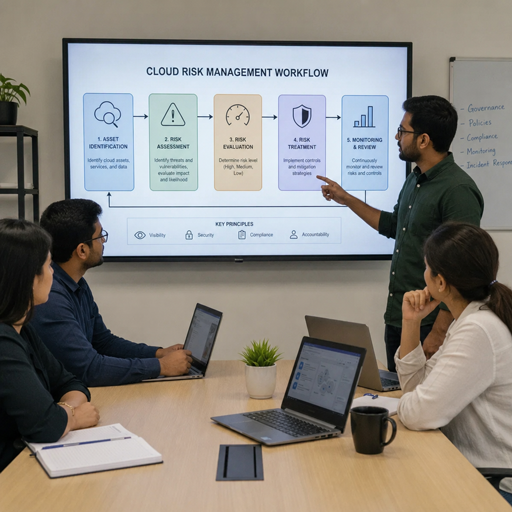
Cloud Security Posture Management, or CSPM, is a discipline and category of cloud security tools used to find, prioritize, and help fix risks across cloud environments. It focuses on how your cloud resources are configured, whether they follow cloud security best practices, and where misconfigurations could expose data, identities, networks, or workloads.
In practical terms, CSPM gives teams a clearer view of their cloud risk management picture. Instead of waiting for an audit, an incident, or a manual review, CSPM solutions continuously check cloud accounts, services, permissions, and policies so security and operations teams can act before small configuration gaps become serious problems.
What is Cloud Security Posture Management CSPM?
Cloud security posture management CSPM is the ongoing process of assessing cloud environments for security weaknesses, compliance gaps, risky configurations, and excessive exposure. It is commonly supported by cloud security posture management cspm tools that connect to cloud platforms, scan resources, compare configurations against policies, and surface issues that need attention.
The “posture” in security posture management refers to the overall state of your cloud security. A strong posture means resources are configured intentionally, access is controlled, sensitive data is protected, and risks are visible. A weak posture often includes public storage, overly broad permissions, unencrypted assets, unmanaged services, missing logging, or inconsistent policies across teams.
CSPM is especially useful because cloud environments change constantly. Developers create new resources, teams test new services, permissions evolve, and infrastructure-as-code templates are updated. Without continuous visibility, an organization may not know that a storage bucket became public, a database was deployed without encryption, or a security group allows unnecessary inbound access.
Why CSPM matters in modern cloud environments
Cloud adoption gives organizations speed, flexibility, and scalability, but it also shifts how risk appears. In traditional environments, security teams often controlled a smaller number of centralized systems. In the cloud, infrastructure can be created quickly by many teams, across multiple accounts, regions, and providers. That speed is valuable, but it can make manual security reviews incomplete or outdated.
CSPM helps close that gap by turning cloud configuration data into actionable security insight. It helps teams answer practical questions: Which resources are exposed? Which accounts are drifting from policy? Which risks affect regulated data? Which misconfigurations should be fixed first?
This matters because many cloud security problems are not caused by a single failed product. They often come from everyday operational details: default settings, unused permissions, inconsistent tagging, weak identity controls, or skipped logging. CSPM solutions help organizations make these details visible, repeatable, and manageable.
A mature CSPM program also supports collaboration. Security teams can define expectations, cloud engineering teams can fix issues closer to deployment, and leadership can understand risk trends without relying on scattered spreadsheets or one-time assessments.
Core characteristics of CSPM
While each platform works differently, most CSPM solutions share a common set of capabilities. These capabilities define what CSPM is meant to do and how it supports cloud risk management.
- Continuous discovery: CSPM tools identify cloud assets such as storage, databases, compute instances, containers, serverless functions, networking rules, keys, and identity permissions.
- Configuration assessment: They compare resource settings against internal policies, regulatory expectations, and cloud security best practices.
- Risk detection: CSPM highlights risky conditions such as public exposure, weak encryption, missing monitoring, excessive privileges, and insecure network paths.
- Prioritization: Strong tools help teams focus on the issues that matter most by considering severity, exposure, business context, and affected resources.
- Remediation guidance: CSPM usually explains why a finding matters and what steps can reduce or remove the risk.
- Compliance support: Many tools map findings to common frameworks or internal controls, helping teams prepare for audits and governance reviews.
- Drift monitoring: CSPM detects when cloud resources move away from approved configurations after deployment.
These characteristics make CSPM more than a dashboard. The goal is not simply to collect alerts, but to create a repeatable way to understand and improve cloud security posture over time.
How does CSPM work?
CSPM works by connecting to cloud environments, collecting configuration and metadata, checking that information against security rules, and reporting risks in a way teams can investigate and fix. Most tools use read-only access to inspect cloud resources, although some may also support automated remediation when organizations choose to enable it.
The process usually starts with asset discovery. A CSPM platform connects to one or more cloud providers and builds an inventory of cloud resources. This inventory is important because teams cannot secure what they cannot see. Discovery also helps uncover forgotten workloads, unused resources, unmanaged accounts, or services created outside standard processes.
Next, the tool evaluates configurations. For example, it may check whether storage is publicly accessible, whether databases require encryption, whether administrative permissions are too broad, whether logging is enabled, or whether network rules allow risky access. These checks are often based on predefined policies, custom rules, or a combination of both.
After assessment, CSPM tools generate findings. A basic finding might say that a resource violates a policy. A more useful finding explains the risk, shows the affected resource, provides evidence, and recommends a fix. Better CSPM solutions also reduce noise by grouping related issues, identifying root causes, and prioritizing risks that are exposed to the internet or connected to sensitive data.
Finally, CSPM supports remediation and reporting. Some teams use tickets and workflows to assign fixes. Others integrate CSPM into DevOps pipelines so issues are detected before deployment. Over time, reports help teams see whether posture is improving, which teams need support, and which controls are most often violated.
What CSPM includes and what it does not replace
CSPM is an important part of a cloud security program, but it is not the entire program. It focuses mainly on cloud configuration risk, posture visibility, policy enforcement, and compliance alignment. It helps teams identify weak settings and insecure patterns, but it does not replace every security function.
CSPM commonly includes checks for identity and access management, network exposure, data storage settings, logging, encryption, compliance controls, and risky service configurations. Some modern platforms also include attack path analysis, infrastructure-as-code scanning, Kubernetes posture checks, or workload context. The exact scope depends on the vendor, cloud provider support, and how the organization configures the tool.
However, CSPM is not a full substitute for endpoint detection, vulnerability management, runtime threat detection, incident response, secure software development, or human security review. For example, CSPM may identify that a database is publicly reachable, but a vulnerability scanner may be needed to detect exploitable software flaws. A runtime detection tool may be needed to spot suspicious behavior after an attacker gains access.
A practical way to view CSPM is as the posture layer of cloud security. It helps prevent avoidable exposure and configuration drift. It works best when paired with identity governance, network controls, vulnerability management, logging, monitoring, and incident response.
CSPM compared with adjacent cloud security tools
Cloud security terminology can be confusing because many categories overlap. CSPM is often discussed alongside CNAPP, CWPP, CIEM, and traditional vulnerability management. Understanding the differences helps teams choose the right mix of cloud security tools.
|
Category |
Primary focus |
Typical question it answers |
|---|---|---|
|
CSPM |
Cloud configurations and posture |
Are our cloud resources configured securely? |
|
CIEM |
Cloud identities and permissions |
Who has access, and is that access excessive? |
|
CWPP |
Workload protection |
Are running workloads protected from threats? |
|
Vulnerability management |
Software flaws and missing patches |
Which systems have known vulnerabilities? |
|
CNAPP |
Broader cloud-native application protection |
Can we manage posture, workload, identity, and pipeline risk together? |
These categories are not always separate in practice. Many vendors combine features, and some cspm solutions include identity, workload, or code scanning capabilities. The important point is to start with the risk you need to manage, not the acronym. If your main challenge is insecure cloud configuration and lack of visibility, CSPM is the relevant starting point.
Practical examples of CSPM findings
CSPM becomes easier to understand when viewed through everyday cloud scenarios. The following examples show how security posture management turns cloud settings into useful security actions.
- Public storage exposure: A storage container is accidentally configured for public access. CSPM flags the exposure, identifies the affected asset, and recommends restricting access.
- Overly permissive identity policy: A user, role, or service account has broad administrative permissions that are not required. CSPM helps highlight privilege risk so teams can move toward least privilege.
- Unencrypted database: A database is deployed without encryption enabled. CSPM alerts the team and may map the issue to internal data protection requirements.
- Open network access: A security rule allows inbound traffic from any source to a sensitive port. CSPM identifies the risky rule and points teams toward narrower access.
- Missing logging: A cloud account or critical service is not sending audit logs. CSPM shows the gap so investigations will not depend on incomplete evidence later.
- Policy drift: A resource was compliant at deployment but changed afterward. CSPM detects the drift and helps teams restore the approved configuration.
These findings are valuable because they connect technical settings to real-world consequences. They help teams move from “something is misconfigured” to “this specific resource creates this specific risk, and this is how we should address it.”
CSPM supports cloud security best practices
CSPM works best when it is aligned with clear cloud security best practices. A tool can detect problems, but the organization still needs policies, ownership, and remediation processes. Without those, even the best alerts can pile up without meaningful risk reduction.
Good CSPM programs usually start with asset visibility. Teams need to know which accounts exist, who owns them, what data they contain, and which resources are internet-facing. Tagging, naming conventions, and ownership metadata make findings easier to route and resolve.
Identity control is another major practice. Cloud permissions should be specific, reviewed regularly, and limited to what users and services need. CSPM can highlight excessive access, but long-term improvement usually requires better role design, stronger approval processes, and routine cleanup of unused permissions.
Logging and monitoring also matter. Secure configurations are important, but teams need evidence when something changes or goes wrong. CSPM can help identify missing logs, but those logs still need to feed a broader detection and response process.
A useful CSPM checklist includes:
- Maintain a current inventory of cloud accounts, assets, and owners.
- Define baseline policies for access, encryption, logging, networking, and data exposure.
- Prioritize findings by severity, exposure, and business context.
- Assign remediation ownership to the teams that manage the affected resources.
- Track recurring issues to identify weak processes or templates.
- Integrate checks into deployment pipelines where possible.
- Review policies regularly as cloud services and business needs change.
This approach turns CSPM from a scanning tool into an operating model for healthier cloud environments.
Common misconceptions about CSPM
Because CSPM is often presented as a product category, it is easy to misunderstand what it can and cannot do. Clearing up these misconceptions helps teams set realistic expectations.
- Misconception: CSPM fixes all cloud security issues automatically. In reality, CSPM identifies and guides remediation. Some fixes can be automated, but many require review, testing, and coordination.
- Misconception: CSPM is only for large enterprises. Any organization using cloud services can benefit from visibility into misconfigurations, especially when multiple teams deploy resources.
- Misconception: Passing compliance checks means the cloud is secure. Compliance alignment is useful, but security also depends on context, threat modeling, access control, and operational discipline.
- Misconception: CSPM is only a security team tool. Engineering, operations, compliance, and platform teams all use CSPM insights to improve how cloud resources are built and maintained.
- Misconception: CSPM replaces secure design. CSPM can catch drift and mistakes, but it should reinforce secure architecture, not compensate for poor planning.
The strongest programs treat CSPM as a feedback system. It shows where the cloud environment differs from the intended standard, then helps teams improve the systems that created the gap.
How to evaluate CSPM solutions
Choosing among CSPM solutions should begin with your cloud environment and risk priorities. A small team using one provider may need clear visibility and simple remediation guidance. A larger organization may need multi-cloud support, custom policies, workflow integrations, compliance reporting, and strong prioritization.
Look for coverage that matches your actual architecture. If your organization uses multiple cloud providers, containers, serverless services, or infrastructure as code, make sure the solution can inspect those areas. A tool that covers only part of your environment can create a false sense of confidence.
Usability is just as important as detection depth. If findings are hard to understand, poorly prioritized, or difficult to assign, teams may ignore them. Effective cloud security posture management cspm tools should help users understand what happened, why it matters, who should fix it, and how to verify the fix.
Key evaluation points include:
- Supported cloud providers, accounts, regions, and services.
- Quality of risk prioritization and context.
- Policy customization for internal standards.
- Integration with ticketing, messaging, CI/CD, and reporting workflows.
- Compliance mapping and evidence collection.
- Remediation guidance, automation options, and approval controls.
- Ability to reduce duplicate or low-value alerts.
- Clear dashboards for technical teams and leadership.
The right tool is not always the one with the longest feature list. It is the one your teams can use consistently to reduce real cloud risk.
CSPM is a foundation for better cloud risk management
CSPM helps organizations bring order to fast-moving cloud environments. It defines what secure configuration should look like, checks whether reality matches that standard, and gives teams a practical path to improvement. As cloud use grows, that continuous feedback becomes essential.
The value of CSPM is not limited to finding mistakes. It helps teams build better habits: clearer ownership, safer defaults, faster remediation, and stronger alignment between security and engineering. When combined with broader cloud security tools and disciplined processes, CSPM becomes a foundation for sustainable cloud risk management.
For beginners, the simplest definition is this: CSPM helps you see whether your cloud is configured securely and what needs to change if it is not. That visibility is the first step toward a stronger, more resilient cloud security posture.
