
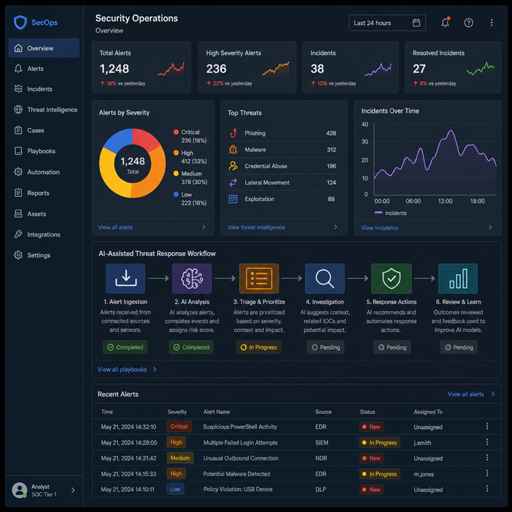
Automated threat response with AI is the use of intelligent software to detect, assess, prioritize, and respond to security threats with minimal manual delay. It combines automated threat detection and response, incident response automation, and risk-based decisioning so security teams can act faster and more consistently. The goal is not to replace human judgment, but to reduce repetitive work, surface the most urgent issues, and help people intervene where expertise matters most.
What is automated threat response with AI?
Automated threat response with AI is a cybersecurity approach that uses machine learning, behavioral analytics, rules, orchestration, and predefined playbooks to recognize suspicious activity and trigger appropriate actions. Those actions may include isolating an endpoint, blocking an IP address, disabling a compromised account, opening an incident ticket, enriching an alert with threat intelligence, or escalating the case to an analyst.
Traditional security tools often generate alerts and leave the next step to a human responder. AI threat response goes further by helping interpret signals, connect related events, estimate severity, and recommend or execute containment steps. In practice, it gives a security operation a faster path from “something looks wrong” to “the right response has started.”
The “AI” part can vary. Some systems use statistical models to identify abnormal behavior. Others use natural language processing to summarize incident context, classify alerts, or assist analysts with investigation notes. Many effective programs combine AI with deterministic controls, human approval points, and cybersecurity automation tools that enforce consistent response workflows.
The defining characteristics of AI-driven response
A system should not be called automated threat response simply because it sends alerts. The defining feature is that detection leads to structured action. A mature setup connects visibility, analysis, decisioning, and response in a controlled loop.
Key characteristics include:
- Continuous monitoring: Security signals are collected from endpoints, networks, cloud systems, identity platforms, applications, and physical or operational environments where relevant.
- Contextual analysis: Alerts are enriched with details such as user behavior, asset importance, vulnerability exposure, location, device type, and known threat indicators.
- Risk-based prioritization: The system weighs likelihood, impact, confidence, and business context instead of treating every alert equally.
- Automated playbooks: Predefined workflows guide what happens next, from data collection to containment and escalation.
- Human oversight: Analysts can approve, adjust, investigate, or reverse actions, especially when the response could disrupt operations.
- Auditability: Actions are logged so teams can review what happened, why it happened, and whether the response was appropriate.
- Continuous improvement: Feedback from analysts, post-incident reviews, and false-positive analysis helps refine models, rules, and playbooks.
These characteristics matter because security teams rarely suffer from a lack of alerts. They suffer from a lack of time, context, and confidence. Automated threat response helps convert noisy signals into repeatable decisions.
How does AI threat response work?
AI threat response works by collecting security data, identifying suspicious patterns, assigning priority, and launching the right response workflow. The system may act automatically for low-risk, high-confidence cases and request human approval for actions that could affect business continuity.
A typical workflow looks like this:
- Signal collection The system gathers events from tools such as endpoint detection, identity systems, firewalls, cloud platforms, email security, vulnerability scanners, access control systems, and application logs.
- Detection and correlation AI models and rules look for unusual activity, known attack behaviors, suspicious combinations of events, or deviations from normal patterns. For example, a login from an unusual location followed by mass file access may be more concerning than either event alone.
- Enrichment The alert is enriched with details that help determine severity. This may include asset criticality, user role, known vulnerabilities, threat intelligence, historical behavior, and whether similar alerts are appearing elsewhere.
- Risk scoring The system estimates priority based on confidence and potential impact. A suspicious process on a low-value test machine may be handled differently from suspicious activity involving an administrator account or critical production system.
- Playbook selection The platform chooses a response playbook. That playbook may be fully automated, semi-automated, or advisory depending on policy.
- Response execution The system takes action, such as quarantining a file, resetting credentials, isolating a host, blocking traffic, revoking a token, or creating an investigation case.
- Notification and escalation Analysts, IT teams, compliance stakeholders, or venue operations teams may be notified depending on the incident type and severity.
- Review and tuning Teams review outcomes, confirm whether the action was useful, and adjust models or playbooks to reduce false positives and improve future response.
This sequence is why incident response automation is most valuable when it is integrated rather than isolated. A tool that blocks malicious traffic is useful. A connected workflow that sees the threat, understands the affected asset, checks related activity, documents the action, and escalates when needed is far more operationally useful.
Core components of an automated response program
Automated threat response is not one product category alone. It is an operating model supported by technology, process, and governance. The exact stack depends on the organization, but most programs include several common layers.
Data sources and telemetry
Security automation depends on visibility. If a system cannot see meaningful events, it cannot respond intelligently. Common data sources include endpoint activity, identity and access logs, network traffic, email activity, cloud configuration events, application logs, vulnerability data, and security camera or access control signals in environments where physical security is part of the risk model.
The value comes from connecting signals. A failed login by itself may be routine. A failed login followed by a successful login from a new device, privilege escalation, and unusual data access may indicate compromise. AI can help correlate those patterns faster than a human analyst manually switching between tools.
Detection logic and AI models
Automated threat detection and response may use several detection methods at the same time. Rule-based detections are effective for known patterns. Behavioral analytics are useful when the threat is unfamiliar but the activity is abnormal. Machine learning can help classify events, cluster related alerts, and find subtle patterns across large datasets.
AI is not magic, and it should not be treated as a black box. Strong programs define what the model is expected to detect, how confidence is measured, and where human approval is required. They also monitor drift, false positives, and false negatives because business behavior changes over time.
Playbooks and orchestration
Playbooks are the practical heart of incident response automation. They define the response steps for specific scenarios, such as suspected phishing, malware detection, account takeover, data exfiltration, insider risk, or unauthorized access to restricted systems.
A playbook may include technical actions, communication steps, documentation requirements, and escalation paths. For example, a phishing playbook might search for similar messages, remove emails from inboxes, block sender domains, check whether users clicked links, reset affected credentials, and create a final incident report.
Human decision points
Automated response works best when it respects operational risk. Some actions are safe to automate because the downside is limited. Others require approval because they could interrupt customers, lock out employees, shut down systems, or create legal and compliance complications.
A balanced program defines decision points in advance. Low-risk actions may run automatically. Medium-risk actions may require analyst approval. High-risk actions may require coordination with IT, legal, facilities, executive leadership, or business owners.
Reporting, audit, and feedback
Every automated action should leave a trail. Logs should show what triggered the action, which data was used, what decision was made, who approved it if approval was required, and what happened afterward. This supports incident review, compliance reporting, and operational trust.
Feedback is equally important. If analysts constantly reverse automated actions, the workflow needs tuning. If threats repeatedly bypass detection, teams need better data, better logic, or stronger controls.
Why automated response matters for modern security
Security teams face a practical problem: attackers move quickly, environments are complex, and manual response does not scale well. Automated threat response reduces the delay between detection and action, which can limit damage when a threat is real.
It also improves consistency. Under pressure, two analysts may respond differently to the same alert. A documented playbook helps standardize the process while still allowing expert judgment when needed. This is especially useful for organizations with distributed teams, complex environments, or limited security staffing.
The benefits often include:
- Faster containment when a threat matches a high-confidence pattern.
- Reduced alert fatigue because enrichment and prioritization help analysts focus.
- More consistent incident handling through repeatable playbooks.
- Better documentation because response actions are logged automatically.
- Improved coordination between security, IT, operations, and leadership.
- Stronger automated risk management because response is tied to asset value and business impact.
The practical implication is simple: automation gives defenders more time. It removes some of the waiting, copying, checking, and ticket-routing that slows down response. Analysts can spend more attention on investigation, judgment, threat hunting, and improvement.
What does automated threat response include and exclude?
Automated threat response includes the technologies and workflows that move a security event toward containment, investigation, recovery, or escalation. It does not include every security control, and it should not be confused with a fully autonomous security program that makes every decision without people.
Included capabilities often involve:
- Alert triage and enrichment.
- User and entity behavior analysis.
- Malware containment.
- Endpoint isolation.
- Account lockout or credential reset.
- Network blocking or segmentation changes.
- Cloud permission changes.
- Ticket creation and case management.
- Evidence collection.
- Analyst recommendations.
- Executive or operational notifications.
- Post-incident reporting.
Automated threat response does not automatically mean:
- Every alert is acted on without approval.
- AI understands business context perfectly.
- Human analysts are unnecessary.
- False positives disappear.
- The system can compensate for poor visibility.
- Response playbooks never need maintenance.
- Compliance, legal, and privacy questions are solved by technology alone.
This distinction matters. Automation is powerful when it operates inside clear boundaries. It becomes risky when organizations automate disruptive actions without testing, governance, or a way for humans to intervene.
Practical examples and use cases
Automated threat response can support many environments, from corporate networks to cloud platforms to large public venues. The common pattern is the same: detect a risk, assess context, and trigger a controlled response.
Useful examples include:
- Phishing response: A reported email is analyzed, similar messages are found across the organization, malicious links are blocked, and affected users are flagged for credential review.
- Ransomware containment: Suspicious file encryption activity triggers endpoint isolation, process termination, backup alerts, and escalation to the incident response team.
- Account takeover: An impossible travel pattern or unusual privilege use triggers step-up authentication, session revocation, or temporary account restriction.
- Cloud misconfiguration: A public storage exposure or risky permission change triggers a ticket, alert, rollback workflow, or policy enforcement action.
- Insider risk: Unusual data movement by a privileged user prompts additional review, evidence preservation, and escalation under an approved governance process.
- Large venue security: Continuous threat monitoring for large venues with automated response can connect access control, network monitoring, camera analytics, and operations workflows so teams can respond quickly to suspicious access, system anomalies, or safety-related alerts.
- Vulnerability exploitation: If a known exploited vulnerability appears on an exposed asset, the system can prioritize the asset, notify the owner, apply a compensating control, or increase monitoring.
- Business email compromise: Suspicious mailbox rules, login anomalies, and unusual payment-related messages can trigger investigation and account protection steps.
These examples show why automated response is not limited to one technical domain. It is a coordination layer. The more connected the environment, the more valuable it becomes to define exactly which signals should trigger which actions.
AI response compared with traditional security automation
Traditional security automation often follows fixed instructions: if a condition is met, perform a predefined action. AI-enabled response can add context, pattern recognition, prioritization, and adaptive recommendations. Both approaches matter, and the strongest programs usually use them together.
|
Area |
Traditional automation |
AI-assisted response |
|---|---|---|
|
Detection |
Relies heavily on known rules and signatures |
Can also identify anomalies and behavioral patterns |
|
Prioritization |
Often based on static severity |
Can incorporate context, asset value, user behavior, and confidence |
|
Investigation |
Requires more manual correlation |
Can summarize related events and suggest next steps |
|
Response |
Executes predefined actions |
Can recommend or select playbooks based on risk and context |
|
Tuning |
Updated through rule changes |
Updated through feedback, model evaluation, and rule refinement |
|
Risk |
Predictable but may miss novel patterns |
More adaptive but requires careful governance and validation |
The distinction is not about replacing one with the other. Rule-based automation is reliable for clear, repeatable actions. AI is useful when patterns are complex, context is scattered, or prioritization is difficult. Together, they can create a response program that is both consistent and flexible.
The role of cybersecurity automation tools
Cybersecurity automation tools provide the technical foundation for AI-driven response. These may include security orchestration platforms, endpoint detection and response systems, extended detection and response platforms, identity security tools, cloud security platforms, ticketing systems, threat intelligence services, and data analytics environments.
The best toolset is the one that fits the organization’s risks and operations. A small business may need straightforward automation around phishing, endpoint protection, and identity alerts. A large enterprise may need deeper integration across cloud, network, identity, data protection, and compliance workflows. A venue operator may need security workflows that connect cyber alerts with physical operations and safety communications.
When evaluating tools, teams should look beyond feature lists. The important question is whether the tool can support reliable response in the real environment where it will be used.
A practical evaluation checklist includes:
- Does it integrate with the systems that produce the most important alerts?
- Can it enrich alerts with asset, identity, vulnerability, and business context?
- Are playbooks easy to build, test, approve, and update?
- Can actions be staged with human approval where needed?
- Does it create clear audit logs and incident records?
- Can it measure response time, false positives, and workflow outcomes?
- Does it support role-based access and separation of duties?
- Can teams simulate actions before enabling them in production?
- Does it allow rollback or recovery when an action causes disruption?
- Can it support both technical responders and nontechnical stakeholders?
Tools matter, but process matters more. A powerful platform with unclear ownership will underperform. A simpler platform with well-designed playbooks and disciplined review can deliver meaningful value.
Common misconceptions about AI and response automation
AI threat response is often misunderstood because the language around automation can sound absolute. In reality, the most effective approach is controlled, measured, and human-aware.
Common misconceptions include:
- “Automation means no people are involved.” Good automation reduces repetitive work, but people still set policy, investigate complex incidents, approve high-impact actions, and improve the program.
- “AI can tell exactly what is malicious.” AI can estimate risk and detect patterns, but it can be wrong. Confidence scoring, validation, and review are essential.
- “More automation is always better.” Automating the wrong action can create outages or unnecessary disruption. The right level of automation depends on confidence, impact, and business tolerance.
- “Only large enterprises need automated response.” Organizations of many sizes can benefit from automation, especially for common threats such as phishing, malware, credential misuse, and exposed cloud assets.
- “A tool purchase creates an automated response program.” Tools enable the program, but playbooks, governance, integrations, training, and review make it work.
- “AI eliminates alert fatigue by itself.” AI can help prioritize and summarize, but noisy data sources and weak detection logic still need tuning.
Understanding these misconceptions helps teams adopt automation with realistic expectations. The objective is not to create a self-driving security department. The objective is to make response faster, clearer, safer, and more repeatable.
Risks and limits to manage
Automated response introduces its own risks. A false positive that simply creates a ticket is inconvenient. A false positive that disables a critical account or isolates a production server can become a business incident. That is why automation should be introduced in stages.
Important risks include:
- False positives causing disruption: A benign action may be misread as malicious and trigger unnecessary containment.
- False negatives allowing threats through: AI and rules may miss activity that does not match expected patterns.
- Overreliance on model outputs: Teams may trust recommendations without checking context.
- Poorly designed playbooks: A response workflow may skip important approvals or fail to preserve evidence.
- Integration gaps: If systems are not connected, automation may act with incomplete information.
- Privilege and access concerns: Automation platforms often need powerful permissions, which must be protected.
- Compliance and privacy issues: Monitoring and response actions may involve sensitive data or regulated processes.
These risks do not make automation a bad idea. They make governance necessary. Teams should test playbooks, start with low-risk actions, require approval for disruptive steps, document decision logic, and review outcomes regularly.
Building a practical automated response workflow
A useful automated response program usually starts small. Instead of trying to automate every threat category, teams can begin with high-volume, well-understood scenarios. Phishing, malware containment, suspicious login activity, and cloud misconfiguration are common starting points because they often have repeatable response steps.
A practical build path looks like this:
- Choose one priority use case Select a threat that is frequent, measurable, and painful enough to justify automation.
- Map the current manual process Document how analysts triage the alert today, which tools they check, which teams they contact, and which decisions they make.
- Define safe automation boundaries Decide which steps can run automatically, which require approval, and which should remain manual.
- Identify required data and integrations Confirm that the system can access the logs, identity data, asset context, and control points needed to act.
- Create the playbook Build the workflow with clear triggers, actions, escalation paths, and documentation steps.
- Test in a controlled mode Run the playbook in observation or approval-only mode before allowing it to execute disruptive actions.
- Measure outcomes Track alert volume, time to triage, time to containment, false positives, analyst overrides, and incident quality.
- Expand carefully Add more actions, more use cases, or more integrations only after the first workflow proves reliable.
This approach keeps automation grounded in reality. It also builds trust with analysts and business stakeholders because they can see how decisions are made before automation is given more authority.
Metrics that show whether automation is working
Automated threat response should be measured by outcomes, not by the number of workflows created. A long list of playbooks does not guarantee better security. The question is whether the program helps the team detect, decide, and respond more effectively.
Useful metrics may include:
- Mean time to triage: How long it takes to determine whether an alert matters.
- Mean time to contain: How long it takes to limit the spread or impact of a confirmed threat.
- Automation success rate: How often automated steps complete as intended.
- Analyst override rate: How often humans reverse, cancel, or modify automated recommendations.
- False-positive rate: How often automation is triggered by benign activity.
- Escalation quality: Whether escalated incidents include enough context for faster investigation.
- Playbook coverage: Which high-priority threat scenarios have documented workflows.
- Business impact: Whether automation reduces disruption rather than creating it.
Metrics should be reviewed with context. A high override rate may mean analysts lack trust, or it may mean the playbook is too aggressive. A low false-positive rate may be good, or it may mean detection is too narrow. Measurement should lead to better decisions, not vanity reporting.
Best practices for safer adoption
AI-driven response works best when security teams combine automation ambition with operational discipline. The safest programs are transparent, tested, and aligned with business priorities.
Best practices include:
- Start with advisory or approval-based workflows before enabling full automation.
- Use clear severity levels and define which actions are allowed at each level.
- Protect automation credentials with strong access controls and monitoring.
- Keep humans in the loop for actions that could disrupt critical systems.
- Build separate playbooks for investigation, containment, eradication, and recovery.
- Include legal, privacy, compliance, and business owners where appropriate.
- Review false positives and false negatives as part of normal operations.
- Document why each automated action exists and when it should run.
- Test playbooks against realistic scenarios, not only ideal conditions.
- Train analysts to understand, challenge, and improve AI recommendations.
The best practice behind all others is clarity. Everyone involved should know what the system can do, what it cannot do, who owns each decision, and how mistakes are corrected.
Where automated risk management fits
Automated risk management connects threat response to business impact. Instead of responding only to technical severity, the system considers what is at stake. A low-level alert on a critical payment system may deserve more attention than a similar alert on a test environment.
This risk-aware approach helps teams prioritize limited resources. It also supports better communication with leadership because incidents can be described in terms of affected assets, likely impact, operational exposure, and response status. For organizations that manage both cyber and physical environments, such as campuses, hospitals, transportation hubs, or event venues, risk context may include safety, access, crowd flow, and operational continuity.
The key is to make risk data usable. Asset inventories, identity roles, vulnerability information, data sensitivity, and business ownership should feed response decisions where possible. Without that context, automation may act quickly but not wisely.
A clear definition for decision-makers
Automated threat response with AI is a risk-aware security capability that turns detection into action through intelligent analysis, automated workflows, and governed human oversight. It helps teams respond faster to common and complex threats by connecting data, context, playbooks, and response controls.
For decision-makers, the value is not simply speed. The value is repeatability, prioritization, and better use of human expertise. AI can summarize, correlate, recommend, and trigger action, while people define acceptable risk, handle uncertainty, and improve the system over time.
Organizations considering automated threat response should start with a focused use case, clear ownership, safe approval gates, and measurable outcomes. With that foundation, cybersecurity automation tools can support a practical program for automated threat detection and response, incident response automation, and ongoing risk reduction without turning security operations into an uncontrolled black box.
