
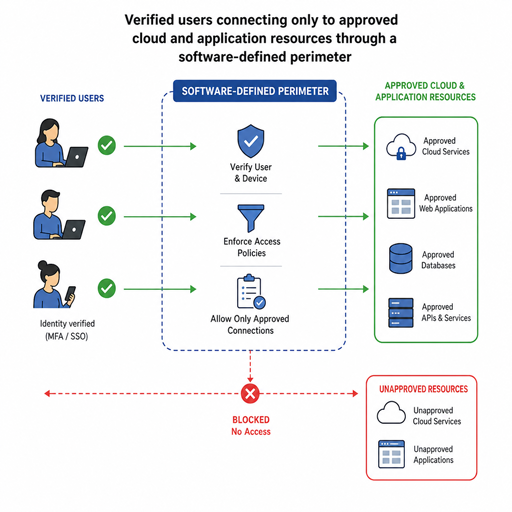
Modern work no longer fits neatly inside one office network, and security can’t rely on a hard outer wall with trusted users on the inside. A Software-Defined Perimeter SDP helps organizations hide sensitive resources from unauthorized users, verify identity and device context before access, and reduce exposure across cloud, hybrid, and remote environments. Used well, it becomes a practical layer in a broader cloud security strategy rather than another isolated tool.
What is Software-Defined Perimeter SDP?
Software-Defined Perimeter SDP is a security architecture that creates access dynamically between verified users, trusted devices, and specific applications or services. Instead of placing resources on an openly reachable network, SDP uses identity-aware controls so protected assets are not visible to users or systems that have not been authorized. The Cloud Security Alliance describes SDP as a framework for protecting application infrastructure from network-based attacks, and its specification has evolved from the original 2014 version to expanded guidance for modern environments.
In practical terms, SDP changes the access conversation from “Can this person reach the network?” to “Should this person, on this device, under these conditions, reach this exact resource right now?” That distinction matters because many breaches expand after an attacker gains a foothold and discovers other reachable systems. With software defined perimeter sdp controls, organizations can narrow what each user can see and do.
The shift from network trust to identity-aware access
Traditional perimeter security solutions were built for a world where most applications lived in company data centers and most users worked on managed office networks. Firewalls, VPNs, and network segmentation still have value, but they become harder to manage when employees, contractors, SaaS platforms, cloud workloads, and unmanaged networks are all part of daily operations. A single network connection can become too broad if it grants visibility into systems the user does not need.
SDP supports secure access control by separating authentication from resource exposure. A user typically proves identity, device posture, and policy eligibility before a connection is created. The result is a smaller attack surface, less unnecessary network visibility, and more precise control over application access.
How SDP supports the zero trust model
The zero trust model assumes that no user, device, or network location should be trusted automatically. NIST’s Zero Trust Architecture guidance defines zero trust as an approach that reduces uncertainty in access decisions and supports least-privilege access across enterprise resources.
Software-Defined Perimeter SDP fits naturally into that approach because it focuses on verification before access and limits connections to approved resources. It does not replace every security control, but it can provide an enforcement layer for zero trust principles. For example, an employee may be allowed to access a finance application only after multi-factor authentication, from a compliant device, and during an approved session.
This is especially useful for organizations that are moving gradually toward zero trust. Instead of redesigning every system at once, teams can begin by placing high-value applications behind SDP controls. Over time, they can extend policies to additional users, workloads, and environments.
Why does SDP matter for cloud and remote access security?
SDP matters because cloud adoption and remote work have stretched the traditional perimeter beyond recognition. Applications may run in multiple clouds, users may connect from anywhere, and partners may need limited access without becoming part of the internal network. A strong remote access security approach must account for all of those realities without creating excessive friction.
VPNs often provide broad network-level access once a user connects. SDP can be more selective by granting application-level access based on policy. That helps teams reduce unnecessary exposure while still supporting the flexibility employees need to work productively.
For cloud environments, SDP also helps security teams apply consistent access rules across changing infrastructure. Cloud resources can be created, moved, or retired quickly, and static network assumptions may become outdated. When access is tied to identity, policy, and context, the organization can adapt more easily.
Core benefits of Software-Defined Perimeter SDP
The value of SDP is not only technical. It also helps security and IT teams simplify access decisions, reduce risk, and support modern work patterns. The strongest benefits usually appear when SDP is integrated with identity management, endpoint security, logging, and cloud security controls.
Key benefits include:
- Reduced attack surface: Protected applications are not openly visible to unauthenticated users, which can limit reconnaissance opportunities.
- More precise access: Policies can grant users access only to the applications and services they need, rather than an entire network segment.
- Improved remote access security: Employees and contractors can connect to approved resources without broad VPN-style exposure.
- Better fit for cloud and hybrid environments: SDP can help unify access control across on-premises systems, cloud workloads, and SaaS-connected workflows.
- Stronger policy enforcement: Access decisions can include identity, device health, location, session risk, and user role.
- Support for compliance efforts: More granular access control and logging can make it easier to demonstrate who accessed what, when, and under which policy.
These benefits are most meaningful when policies are carefully designed. If an organization simply recreates broad network access through a new tool, it loses much of the advantage. SDP should encourage teams to define access around real business needs.
Common SDP use cases
SDP can be applied in several practical scenarios, especially where broad network access creates avoidable risk. It is often considered by organizations that need to modernize access without slowing down cloud adoption or remote collaboration.
Securing private applications
Many organizations have internal applications that were never designed for direct internet exposure. SDP can place those applications behind identity-aware controls so only approved users can reach them. This is useful for HR portals, finance systems, operational dashboards, developer tools, and administrative consoles.
Replacing or reducing traditional VPN dependency
A VPN can still be useful, but it may not be the best default for every access scenario. SDP can provide a narrower path to specific applications, which may reduce the risk created by overly broad network tunnels. For users, this can also mean a more direct experience when accessing approved resources.
Enabling third-party and contractor access
Partners and contractors often need limited, temporary access. SDP can help provide that access without placing external users inside a trusted network zone. Policies can be tied to time-bound roles, device requirements, and specific applications.
Protecting cloud workloads
In cloud environments, resources are dynamic and distributed. SDP can help apply consistent access controls even as workloads shift. This supports a cloud security strategy where access is managed through policy rather than assumed network location.
SDP, VPN, and traditional perimeter tools
SDP should not be framed as a magic replacement for every existing control. Firewalls, endpoint protection, identity platforms, monitoring tools, and segmentation can all remain important. The difference is that SDP changes how access is granted to protected resources.
A simple comparison helps clarify the role:
|
Security approach |
Typical focus |
Practical limitation |
Where SDP helps |
|---|---|---|---|
|
Traditional firewall |
Block or allow traffic by network rules |
Can depend heavily on static locations and ports |
Adds identity-aware access before resources are reachable |
|
VPN |
Connect users to a private network |
May expose more network access than needed |
Grants narrower application-level access |
|
Network segmentation |
Separate systems into zones |
Can become complex in cloud and hybrid setups |
Uses policy to connect verified users to specific resources |
|
SDP |
Hide resources and grant dynamic access |
Requires careful identity and policy design |
Supports least-privilege, context-based secure access control |
This comparison does not mean every organization should immediately remove existing perimeter security solutions. In many cases, SDP works alongside them. The goal is to reduce blind trust and make access more intentional.
Planning SDP as part of a cloud security strategy
A successful SDP rollout starts with clarity. Security teams should know which resources need protection, who requires access, and what conditions should influence access decisions. Without that foundation, policies can become either too restrictive or too permissive.
A practical planning checklist includes:
- Map critical applications and data. Identify which systems create the highest risk if exposed or misused.
- Define user groups and access needs. Separate employees, administrators, contractors, partners, and service accounts.
- Set device and identity requirements. Decide where multi-factor authentication, device compliance, and endpoint checks are mandatory.
- Start with a focused pilot. Choose a high-value but manageable application before expanding SDP controls broadly.
- Monitor user experience. Strong security should not create confusing workflows that push users toward workarounds.
- Review policies regularly. Access needs change as roles, projects, and cloud environments evolve.
This staged approach helps teams gain confidence without creating unnecessary disruption. It also makes it easier to measure whether SDP policies are improving security posture and operational control.
Implementation challenges to anticipate
Like any security architecture, SDP works best when teams plan for real-world complexity. Identity data may be inconsistent, legacy applications may not integrate easily, and users may resist changes to familiar access workflows. These challenges do not make SDP impractical, but they do make preparation important.
The most common issue is policy design. If roles are poorly defined, access rules may become messy or difficult to maintain. Security teams should collaborate with application owners and business leaders so policies reflect actual work patterns, not assumptions.
Visibility is another concern. SDP can improve access logging, but only if events are integrated with monitoring and incident response processes. Teams should ensure that authentication attempts, denied access, policy changes, and unusual connection patterns are reviewed in the right systems.
A practical takeaway for modern security teams
Software-Defined Perimeter SDP gives organizations a more controlled way to connect users to applications in cloud, hybrid, and remote environments. By hiding resources from unauthorized users and enforcing identity-aware access, SDP supports the zero trust model and strengthens remote access security without relying only on traditional network boundaries.
The best way to think about SDP is not as a single product category or quick fix, but as a design pattern for modern secure access control. When it is aligned with identity, device posture, monitoring, and a clear cloud security strategy, it can help organizations reduce exposure while keeping work flexible and connected.
