
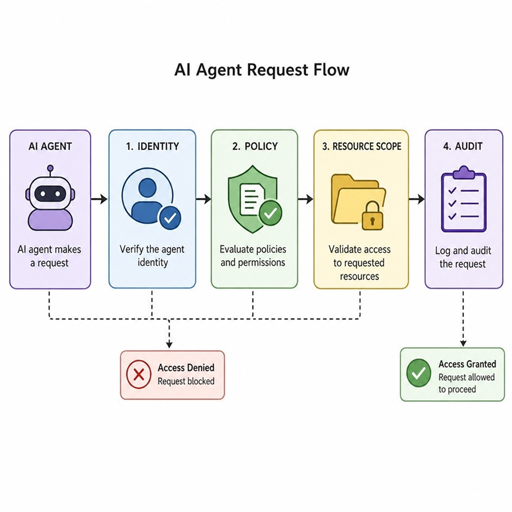
AI agents can move faster than people, connect to more systems, and take action across workflows that used to require manual review. Keeping them within their permissions means designing access around identity, intent, resource scope, and continuous oversight—not simply giving an agent an API key and hoping logs will catch mistakes later. This guide explains practical AI agent permissions best practices for teams that want useful automation without uncontrolled access.
What does it mean to keep an AI agent within its permissions?
Keeping an AI agent within its permissions means the agent can only perform actions that are explicitly allowed for its role, task, user delegation, and current context. It should not be able to read data, call tools, approve changes, modify records, or trigger workflows unless those actions are authorized at the right level of detail. In practice, agent access control combines authentication, authorization, resource-scoped rules, policy enforcement, audit trails, and human review for higher-risk actions.
The challenge is that AI agents do not behave like traditional software scripts. A script usually follows a fixed path; an agent may choose between tools, interpret instructions, summarize context, and decide what step to take next. That flexibility is useful, but it also means permissions must be enforced outside the model, not trusted to the model’s reasoning alone.
A well-designed permission system answers four questions before every meaningful action:
- Who or what is acting? The system must know whether the action comes from a human, a service account, an agent, or an agent acting on behalf of a specific user.
- What is being requested? Reading a document, sending an email, editing a ticket, and deleting a file are different actions with different risk levels.
- Which resource is involved? Access should be scoped to a specific customer, project, repository, file, workspace, or record.
- Why is the action allowed right now? Context matters, including user intent, active session, approval status, environment, and business workflow.
The core risk is over-broad delegation
Many permission failures begin with convenience. A team wants an agent to be useful, so it gives the agent broad access to email, documents, CRM records, project boards, code repositories, or internal tools. The agent may work well in normal cases, but broad delegation creates a large blast radius when prompts are ambiguous, data is sensitive, integrations behave unexpectedly, or a user asks for something outside their authority.
For example, a project management agent may need to summarize tasks in one workspace and update due dates for a specific project. It does not need organization-wide access to every client board, archived document, billing record, and private leadership plan. The safest design is not “let the agent in and monitor it later.” The safer design is “make the allowed path easy and every other path impossible.”
This is especially important when an agent can chain actions. Reading a support ticket may seem low risk. Reading the ticket, finding the customer account, changing the account status, sending a refund request, and notifying an external contact is a much broader workflow. Each step needs its own permission check.
Permission design starts with agent identity
An AI agent needs a clear identity in your system. Treating all agent activity as a generic backend process makes it hard to enforce rules, investigate behavior, and separate legitimate automation from misuse. The agent should have its own identity, and when it acts for a user, the system should preserve that user context as well.
There are three common identity patterns:
- Agent as itself: The agent has a dedicated identity with its own permissions. This works for background automation, such as organizing public documentation or monitoring a shared queue.
- Agent acting on behalf of a user: The agent’s authority is derived from the user’s permissions, often with added restrictions. This is useful when the agent drafts emails, updates tasks, or retrieves documents for a logged-in user.
- Agent acting through a workflow role: The agent receives temporary authority tied to a specific business process, such as triaging new tickets or preparing a deployment checklist.
The second and third patterns are usually safer than giving every agent a powerful standing account. If the agent acts for a user, it should not exceed that user’s entitlements. If the agent acts for a workflow, it should lose access when the workflow ends.
Resource-scoped authorization reduces the blast radius
Resource-scoped authorization limits permissions to specific objects rather than broad systems. Instead of saying “this agent can update tasks,” the rule becomes “this agent can update tasks in Project A when delegated by a member of Project A.” That difference matters because most organizations have overlapping teams, private workspaces, client-specific records, and sensitive operational data.
This is where fine-grained authorization models are useful. Teams researching tools for managing AI agent permissions and entitlements often look for systems that can represent relationships among users, agents, groups, roles, projects, and resources. Search phrases such as “workos fga ai agent permissions resource scoped authorization” usually point to this need: the ability to define who can do what, on which resource, under which relationship or condition.
A resource-scoped model can express rules such as:
- A sales assistant agent may read accounts assigned to the requesting salesperson.
- A project agent may update tasks only inside the project where it was invoked.
- A support agent may draft a response but needs approval before sending messages externally.
- A coding agent may open a pull request in an assigned repository but cannot merge it.
- A finance agent may classify invoices but cannot change vendor bank details.
The practical benefit is containment. If an agent receives a confusing instruction, encounters malicious content, or makes a flawed plan, the authorization layer blocks actions outside the approved scope.
How should teams structure AI agent permissions?
Teams should structure AI agent permissions around least privilege, explicit delegation, and step-by-step authorization. The agent should receive only the access required for its current task, for the shortest reasonable duration, and every sensitive action should be checked against policy at the moment it happens. This structure keeps agent access control aligned with normal business authority instead of creating a parallel system of hidden privileges.
A useful design starts with a permission inventory. List the agent’s intended jobs, the systems it must touch, the resources involved, and the actions it may perform. Then separate read, write, execute, approve, delete, and external-send permissions. These actions should not be bundled together unless they truly share the same risk.
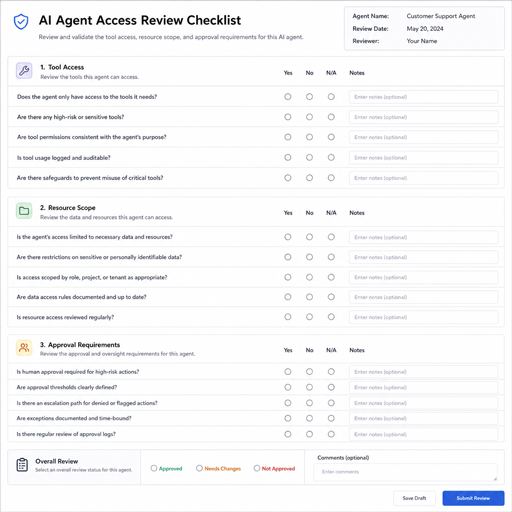
A practical permission checklist
Use this checklist before deploying or expanding an agent:
- Define the agent’s purpose. Write a short description of what the agent is allowed to accomplish and what is out of scope.
- Create a distinct agent identity. Avoid sharing human credentials or unrestricted service accounts.
- Map every tool call. Know which APIs, internal tools, databases, and SaaS integrations the agent can access.
- Separate read from write. Reading data and changing data should require different permissions.
- Scope access to resources. Limit access by project, workspace, customer, repository, region, department, or record type.
- Use temporary credentials where possible. Prefer short-lived tokens or session-bound delegation over standing secrets.
- Require approval for irreversible actions. Deletion, payment, external communication, production changes, and legal or HR actions deserve additional checks.
- Log decisions, not just outcomes. Capture who invoked the agent, what it requested, which policy allowed or denied it, and what changed.
- Review permissions regularly. Remove unused tool access and adjust policies when workflows change.
This checklist is deliberately operational. AI agent permissions best practices project management teams can use, for example, should not live only in security architecture documents. Product managers, engineering leads, operations owners, and compliance stakeholders all need a shared view of what the agent can and cannot do.
Policy enforcement belongs outside the model
Prompt instructions are not permission controls. You can and should tell an agent, “Do not access private projects” or “Ask before sending external emails,” but those instructions are not enough. A model may misunderstand, be manipulated by retrieved content, or be asked to solve a goal in an unexpected way.
Enforcement should happen in deterministic systems around the agent. Before a tool call is executed, the application should check the agent identity, user context, requested action, target resource, and current policy. If the request fails the check, the tool should not run.
A strong architecture often includes these layers:
|
Layer |
Purpose |
Example control |
|---|---|---|
|
Identity |
Knows who is acting |
Agent ID plus user delegation context |
|
Authorization |
Decides what is allowed |
Role, relationship, or resource-scoped policy |
|
Tool gateway |
Mediates actions |
Blocks unauthorized API calls before execution |
|
Approval workflow |
Adds human judgment |
Manager approval before external send or deletion |
|
Audit logging |
Preserves accountability |
Records policy decision, request, resource, and result |
|
Monitoring |
Detects unusual behavior |
Alerts on repeated denials or abnormal access patterns |
This layered approach helps teams avoid relying on any single control. If the prompt fails, policy still applies. If a tool is misused, logs and monitoring provide visibility. If a workflow is sensitive, human review adds judgment before the action completes.
Entitlements should mirror real business relationships
Entitlements define what a person, team, service, or agent is allowed to access. For AI agents, entitlements work best when they mirror real business relationships rather than broad job titles alone. A user may be a project manager, but that does not mean they can access every project. An agent helping that user should inherit the same practical boundaries.
Relationship-based rules can capture nuance. A person may be an owner of one workspace, a viewer in another, and have no access to a third. An agent acting for that person should respect those distinctions. This is why many teams evaluate tools for managing AI agent permissions and entitlements that support fine-grained policies rather than simple all-or-nothing roles.
The goal is not to make permissions complex for their own sake. The goal is to make the authorization model match how the organization actually works. When policies reflect real ownership, membership, and delegation, agents can be helpful without becoming exceptions to governance.
Safe tool design prevents accidental privilege escalation
Tools are the hands of an AI agent. If a tool is too powerful, the agent can cause damage even when its reasoning seems reasonable. Safe tool design means building narrow, predictable capabilities instead of exposing broad administrative functions.
For example, a risky tool might be called update_customer_record and accept any customer ID plus any field. A safer design separates actions: update_customer_note, change_customer_owner, and request_billing_change can each have their own policy. The agent can still complete useful work, but sensitive changes receive stricter checks.
Good tool design also limits inputs. The agent should not be able to pass arbitrary filters that return all records unless that is explicitly intended. It should not be able to override policy by supplying a different user ID. It should not be able to choose its own permission level. Keep the tool interface narrow enough that the safest path is also the easiest path.
Approvals and escalation paths keep humans in control
Not every action should be fully automated. Some actions need human approval because they are irreversible, externally visible, financially significant, or sensitive to employees or customers. A mature permissions model defines when the agent may act independently and when it must pause.
Approval does not have to make the workflow slow. The agent can prepare a summary, draft the change, explain the reason, and present the exact action for review. The human then approves, edits, or rejects it. This keeps the agent useful while preserving accountability.
Common approval triggers include:
- Sending messages to customers, vendors, regulators, or broad internal groups.
- Deleting files, records, tickets, repositories, or user accounts.
- Changing billing details, payment instructions, contracts, or pricing fields.
- Modifying production infrastructure or security settings.
- Accessing HR, legal, health, financial, or executive materials.
- Taking action after repeated authorization denials or unusual tool usage.
Escalation paths are equally important. If an agent lacks access, it should not improvise around the control. It should explain what permission is missing and route the request to the right owner.
Monitoring turns permissions into an ongoing practice
AI agent permissions are not a one-time setup. Agents change, tools change, teams change, and workflows expand. Monitoring helps security and operations teams see whether policies still match reality.
Useful monitoring focuses on behavior, not just errors. Look for repeated denied requests, access attempts outside normal projects, unexpected spikes in tool calls, unusual external communication, or actions taken at odd times. These signals do not always mean something is wrong, but they are worth reviewing.
Audit logs should be understandable by humans. A log that says an opaque service token called an endpoint is less helpful than one that records the agent, delegated user, requested action, target resource, policy decision, and final result. When something goes wrong, clear logs shorten investigation time and make it easier to improve controls.
Choosing access control tools for AI agents
When evaluating top providers AI agent permissions access control, avoid focusing only on whether a platform can store roles. AI agents need authorization that works at runtime, across resources, and inside fast-moving workflows. The right tool should help your application decide whether a specific agent may perform a specific action on a specific resource in a specific context.
Look for capabilities such as:
- Fine-grained authorization: Support for resource-level rules, relationships, and delegated access.
- Policy clarity: Rules that developers and security teams can understand, test, and review.
- Runtime enforcement: Permission checks that happen before tool execution, not only during login.
- Integration flexibility: Ability to connect with your identity provider, application data, internal tools, and audit systems.
- Separation of duties: Support for approval flows and controls around sensitive actions.
- Operational visibility: Logs and reporting that show what agents attempted and why access was granted or denied.
- Developer experience: APIs and patterns that make secure implementation practical rather than burdensome.
No tool can replace thoughtful design. The best platform will still depend on accurate resource modeling, clear policies, and disciplined implementation.
A phased rollout lowers risk
The safest way to deploy agent permissions is gradually. Start with low-risk read-only use cases, validate logging and policy checks, then expand to write actions in limited environments. This gives teams time to discover missing rules, confusing workflows, and tool designs that are too broad.
A simple rollout plan might look like this:
- Observe-only mode: The agent can retrieve approved information and make recommendations without changing systems.
- Draft mode: The agent can prepare messages, tickets, updates, or code changes for human review.
- Scoped action mode: The agent can perform low-risk actions inside a defined project or workspace.
- Conditional autonomy: The agent can complete routine tasks when policy, confidence, and context meet defined thresholds.
- Expanded automation: Additional tools are added only after audit results and user feedback show the controls are working.
This phased approach also helps teams build trust. Users can see what the agent does, security teams can verify enforcement, and product owners can refine permissions before granting broader access.
Common mistakes to avoid
The most common mistake is treating the agent as a trusted employee rather than a software actor that needs strict boundaries. Even helpful agents should be constrained by policy. Trust should come from control design, not from optimism about model behavior.
Other mistakes include giving agents shared admin credentials, skipping resource-level checks, failing to separate user authority from agent authority, and relying on prompts as the main security layer. Another frequent issue is logging too little. If teams cannot reconstruct what the agent attempted, what policy decided, and what changed, they cannot confidently manage risk.
Finally, avoid permission sprawl. As agents become more useful, teams may keep adding tools without removing old access. Schedule reviews and make deprovisioning part of the lifecycle.
Key takeaways for secure AI agent access
AI agents should be powerful enough to help, but never so broadly privileged that a single mistake can affect unrelated systems or sensitive data. Strong AI agent permissions combine least privilege, resource-scoped authorization, external policy enforcement, safe tool design, approvals, and continuous monitoring.
The practical path is clear: give every agent a distinct identity, bind actions to user or workflow context, check authorization before every tool call, and keep humans in the loop for high-risk decisions. With those foundations in place, organizations can adopt agentic workflows while keeping access aligned with real permissions, real resources, and real accountability.
