
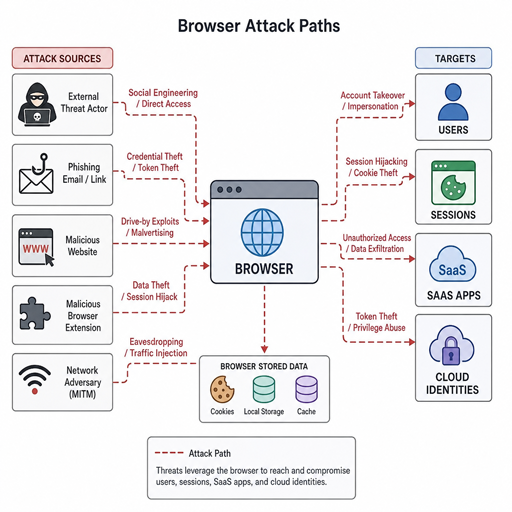
The browser has become one of the most important battlegrounds in modern cybersecurity because it sits between users, identities, SaaS apps, cloud data, and everyday work. The most relevant 2026 browser attack techniques are not limited to classic malware downloads; they increasingly target sessions, tokens, permissions, extensions, and user trust. This article breaks down the browser security threats organizations should understand, the web security risks behind them, and the cybersecurity techniques that can reduce exposure.
Which 2026 browser attack techniques matter most right now?
The most important 2026 browser attack techniques are adversary-in-the-middle phishing, session hijacking, ClickFix-style social engineering, malicious OAuth consent, malicious browser extensions, HTML smuggling, QR-code phishing, credential stuffing, and browser-launched remote monitoring and management abuse. Current reporting from browser security vendors and threat intelligence teams consistently points to a shift away from “just steal the password” attacks and toward attacks that exploit authenticated browser sessions, trusted access, and normal user workflows. Push Security’s 2026 browser attacks report, for example, highlights AiTM phishing, malicious OAuth apps, malicious browser extensions, credential stuffing, ClickFix variants, and session hijacking as major in-the-wild techniques.
This matters because the browser is where identity and application access converge. A user may have strong endpoint protection, a managed laptop, and multifactor authentication, yet still interact with a convincing login page, approve a malicious app, paste a command into a terminal, or run a harmful extension. That is why cyber attack trends in 2026 are less about one isolated exploit and more about chains of small actions that look normal until the attacker has durable access.
The browser is now an identity and workflow control point
For years, many organizations treated browser risk as a subset of endpoint, email, or network security. That model is weaker today because work happens inside SaaS applications, identity providers, collaboration tools, admin consoles, and web-based developer platforms. Unit 42 reported that nearly half of the incidents it reviewed for its 2026 Global Incident Response Report involved browser-based activity, showing how often intrusions intersect with ordinary email, web, and SaaS workflows.
Microsoft’s 2026 Digital Defense Report also emphasizes that people and identities remain primary entry points for attackers, with valid accounts and follow-on credential theft playing a major role in observed intrusions. That is the practical reason browser security threats deserve board-level and engineering-level attention. The attacker does not always need to break the browser itself; they often need to bend the user’s browser session, OAuth approval, cookie, or cloud identity into doing the work for them.
A modern browser attack may start with a search result, QR code, email link, fake CAPTCHA, shared document, browser notification, extension prompt, or “fix this error” instruction. Each step can look plausible. The danger comes from the attacker’s ability to turn familiar browser behavior into access, execution, or data movement.
The attack patterns defining browser risk in 2026
AiTM phishing and session token theft
Adversary-in-the-middle phishing sits between the user and the real login service. Instead of merely collecting a username and password, the attacker proxies the authentication flow and attempts to capture session cookies or tokens after the user completes login. This makes the technique especially dangerous when organizations rely on phishable MFA or do not bind sessions strongly to trusted devices.
The defensive lesson is not that MFA is useless. It is that security teams need phishing-resistant MFA, conditional access, device posture checks, session monitoring, and rapid token revocation. CISA continues to recommend phishing-resistant MFA, including FIDO/WebAuthn or PKI-based approaches, as a stronger option than weaker factors such as SMS.
ClickFix and the rise of “helpful” social engineering
ClickFix attacks trick users into performing the attacker’s instructions under the pretext of solving a problem. The lure may claim that the browser is blocked, a CAPTCHA failed, a video will not load, or an AI tool needs a local repair. The user is guided to copy and paste a command, download a file, approve a permission, or run a script.
ESET reported that ClickFix detections grew sharply between the second half of 2025 and the first half of 2026, and also noted related variants such as AI-fix, CrashFix, and ConsentFix. These attacks work because they do not initially look like exploitation. They look like troubleshooting. The best response combines user education with controls that limit script execution, monitor suspicious clipboard activity, restrict unmanaged downloads, and block risky command interpreters where they are not required.
Malicious OAuth consent and permission abuse
OAuth abuse targets the trust relationship between users and cloud applications. Instead of stealing a password, the attacker convinces the user to grant an app permission to read mail, access files, manage calendars, or maintain offline access. Once approved, the attacker may retain access even if the user changes a password.
This is one of the clearest examples of web security risks moving into identity governance. Security teams should review app consent policies, restrict user consent where appropriate, monitor new high-risk permissions, and require admin approval for sensitive scopes. OAuth events also need to be visible to the SOC, because the browser prompt may be the only moment when the attack is obvious to the user.
Malicious and over-permissioned browser extensions
Browser extensions can improve productivity, but they can also observe pages, inject scripts, harvest data, or modify browser behavior. The risk is not limited to obviously malicious extensions. A legitimate extension can become dangerous if it is sold, compromised, abandoned, or granted more permissions than it needs.
This risk has grown alongside interest in AI-powered add-ons and productivity tools. Research on GenAI-themed Chrome extensions has found that threat actors can exploit browser extension APIs and user interest in new tools for harmful behavior. A practical extension policy should allowlist approved extensions, block sideloading, review permission changes, and treat extension telemetry as part of browser security rather than as a minor IT preference.
HTML smuggling, fake downloads, and RMM tool abuse
HTML smuggling uses browser features to assemble or deliver malicious files on the client side, often helping attackers bypass basic perimeter scanning. Once the user opens the file, the chain may lead to credential theft, malware, or installation of remote monitoring and management tools. RMM abuse is especially difficult because the tools may be legitimate software used by IT teams.
Menlo Security’s 2026 browser security threat report highlights ClickFix, AiTM, HTML smuggling, and RMM tool abuse as browser-session-layer problems that many traditional tools were not designed to cover. The response should include download isolation, file detonation, blocking unapproved RMM tools, and alerts for unusual installation paths or remote access activity after a browser event.
QR-code phishing and cross-device pivots
QR-code phishing, often called quishing, uses the browser indirectly by moving the user from a protected corporate device to a personal phone or unmanaged browser session. A malicious QR code in an email, PDF, poster, or message can send the user to a fake login page outside normal enterprise controls.
Microsoft reported more than 145 million QR-code phishing attacks detected between July 2025 and June 2026, while ESET reported record QR-code phishing levels in the first half of 2026. This trend is a reminder that browser defense cannot stop at the managed desktop. Organizations should train users to treat QR codes like links, inspect destination domains, and avoid entering corporate credentials after scanning codes from unexpected sources.
How should security teams respond to browser security threats?
Security teams should respond by treating the browser as a managed security layer, not as an unmanaged window to the internet. That means combining identity controls, browser telemetry, SaaS governance, endpoint hardening, and user-focused prevention into one operating model. OWASP’s 2025 Top 10 also reinforces that web application risk remains rooted in issues such as broken access control, security misconfiguration, software supply chain failures, injection, authentication failures, and weak logging or alerting.
A practical browser defense program should include:
- Phishing-resistant authentication: Prioritize FIDO/WebAuthn, passkeys, or certificate-based authentication for high-risk users and critical apps.
- Session protection: Monitor impossible travel, suspicious token reuse, abnormal user agents, and risky session persistence.
- Managed browser configuration: Enforce safe defaults, disable risky features where possible, and prevent users from bypassing core protections.
- Extension governance: Allowlist approved extensions, review requested permissions, and remove unused or unmaintained add-ons.
- OAuth app control: Limit user consent, review new app grants, and alert on sensitive scopes such as mail, files, offline access, and admin functions.
- Download and script controls: Isolate suspicious downloads, block unauthorized script execution, and restrict tools commonly abused after ClickFix-style lures.
- SaaS and identity logging: Centralize browser, identity provider, email, endpoint, and SaaS events so analysts can connect the chain.
- User intervention design: Replace generic awareness training with just-in-time warnings for real risky actions, such as granting OAuth permissions or pasting commands.
These cybersecurity techniques work best together. A phishing-resistant login helps, but it will not control a malicious extension. Extension governance helps, but it will not stop a user from approving a dangerous OAuth app. The goal is layered friction at the exact points where browser attacks become access.
Detection starts with behavior, not just URLs
Traditional URL filtering still matters, but many 2026 browser attack techniques use trusted infrastructure, compromised sites, short-lived pages, or legitimate tools. Defenders need to focus on behavior: what happened before the login, what changed during the session, what permissions were granted, what files were downloaded, and what process launched afterward.
Useful detection questions include:
- Did a browser event precede a suspicious endpoint action? Look for command-line execution, archive extraction, installer launches, or RMM installation soon after a web visit.
- Did the user approve a new OAuth application? Review the app publisher, permission scope, consent time, and whether other users approved the same app.
- Did the session change context? Watch for new countries, new devices, new user agents, impossible travel, or token use outside expected patterns.
- Did an extension change? Investigate newly installed extensions, permission escalations, sideloaded packages, or extensions contacting unusual domains.
- Did the user move across channels? QR codes, personal devices, messaging apps, and phone-based instructions can indicate a cross-device phishing attempt.
This behavior-first mindset also improves incident response. Instead of closing a ticket after blocking a domain, analysts can ask whether the attacker obtained a token, created a mailbox rule, added an OAuth grant, installed a remote tool, or persisted through a browser extension.
Building safer browser habits across the organization
Technology controls are essential, but employees still need simple rules for moments when the browser asks them to trust something. The best training is specific, short, and tied to real decisions. Users should know that a CAPTCHA should not require a command prompt, a login should not begin from an unexpected QR code, and a productivity extension should not need broad access to every site unless there is a clear business reason.
Security teams can make these habits easier by reducing unnecessary prompts. If users are constantly asked to approve pop-ups, permissions, downloads, and MFA challenges, they learn to click through. Cleaner workflows, fewer exceptions, and clearer warnings make suspicious moments stand out.
Leaders also need to treat browser security as a shared responsibility between IT, security, identity, legal, and business application owners. SaaS adoption, extension use, OAuth permissions, and AI tools often grow outside formal procurement. A lightweight approval path is better than forcing teams into shadow IT.
A concise takeaway for 2026
The most prevalent browser attack techniques in 2026 exploit trust more often than they exploit a single browser bug. Attackers are targeting sessions, OAuth grants, extensions, QR codes, downloads, and user troubleshooting behavior because those paths blend into everyday work. The organizations that reduce risk fastest will manage the browser as a first-class security surface, connect browser events to identity and endpoint telemetry, and apply layered controls where modern attacks actually happen.
