
Zero Trust Network Access ZTNA is a modern approach to connecting users, devices, and applications without assuming anything inside or outside the network is automatically safe. Instead of granting broad access after a simple login, ZTNA verifies identity, device context, policy, and risk before allowing a user to reach a specific resource. For organizations supporting remote work, cloud apps, hybrid infrastructure, or third-party users, it offers a more precise way to deliver secure remote access while reducing unnecessary exposure.
What is Zero Trust Network Access ZTNA?
Zero Trust Network Access ZTNA is a security model that gives users access only to the applications and services they are authorized to use, based on continuous verification rather than location-based trust. It is built on the principle often summarized as “trust no one,” meaning every access request must be checked, even if it comes from a known employee, a managed device, or a corporate network. In practice, ZTNA combines identity verification, access management, device posture checks, and policy enforcement to reduce the risk of unauthorized movement across systems.
Traditional network security often focused on building a strong perimeter. Once someone connected to the private network, they could sometimes see or reach more than they needed. ZTNA changes that pattern by hiding applications from the open internet and brokering access only after the request satisfies defined security rules.
This matters because business environments are no longer neatly contained. Employees work from home, contractors need temporary access, applications run across cloud and on-premises environments, and devices may connect from many locations. ZTNA helps security teams control access at the application level instead of treating the entire network as a single trusted zone.
The shift from perimeter security to zero trust security
For many years, organizations relied on perimeter defenses such as firewalls, VPNs, and internal network segmentation. These tools still have a role, but they were designed for a world where most users, devices, and applications lived inside a controlled environment. As cloud adoption and remote work expanded, the perimeter became harder to define.
Zero trust security responds to that reality by assuming risk exists everywhere. The goal is not to distrust employees or slow down work. The goal is to remove automatic trust from the access process and replace it with consistent verification.
A zero trust cybersecurity framework typically focuses on several ideas:
- Verify explicitly: Confirm identity, device health, location, session context, and other risk signals before granting access.
- Use least privilege: Give each user only the access needed for their role or task.
- Assume breach: Design controls as if attackers may already have credentials or a foothold somewhere in the environment.
- Monitor continuously: Reassess access when context changes, such as a risky login location or an unmanaged device.
- Limit lateral movement: Prevent one compromised account or device from becoming a doorway into the wider network.
ZTNA turns these principles into a practical network access control strategy. Instead of opening a broad tunnel into the corporate environment, it creates a more targeted connection between an approved user and an approved application.
How ZTNA works in everyday access decisions
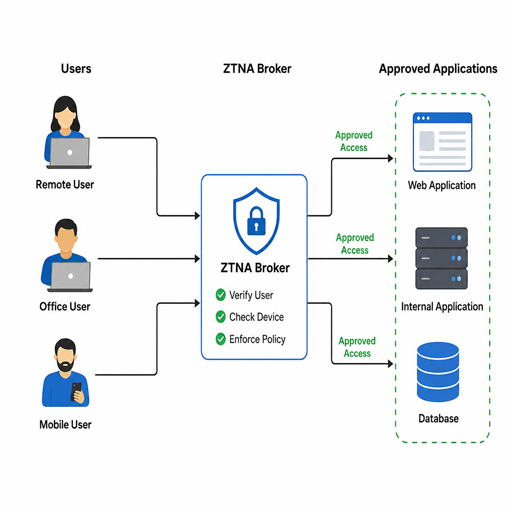
ZTNA usually sits between users and protected resources. When someone requests access, the ZTNA service evaluates the request against security policies. If the request is approved, the user receives access to a specific application or service. If the request fails, access is denied or limited.
A typical access flow looks like this:
- The user requests an application. This may happen through a portal, agent, browser, or integrated identity workflow.
- Identity is verified. The system checks credentials, multi-factor authentication, single sign-on status, or identity provider signals.
- Device context is evaluated. Policies may check whether the device is managed, encrypted, patched, or running required security software.
- Policy is applied. The request is compared with rules based on role, group, application sensitivity, location, time, and risk level.
- Access is granted narrowly. The user connects only to the approved resource, not the full private network.
- Activity is monitored. The session can be logged, reviewed, adjusted, or terminated if conditions change.
This process is useful because access decisions become more dynamic. A finance employee using a managed laptop from a familiar location may be allowed into a finance application. The same account trying to connect from an unknown device or unusual region may require extra verification or be blocked entirely.
Why does ZTNA matter for secure remote access?
ZTNA matters for secure remote access because it reduces the amount of trust placed in the network connection itself. Instead of assuming a user is safe after connecting through a VPN or corporate network, ZTNA checks whether that user, device, and request should reach a specific application at that moment. This gives organizations a stronger way to support remote teams, partners, and hybrid work without exposing broad network pathways.
Remote access has become a normal part of business operations, not an exception. People need to work from homes, hotels, client sites, airports, and shared spaces. At the same time, attackers often target remote access tools because they can provide a direct path into sensitive environments.
ZTNA helps by narrowing what a successful login can do. If an attacker obtains credentials, they still need to pass additional checks. Even then, access can be restricted to only the systems tied to that identity and policy. This does not eliminate risk, but it reduces the potential blast radius.
For users, a well-designed ZTNA experience can also be simpler. Instead of manually connecting to a VPN and navigating internal network paths, users may access approved applications through familiar identity workflows. The best implementations balance security with usability so that protection does not become a daily obstacle.
Core benefits for modern organizations
ZTNA is not just a security upgrade. It also supports operational flexibility. When implemented carefully, it can help IT and security teams manage access across complex environments with more consistency.
Key benefits include:
- Reduced network exposure: Applications can be hidden from unauthorized users and the public internet.
- Stronger access management: Policies can reflect role, identity, device status, and risk rather than simple network location.
- Better support for hybrid work: Employees can reach approved applications without requiring broad access to the internal network.
- Improved third-party control: Contractors, vendors, and partners can receive limited access to only the resources they need.
- Lower lateral movement risk: Users are not automatically placed inside a large trusted network segment.
- More useful visibility: Logs and access decisions can help teams understand who accessed what, from where, and under which conditions.
The value is especially clear in organizations with cloud applications, distributed teams, or sensitive data. ZTNA helps align access with business need instead of network convenience.
ZTNA and VPNs solve different problems
ZTNA is often discussed as a VPN replacement, but the comparison is more nuanced. A VPN creates an encrypted tunnel between a user and a network. ZTNA focuses on verified, policy-based access to specific applications. Both can support remote access, but they take different approaches to trust and scope.
|
Area |
Traditional VPN |
ZTNA |
|---|---|---|
|
Access scope |
Often network-level |
Application-level |
|
Trust model |
Trust commonly increases after connection |
Trust is continuously evaluated |
|
User experience |
May require manual connection to a network |
Can be integrated into app or identity workflows |
|
Risk profile |
Broad access may increase lateral movement risk |
Narrow access limits unnecessary reach |
|
Best fit |
Some legacy network use cases |
Cloud, hybrid, remote, and role-based access needs |
Many organizations do not switch overnight. They may begin by protecting high-risk applications with ZTNA, then expand over time. VPNs may remain for certain legacy systems, administrative tasks, or specialized infrastructure until those access patterns can be modernized.
Where ZTNA fits within a cybersecurity framework
ZTNA is one part of a broader cybersecurity framework, not a complete security program by itself. It works best when paired with identity security, endpoint protection, monitoring, data protection, and incident response. The access decision is powerful, but it depends on reliable signals from the surrounding security ecosystem.
For example, ZTNA policies are stronger when identity groups are accurate, user roles are current, and devices are properly managed. If an employee changes departments but keeps old permissions, access policies may no longer reflect real business need. If endpoint health data is missing, the system has less context for deciding whether a device should connect.
A mature approach connects ZTNA with:
- Identity and access management: Single sign-on, multi-factor authentication, role-based access, and lifecycle management.
- Endpoint security: Device posture, encryption, malware protection, patch status, and compliance checks.
- Security monitoring: Session logs, anomaly detection, and alerts for suspicious access behavior.
- Data security: Classification, encryption, and controls that protect sensitive information after access is granted.
- Governance: Regular reviews of policies, permissions, and exceptions.
This layered approach helps organizations move from isolated tools to coordinated zero trust security.
What should organizations consider before adopting ZTNA?
Organizations should consider their users, applications, identity systems, device landscape, and current access risks before adopting ZTNA. A successful rollout depends on knowing which resources need protection, who should reach them, and what conditions should apply. Starting with clear priorities helps avoid overcomplicated policies and user frustration.
Begin with discovery. Identify the applications that remote users rely on, especially those containing sensitive data or serving critical operations. Map which groups need access and whether that access is permanent, temporary, or conditional.
Next, evaluate readiness. ZTNA depends heavily on identity quality and device visibility. If user directories are outdated or unmanaged devices are common, those issues should be addressed as part of the rollout plan.
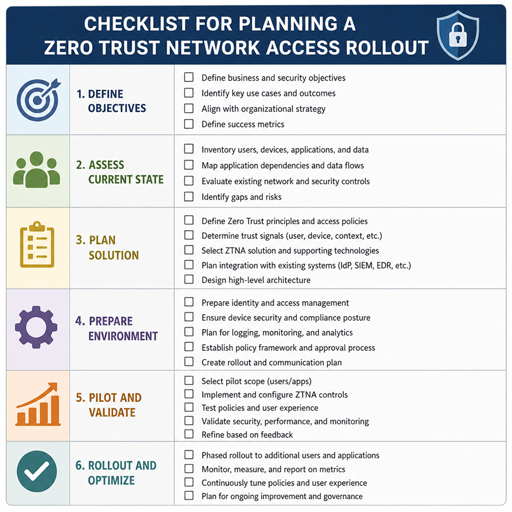
A practical preparation checklist includes:
- Define the business reason for ZTNA, such as reducing VPN reliance or improving third-party access.
- Inventory applications by sensitivity, user group, and hosting environment.
- Review current access permissions and remove obvious overprivilege.
- Strengthen multi-factor authentication and identity lifecycle processes.
- Decide which device posture signals are required for high-risk applications.
- Pilot with a small set of users before expanding organization-wide.
- Communicate changes clearly so users understand how access will work.
Good planning keeps ZTNA from becoming just another security layer. The goal is to make access safer and more intentional without creating unnecessary friction.
Common implementation challenges
ZTNA can deliver strong benefits, but implementation still requires careful management. One common challenge is policy complexity. If access rules become too detailed too quickly, administrators may struggle to maintain them and users may encounter inconsistent experiences.
Another challenge is legacy application support. Some older systems were not designed for modern identity workflows or application-level access controls. These systems may require phased migration, additional connectors, or temporary hybrid access methods.
User adoption also matters. If people do not understand why access is changing, they may view ZTNA as a barrier rather than a protection. Clear communication, simple instructions, and responsive support can make the transition smoother.
Security teams should also avoid treating ZTNA as a one-time deployment. Roles change, applications move, risks evolve, and business needs shift. Policies should be reviewed regularly so access remains accurate and useful.
Practical steps for getting started
A strong ZTNA journey does not have to begin with a massive transformation. Many organizations make better progress by starting with a narrow use case, learning from it, and expanding in stages.
Consider this approach:
- Choose a focused use case. Start with remote access to a sensitive application, contractor access, or a group that currently relies heavily on VPN.
- Set clear access policies. Define who can connect, from which devices, under what conditions, and with what level of verification.
- Measure user impact. Track access failures, support requests, and user feedback during the pilot.
- Refine before expanding. Adjust policies that are too strict, unclear, or difficult to maintain.
- Scale by risk. Add applications and groups based on sensitivity and business priority.
This phased model lets teams build confidence. It also helps security leaders demonstrate value without disrupting the entire organization at once.
The lasting value of a trust no one model
The phrase “trust no one” can sound severe, but in security it means something practical: trust should be earned through verification, limited by policy, and reviewed continuously. ZTNA applies that idea to network access control by replacing broad assumptions with specific decisions.
As work becomes more distributed, organizations need security models that follow users and applications wherever they are. Zero Trust Network Access ZTNA supports that shift by making access more precise, contextual, and controlled. It helps teams provide secure remote access while reducing the unnecessary reach that attackers often exploit.
The takeaway is simple: ZTNA is not about making work harder. It is about making access smarter. When combined with strong identity practices, healthy devices, thoughtful policies, and ongoing review, it becomes a practical foundation for modern zero trust security.
