
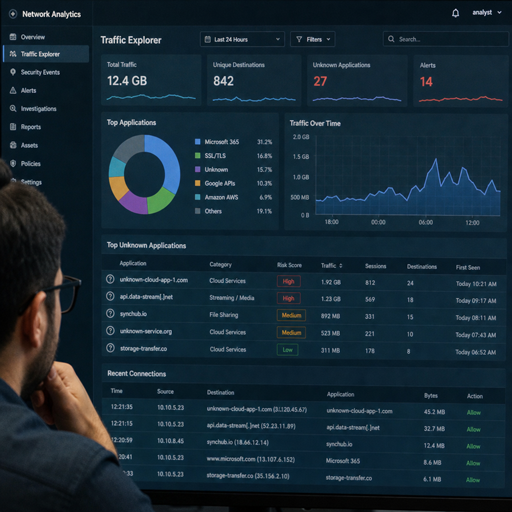
Shadow IT is any technology, application, cloud service, device, integration, or data workflow used for business purposes without formal approval or visibility from IT and security teams. Identifying it requires more than scanning a network once; it takes a practical mix of network visibility tools, cloud security tools, asset inventory, identity review, employee engagement, and clear governance. This guide explains how shadow IT appears on corporate networks, why it matters for it risk management, and how organizations can build a repeatable shadow it detection process without slowing down legitimate work.
What does shadow IT look like on a corporate network?
Shadow IT usually looks like normal business activity until you connect the dots: unknown SaaS logins, unsanctioned file-sharing tools, personal devices on Wi-Fi, browser extensions, unmanaged scripts, trial software, or cloud storage accounts moving company data outside approved systems. It is not always malicious. In many cases, employees are trying to solve a real workflow problem faster than the official process allows.
The challenge is that “unapproved” does not always mean “dangerous,” and “approved” does not always mean “safe.” A free design tool used by a marketing team may store customer data. A personal automation account may connect to a sales platform. A department may use a project management app that creates its own user directory, file repository, and notification workflows outside central controls.
Common forms of shadow IT include:
- Unauthorized SaaS applications used for file sharing, messaging, analytics, collaboration, design, development, or customer communication.
- Personal cloud storage accounts where employees upload work documents to access them more easily.
- Unmanaged devices such as personal laptops, phones, tablets, printers, cameras, and IoT equipment connected to corporate networks.
- Department-owned software subscriptions purchased with expense cards instead of IT procurement.
- Unapproved integrations and APIs that move data between sanctioned and unsanctioned platforms.
- Browser extensions and plugins that access documents, emails, web sessions, or customer records.
- Local tools and scripts used by technical teams to automate tasks without security review.
A good identification program separates visibility from punishment. If employees believe discovery will only lead to blame, they will hide workarounds. If they believe the process will help them get safer tools, better integrations, or faster approvals, they are more likely to cooperate.
Why shadow IT risks matter for IT risk management
Shadow it risks matter because organizations cannot protect assets, accounts, data, and workflows they cannot see. Unknown tools may bypass identity controls, data security measures, retention rules, vendor reviews, audit requirements, and incident response procedures. Even when a tool is useful, its unmanaged use can create avoidable exposure.
The most obvious concern is data leakage. Employees may upload customer lists, financial information, contracts, source code, product plans, or internal reports to tools that were never assessed for access control, encryption, retention, logging, or deletion. If the tool has weak permissions or broad sharing defaults, sensitive information can spread beyond the intended audience.
Another concern is identity fragmentation. When employees create separate accounts outside single sign-on, security teams lose the ability to enforce centralized authentication policies, remove access during offboarding, monitor unusual sign-ins, or apply consistent multifactor authentication. A former employee could retain access to a cloud workspace if no one knows it exists.
Shadow IT also complicates incident response. During an investigation, teams need to know where data resides, which accounts touched it, and what systems exchanged information. Unknown applications create blind spots. Logs may be unavailable, incomplete, or controlled by someone outside IT.
There are business risks as well. Teams may become dependent on tools with no support plan, backup strategy, continuity review, or ownership model. If the employee who created the account leaves, the organization may lose administrative access, billing control, or important business records.
From an it risk management perspective, the goal is not to ban every unsanctioned tool. The goal is to understand what exists, assess the level of risk, preserve useful innovation, and bring important systems under appropriate governance.
Network visibility is the foundation of discovery
Shadow IT detection starts with visibility across the places where technology usage leaves signals. No single control sees everything. A complete approach combines network traffic, DNS activity, endpoint telemetry, identity logs, cloud access patterns, expense data, and employee-reported information.
Traditional asset inventories often miss browser-based applications because there may be no installed software to find. Modern work happens through web sessions, mobile apps, APIs, and cloud dashboards. That means organizations need visibility into both managed endpoints and network paths, including remote work connections where possible.
Effective network visibility tools can help teams answer practical questions:
- Which domains and cloud services are employees accessing?
- Which devices are connecting to the corporate network?
- Which applications generate high volumes of traffic?
- Which tools are used by only one department or location?
- Which services transfer files, customer records, code, or large datasets?
- Which destinations are new, rare, risky, or associated with unsanctioned categories?
The purpose is not to inspect every employee action unnecessarily. The purpose is to identify business technologies that may create risk and need review. Teams should define acceptable monitoring practices, align them with legal and privacy expectations, and communicate them clearly.
Important data sources for shadow IT detection
A strong detection program draws from several sources because each one reveals a different layer of activity:
- DNS and web proxy logs show the domains employees access, including SaaS applications and file-sharing services.
- Firewall and secure web gateway data show traffic patterns, destinations, and categories.
- Endpoint management platforms show installed applications, local tools, browser extensions, and device posture.
- Identity provider logs show app sign-ins, federated authentication, failed logins, and unmanaged account patterns.
- Cloud access security and cloud security tools show usage of sanctioned and unsanctioned cloud services.
- Data loss prevention signals show sensitive information moving through email, uploads, downloads, or file shares.
- Procurement and expense records show department-level software purchases that may not appear in IT systems.
- Help desk tickets and employee surveys reveal tools people rely on but may not have formally requested.
When these sources are correlated, shadow IT becomes easier to distinguish from harmless browsing. For example, one visit to a software homepage may not matter. Repeated logins, file uploads, OAuth permissions, and recurring payments suggest a business process worth reviewing.
How do you identify shadow IT without disrupting work?
You identify shadow IT effectively by treating discovery as a risk-based improvement process, not a hunt for rule breakers. Start with visibility, classify what you find, prioritize the riskiest uses, and give teams a path to safe approval or replacement. The process should reduce uncertainty while allowing employees to keep solving business problems.
A practical discovery workflow can look like this:
- Define what counts as shadow IT. Include unsanctioned SaaS, devices, integrations, extensions, scripts, cloud environments, and data repositories.
- Build a baseline inventory. Combine known assets, approved applications, user directories, cloud subscriptions, device records, and vendor lists.
- Collect usage signals. Review DNS, proxy, endpoint, identity, and cloud logs to find applications and services outside the baseline.
- Group findings by business context. Identify which team uses each tool, what problem it solves, what data it handles, and whether it connects to approved systems.
- Score risk. Consider data sensitivity, user count, access model, vendor maturity, authentication, sharing controls, integrations, and compliance relevance.
- Decide the treatment. Approve, restrict, replace, monitor, migrate, or retire the tool depending on its value and risk.
- Document ownership. Assign an application owner, data owner, administrator, renewal contact, and security reviewer where needed.
- Repeat continuously. Shadow IT changes as teams adopt new tools, projects, and workflows.
This approach works because it avoids a binary “allowed or blocked” mindset. Some tools will be unacceptable, especially if they expose sensitive data or bypass required controls. Others may be safe enough after configuration changes, single sign-on integration, contract review, or user training.
Signals that indicate unmanaged technology use
Not every unknown service is a major issue, so detection teams need practical indicators. Patterns are more useful than isolated events. The stronger the combination of signals, the more likely a tool is being used for real business activity.
Look for these indicators:
- Frequent logins to unapproved SaaS domains across a team, department, or office.
- Large uploads or downloads involving unknown file-sharing, storage, analytics, or AI-enabled tools.
- OAuth consent grants that allow third-party apps to access email, calendars, documents, repositories, or CRM data.
- Recurring card payments for software that does not appear in the approved vendor inventory.
- Browser extensions requesting broad permissions such as reading page content, modifying data, or accessing clipboard information.
- Devices with unknown ownership connecting to internal Wi-Fi, VPN, or wired networks.
- Use of personal email addresses to register for business tools.
- API tokens or webhooks connecting approved systems to unknown destinations.
- Repeated bypass requests where employees ask to unblock the same domains or services.
These signals should be reviewed in context. A development team may legitimately access testing platforms. A sales team may trial a prospecting tool before requesting approval. A finance team using an unknown file-sharing service for sensitive spreadsheets requires faster attention.
Classifying discovered tools by risk and business value
Discovery is only useful if findings are organized into decisions. Without classification, security teams may end up with a long list of domains and no clear next step. A simple risk-and-value model helps prioritize effort.
Low-risk, low-value tools
These may include occasional visits to software marketing pages, tools with no account creation, or services with no evidence of company data. They usually require monitoring rather than immediate action. If usage increases, the classification can change.
Low-risk, high-value tools
These tools solve a real business need and do not handle sensitive data or critical workflows. They may be candidates for approval after basic review. Bringing them into the official catalog can improve productivity and reduce future workaround behavior.
High-risk, low-value tools
These are often the easiest to restrict. Examples may include unknown services with broad permissions, weak account controls, unclear ownership, or unnecessary access to sensitive information. Security teams should communicate why the tool is risky and offer safer alternatives where possible.
High-risk, high-value tools
These require careful handling. A tool may be deeply embedded in a department’s process while still creating serious exposure. In this case, shadow it solutions may include formal vendor assessment, data migration, single sign-on, role-based permissions, logging, contractual review, or replacement with an approved platform.
A classification model keeps conversations grounded. Instead of saying “this tool is forbidden,” teams can say, “this tool handles sensitive data, has unmanaged accounts, and lacks central access control, so we need to remediate these issues before continued use.”
Data security measures for reducing exposure
Once shadow IT is found, the next step is to reduce the chance of data loss, unauthorized access, and uncontrolled retention. The right data security measures depend on what the tool does and what information it touches.
Core measures include:
- Data classification: Define which data types are public, internal, confidential, regulated, or business-critical.
- Access control: Require least-privilege permissions, named accounts, strong authentication, and timely removal of access.
- Single sign-on where appropriate: Centralize authentication for tools that will remain in use.
- Multifactor authentication: Reduce account takeover risk, especially for applications handling sensitive information.
- Sharing restrictions: Limit public links, external sharing, anonymous access, and bulk downloads.
- Logging and monitoring: Ensure meaningful activity logs are available for security review and incident response.
- Retention and deletion rules: Confirm data can be archived, exported, deleted, or transferred when needed.
- Integration review: Check whether APIs, plugins, and automation flows expose more data than necessary.
These controls are not just technical requirements. They are practical safeguards that make tools manageable over time. If a tool cannot support the controls needed for the data it handles, the organization should consider replacing it or limiting its use.
Governance turns detection into prevention
Shadow IT often grows when official processes are slow, unclear, or disconnected from how teams work. Governance should make the safer path easier than the workaround. That means creating a process people can actually use.
A useful governance model includes:
- A clear approved application catalog so employees know what tools are already available.
- A simple request path for new software, integrations, and trials.
- Risk-based review tiers so low-risk tools do not wait behind complex enterprise assessments.
- Defined ownership for every approved business application.
- Renewal and offboarding checks to prevent forgotten subscriptions and orphaned accounts.
- Acceptable use guidance that explains what data can and cannot be placed in certain tools.
- Feedback loops from employees, department leaders, procurement, legal, privacy, IT, and security.
Good governance does not mean every decision must be centralized. Some organizations allow departments to choose tools within defined guardrails. Others require formal approval for anything that stores company data. The best model depends on risk appetite, regulatory obligations, company size, and operational maturity.
A practical checklist for ongoing shadow IT detection
Use this checklist to keep discovery repeatable rather than reactive:
- Maintain an inventory of approved applications, owners, administrators, and data types.
- Review DNS, proxy, and secure web gateway reports for new or high-volume SaaS usage.
- Compare identity provider app usage against the approved application list.
- Monitor OAuth grants, API tokens, webhooks, and third-party integrations.
- Review endpoint software and browser extensions on managed devices.
- Match expense records against the technology vendor inventory.
- Investigate repeated access requests to blocked or uncategorized services.
- Ask department leaders which tools their teams rely on outside formal systems.
- Prioritize findings based on sensitive data, user count, permissions, and business dependency.
- Document decisions: approved, restricted, replaced, monitored, or retired.
- Revisit high-risk tools after remediation to confirm controls are working.
The checklist is most effective when used on a schedule. Monthly or quarterly reviews can catch emerging tools before they become deeply embedded. High-risk environments may need more frequent monitoring, especially where sensitive data, regulated workflows, or external collaboration are common.
Building a balanced shadow IT program
An effective program combines technology, process, and trust. Network visibility tools and cloud security tools provide the signals, but people provide context. Procurement may know who bought a subscription. Department managers may know why it matters. Employees may know which approved tools are failing to meet real needs.
The most mature shadow it solutions usually include both enforcement and enablement. Enforcement is necessary when tools create unacceptable exposure. Enablement is equally important because it channels demand into safer options: approved alternatives, faster reviews, secure configurations, and documented ownership.
A balanced program should answer four questions for every discovered tool:
- What is it? Identify the application, service, device, extension, integration, or workflow.
- Who uses it? Determine the users, team, owner, and administrator.
- What data does it touch? Understand sensitivity, volume, sharing, storage, and retention.
- What should happen next? Approve, configure, migrate, replace, block, or monitor.
Over time, this approach improves both security and productivity. Employees get clearer choices. IT gains a more accurate view of the environment. Security teams can focus on the highest-risk activity instead of treating every unknown tool the same way.
Turning hidden technology into managed capability
Shadow IT is a visibility problem, a governance problem, and often a signal that employees need better tools or faster support. The best response is not simply to block everything unfamiliar, but to discover what exists, understand why it exists, and bring valuable technology into a managed framework.
For corporate networks, that means investing in shadow it detection across network, cloud, endpoint, identity, procurement, and user feedback channels. It also means applying practical data security measures and risk-based decisions so the organization can protect sensitive information without shutting down useful innovation. When handled well, identifying shadow IT becomes more than a security exercise; it becomes a way to improve technology management across the business.
