
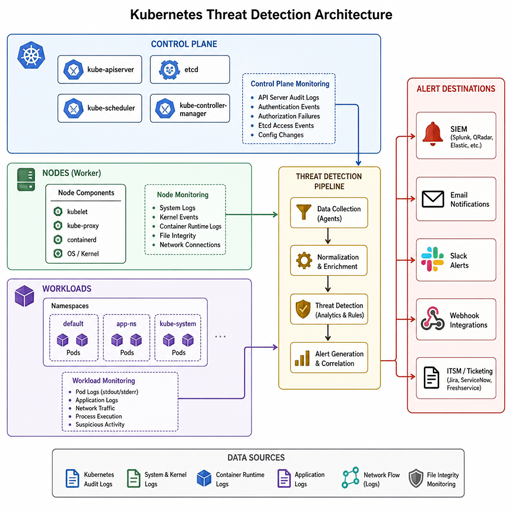
Kubernetes threat detection tools help teams spot suspicious activity across clusters, workloads, nodes, APIs, identities, and container runtime behavior. The right setup rarely depends on one product alone: strong Kubernetes security monitoring usually combines audit logs, runtime signals, vulnerability context, policy enforcement, and alert routing into the systems your engineers already use.
This guide explains what to look for, how common tool categories differ, and how to build a practical detection stack without drowning your team in noise.
What should Kubernetes threat detection tools actually detect?
Kubernetes threat detection tools should detect suspicious behavior at the control plane, workload, node, network, identity, and runtime layers, then provide enough context for a human or automated workflow to respond. In practice, that means looking beyond “is a pod running?” and asking whether a workload is doing something unexpected, risky, or clearly malicious.
A useful tool should help identify activity such as unusual API calls, privilege escalation attempts, suspicious shell access, sensitive file changes, unexpected process execution, abnormal network connections, cryptocurrency mining behavior, exposed secrets, and risky workload configurations. Kubernetes audit logging is especially important because it provides a chronological record of security-relevant actions in the cluster.
Good threat detection tools also preserve context. A raw event like curl running in a container is less useful than an alert that ties the process to a namespace, pod, service account, image, node, recent deployment, and related API activity. That context helps teams decide whether the event is a real incident, expected maintenance, or a noisy rule that needs tuning.
Kubernetes threat detection is a layered discipline
Kubernetes is dynamic by design. Pods appear and disappear quickly, workloads scale automatically, and developers may ship multiple times per day. Traditional host monitoring can still help, but it often misses Kubernetes-specific context unless it understands pods, namespaces, service accounts, container images, admission controls, and API server activity.
A layered approach gives better coverage because attackers do not stay in one layer. An incident might begin with a vulnerable container image, move through a web shell, attempt credential theft, query the Kubernetes API, and then pivot toward cloud resources. One signal may look weak by itself, but several signals together can reveal a serious compromise.
For most teams, Kubernetes security tools fall into five broad groups:
- Runtime detection tools that monitor process, file, network, and system activity inside workloads and on nodes.
- Audit log and control-plane monitoring tools that detect suspicious Kubernetes API activity.
- Vulnerability and configuration scanners that reveal risky images, manifests, RBAC, and cluster settings.
- Network observability and policy tools that show service-to-service communication and enforce segmentation.
- Cloud-native security tools that connect Kubernetes findings with cloud identity, storage, secrets, and managed service activity.
The best stack is not necessarily the largest. It is the one your team can operate consistently, tune over time, and connect to response workflows.
The core capabilities that matter most
Before comparing the top Kubernetes threat detection tools, define what “good” means for your environment. A small platform team running a few internal services has different needs than a regulated enterprise running dozens of production clusters across multiple clouds.
Runtime visibility
Runtime visibility answers the question: what is actually happening inside the workload right now? This is where tools watch for process execution, file access, system calls, network connections, and container escape patterns. Runtime visibility is valuable because many attacks only become obvious after a workload starts behaving differently from its intended purpose.
For example, a container that normally runs a web server may suddenly spawn a shell, download a binary, scan internal services, or touch sensitive host paths. These actions may not appear in image scans or static configuration checks. Runtime monitoring gives defenders a way to catch behavior that appears after deployment.
Kubernetes-aware context
A detection tool must understand Kubernetes objects, not just hosts. If an alert only says that a process ran on a Linux node, the responder still has to map that process back to a pod, namespace, controller, image, service account, and owning team. That extra work slows triage and increases the chance that alerts will be ignored.
Kubernetes-aware context should include workload metadata, labels, namespace, container image, node, cluster, runtime identity, and policy history where possible. This is what turns raw telemetry into actionable Kubernetes security monitoring.
Control-plane monitoring
The Kubernetes API server is the front door to cluster state. Changes to RBAC, secrets, deployments, admission settings, or privileged workloads can be highly significant. Kubernetes audit logs help document the sequence of actions in a cluster, and the official Kubernetes documentation frames auditing as a security-relevant chronological record.
Control-plane detection is especially useful for finding suspicious service account activity, unexpected secret reads, attempts to create privileged pods, and changes to roles or bindings. These events often indicate misuse of credentials or an attacker trying to expand access.
Policy and enforcement options
Detection tells you something happened. Enforcement can stop or limit what happens next. Some tools only alert, while others can block actions, kill processes, restrict file access, or enforce workload behavior through Linux security mechanisms.
Enforcement is powerful, but it requires caution. A noisy rule in alert-only mode creates work; a noisy rule in blocking mode can break production. Most teams should begin with observation and alerting, then move selected, well-understood behaviors into enforcement once they have enough confidence.
Integration with existing workflows
Threat detection tools are only useful if alerts reach the right people with the right context. Look for integrations with SIEM platforms, ticketing systems, chat tools, Prometheus, Grafana, OpenTelemetry pipelines, cloud security consoles, or incident response platforms. If a tool traps findings in a dashboard nobody checks, it will not improve security.
A practical integration should answer three questions:
- Who owns this workload? Use namespaces, labels, GitOps metadata, or service catalogs.
- How severe is the behavior? Separate suspicious activity from confirmed malicious indicators.
- What happens next? Provide a runbook, response action, or escalation path.
Top Kubernetes threat detection tools and where they fit
No single list can be perfect for every team, but several open-source and managed options appear frequently in cloud-native security programs. The following tools represent different strengths rather than a universal ranking. Treat them as building blocks for a detection strategy.
Falco
Falco is one of the most widely recognized open-source runtime threat detection tools for containers and Kubernetes. The project describes Falco as a cloud-native security tool that provides near real-time threat detection for cloud, container, and Kubernetes workloads by using runtime insights and customizable rules.
Falco is useful when you want a flexible runtime detection engine with Kubernetes metadata enrichment. It can monitor events from sources such as the Linux kernel and evaluate them against rules that describe suspicious behavior. Teams often use it to detect unexpected shells, sensitive file access, privilege escalation indicators, or abnormal process activity.
Falco works best when teams invest time in rule tuning. Default rules can provide a starting point, but production workloads have their own patterns. The goal is to reduce noise while preserving meaningful alerts that security and platform teams will trust.
Best fit: teams that want open-source runtime detection, customizable rules, and Kubernetes-aware alerts.
Tetragon
Tetragon is an eBPF-based security observability and runtime enforcement tool associated with the Cilium ecosystem. Its documentation describes real-time eBPF-based security observability and enforcement, with the ability to join kernel state with Kubernetes awareness or user policy.
Tetragon is compelling for teams that already use, or are evaluating, Cilium and eBPF-based observability. It can provide deep visibility into process execution, network behavior, and kernel-level events while maintaining Kubernetes context. This makes it useful for both detection and investigation.
Its enforcement capabilities can be valuable, but they should be introduced carefully. Start by observing high-signal behaviors, validate rules against normal workloads, and then consider enforcement for tightly defined actions that should never happen in production.
Best fit: teams interested in eBPF-based runtime visibility, Cilium-aligned security, and selective runtime enforcement.
KubeArmor
KubeArmor focuses on runtime security enforcement through Linux security mechanisms such as AppArmor, SELinux, and BPF-LSM. Its documentation describes a Runtime Enforcer that translates high-level security policies into controls the underlying operating system can enforce, allowing actions to be allowed, audited, or blocked.
This makes KubeArmor useful when the goal is not only to detect suspicious behavior, but also to restrict what workloads can do at runtime. For example, teams can define policies around file access, process execution, and network behavior for pods, containers, or nodes.
KubeArmor is strongest when paired with a thoughtful policy development process. If you understand what a workload should and should not do, enforcement becomes more realistic. If you do not yet understand workload behavior, begin with audit mode and use the results to shape policies.
Best fit: teams that want runtime hardening and policy-based enforcement in addition to detection.
Tracee
Tracee is an open-source runtime security and observability tool from Aqua Security. The documentation describes it as using eBPF to tap into system activity and expose events that help teams understand how systems and applications behave.
Tracee can be useful for teams that want deep Linux runtime telemetry, event collection, and detection logic in a cloud-native environment. Because it is eBPF-based, it can observe low-level activity that is difficult to capture through application logs alone.
As with other runtime tools, the operational challenge is turning rich telemetry into useful alerts. Tracee is most valuable when teams map detections to real incident scenarios, send events into existing analysis workflows, and tune rules around production behavior.
Best fit: teams that want eBPF-powered runtime observability and detection with strong low-level event visibility.
Kubescape
Kubescape has expanded beyond posture scanning into runtime threat detection and vulnerability context. Its runtime threat detection documentation says the feature provides visibility into runtime environments and detects threats in real time within Kubernetes pods and the API server, using eBPF-based event monitoring and a rule engine.
Kubescape can be attractive when teams want one tool to connect multiple Kubernetes security concerns: posture, vulnerability scanning, runtime activity, and compliance-style controls. Its documentation also notes that Kubescape can examine Kubernetes object configuration, API server settings, worker nodes, and container image results.
This combination helps teams avoid treating every issue as equal. A vulnerability in a dormant package is different from a vulnerable component that is relevant to a running workload. Security teams benefit when posture and runtime context come together.
Best fit: teams that want Kubernetes security posture management plus runtime detection and vulnerability visibility.
Trivy Operator
Trivy is best known for scanning containers and infrastructure-as-code, but Trivy Operator brings continuous Kubernetes scanning into the cluster. The documentation says the operator watches Kubernetes for state changes, automatically triggers scans, and generates security reports as Kubernetes custom resources.
Trivy Operator is not a runtime behavior detector in the same sense as Falco or Tetragon. Instead, it strengthens detection readiness by continuously surfacing vulnerabilities, misconfigurations, exposed secrets, and risky workload definitions. Its Kubernetes scanning documentation distinguishes between cluster infrastructure, cluster configuration, and application workloads.
This matters because many incidents exploit known weaknesses before runtime alerts ever fire. If you reduce vulnerable images, dangerous RBAC, exposed secrets, and weak manifests, you reduce the attack paths that runtime tools must catch later.
Best fit: teams that want continuous in-cluster vulnerability and configuration visibility.
Amazon GuardDuty for EKS
For AWS users, Amazon GuardDuty provides managed threat detection for EKS through Kubernetes audit log monitoring and runtime monitoring options. AWS documentation says GuardDuty Runtime Monitoring can cover Amazon EKS, ECS on Fargate, and EC2 resources, and observes operating system-level, networking, and file events to help detect potential threats.
GuardDuty EKS Runtime Monitoring uses a security agent to add visibility into EKS workloads, including file access, process execution, and network connections. AWS also notes that it can help identify potentially compromised containers and detect attempts to escalate privileges from a container to the underlying host or broader AWS environment.
The biggest advantage is cloud context. If your clusters run on AWS, GuardDuty can connect Kubernetes activity with AWS account signals, API behavior, and cloud threat intelligence. The tradeoff is that it is most relevant to AWS environments and should be evaluated against your specific EKS architecture.
Best fit: AWS-centric teams running EKS that want managed cloud-native security tools with runtime and audit-log context.
Microsoft Defender for Containers
Microsoft Defender for Containers is a managed option for teams using Azure, hybrid clusters, or multi-cloud Kubernetes environments. Microsoft describes it as a cloud-native solution that enhances, monitors, and maintains the security of containerized assets, including runtime protection for Kubernetes nodes and clusters.
Its value is strongest when organizations already use Microsoft Defender for Cloud and want Kubernetes findings integrated with broader cloud security management. This can help central teams view container risks alongside cloud posture, identity, and workload protection signals.
As with any managed platform, evaluate cluster coverage, supported environments, alert quality, and integration with your response process. Managed tools are not automatically low-effort; they still require ownership, tuning, and operational routines.
Best fit: Microsoft-leaning organizations that want Kubernetes security monitoring connected to Defender for Cloud.
Google Security Command Center and Container Threat Detection
For GKE users, Google Cloud Security Command Center includes Kubernetes-focused threat findings. Google documentation states that Security Command Center performs runtime and log-based monitoring of Google Kubernetes Engine resources, with Container Threat Detection providing runtime detections.
This is most useful for teams standardized on GKE that want threat detection integrated into Google Cloud’s security operations model. Like GuardDuty on AWS or Defender in Microsoft environments, the benefit comes from connecting Kubernetes activity with cloud-native identity, logging, and resource context.
If you run GKE alongside other platforms, consider how findings will be normalized across clusters. A multi-cloud team may still need a central SIEM, CNAPP, or open telemetry pipeline to avoid separate alert silos.
Best fit: GKE-focused teams that want managed Kubernetes threat detection inside Google Cloud security workflows.
How do you choose the right tool stack?
Choose Kubernetes threat detection tools by matching capabilities to your risk model, operating model, and cluster architecture. A good stack should cover the most likely attack paths, produce alerts your team can act on, and integrate into the systems you already use for incident response.
Start with the basics. If you do not collect Kubernetes audit logs, workload logs, vulnerability data, and runtime signals, your detection coverage will have blind spots. If you collect all of them but nobody owns triage, you will create noise rather than security.
Use this checklist to narrow your options:
- Cluster environment: Are you running EKS, AKS, GKE, self-managed Kubernetes, or a mix?
- Runtime needs: Do you need alert-only detection, blocking, or both?
- Telemetry depth: Do you need kernel-level eBPF events, Kubernetes API logs, network flow visibility, or vulnerability context?
- Team maturity: Can your team tune rules, write policies, and operate agents across nodes?
- Integration path: Will findings flow into your SIEM, alert manager, ticketing system, or cloud security console?
- Performance tolerance: What overhead is acceptable for production workloads?
- Compliance requirements: Do you need evidence, retention, reports, or mapped controls?
- Ownership model: Will platform, security, DevOps, or application teams respond to alerts?
For many organizations, a balanced setup might include a posture scanner, a runtime detection tool, audit-log monitoring, and cloud-provider threat detection. That combination gives visibility before deployment, during runtime, and across the cloud account.
Open-source and managed tools solve different problems
Open-source Kubernetes security tools often provide flexibility, transparency, and direct control. They can be excellent for engineering-led teams that are comfortable running agents, tuning rules, managing Helm deployments, and integrating alerts into their own pipelines.
Managed cloud-native security tools usually reduce setup burden and add cloud-provider context. They are especially useful when the provider can correlate Kubernetes behavior with identity, network, storage, and account-level events. The tradeoff is that detection logic, pricing, data handling, and platform coverage may be less portable across clouds.
A practical comparison looks like this:
|
Tool type |
Strengths |
Watch-outs |
|---|---|---|
|
Open-source runtime tools |
Flexible rules, deep visibility, strong community ecosystems |
Require tuning, maintenance, and alert routing |
|
Enforcement tools |
Can block risky behavior, not just alert on it |
Need careful rollout to avoid disrupting workloads |
|
Posture and vulnerability scanners |
Find issues before exploitation, support remediation planning |
Do not replace runtime detection |
|
Cloud-provider tools |
Managed operations, strong cloud context, native integrations |
May be provider-specific or limited outside that ecosystem |
|
CNAPP platforms |
Broad coverage across code, cloud, containers, and runtime |
Can become complex without clear ownership |
The right choice is often hybrid. For example, an EKS team might use GuardDuty for managed AWS threat detection, Trivy Operator for vulnerability and configuration reports, and Falco or Tetragon for workload-level runtime detail.
Alert quality matters more than alert quantity
Many Kubernetes monitoring solutions can generate a large number of findings. That does not mean they improve security. The best threat detection tools help teams prioritize what matters and suppress what does not.
High-quality alerts usually include:
- Clear behavior: What happened, in plain language.
- Kubernetes context: Namespace, pod, container, image, node, service account, and labels.
- Severity rationale: Why the event matters.
- Related events: Nearby API calls, network activity, process ancestry, or file changes.
- Recommended action: A triage step, containment option, or runbook.
- Owner signal: The team or service responsible for the workload.
Noise reduction should be an explicit part of your rollout plan. Run tools in observe mode, baseline normal behavior, tune rules for production workloads, and document why certain alerts are suppressed. If an alert cannot lead to a decision, it probably needs better context, different routing, or removal.
A practical rollout plan for Kubernetes security monitoring
Rolling out Kubernetes threat detection tools is easier when you treat it as an operational program rather than a one-time installation. The technology matters, but process determines whether detections become useful.
1. Map the environment
Start by documenting clusters, namespaces, critical workloads, ingress paths, cloud accounts, registries, CI/CD systems, and privileged service accounts. This map helps you decide where to deploy sensors first and which workloads deserve stricter monitoring.
You do not need a perfect inventory to begin. Focus on production clusters, internet-facing services, privileged workloads, and namespaces that process sensitive data. These areas usually produce the highest security value.
2. Establish baseline telemetry
Enable Kubernetes audit logs where appropriate, collect workload and node logs, and make sure alerts can be routed to a central place. Add vulnerability and configuration scanning so you understand the risk profile before runtime events occur.
At this stage, avoid turning every finding into a page. Use dashboards, reports, and low-severity queues to understand patterns. Reserve urgent alerting for behaviors that are clearly dangerous or highly suspicious.
3. Deploy runtime detection in observe mode
Install your chosen runtime detector on a limited set of clusters or namespaces first. Watch for common behaviors such as shell execution, package manager use, sensitive file access, suspicious outbound connections, and privilege escalation attempts.
Observe mode lets you learn what normal looks like. Some workloads legitimately run shells, write to unusual paths, or make dynamic network calls. Others should never do those things. This difference is what makes Kubernetes-aware policy valuable.
4. Tune rules with application owners
Security teams often lack the full context of how an application behaves. Application owners can explain whether an event is expected, temporary, or a design smell that should be fixed. Bring them into tuning early.
Use labels, namespaces, or workload profiles to apply different rule sets. A batch processing job, CI runner, database, and public API should not all be judged by the same runtime expectations.
5. Define response actions
For each high-confidence alert, define what happens next. Response may include capturing pod details, isolating a namespace, revoking credentials, scaling a deployment to zero, blocking egress, collecting forensic data, or opening an incident.
The goal is not to automate everything immediately. The goal is to make the first response predictable. Once the team trusts a detection, selected containment steps can become automated.
6. Expand coverage gradually
After the first clusters are stable, expand to more namespaces, environments, and regions. Keep measuring noise, false positives, response time, and rule effectiveness. Kubernetes changes quickly, so detection content should evolve with your workloads.
Common mistakes to avoid
The most common mistake is assuming that installing a tool equals having a detection program. Kubernetes threat detection tools need ownership, tuning, and response workflows to create value.
Another mistake is relying only on vulnerability scanning. Image and manifest scanning are essential, but they cannot tell you everything a workload does after it starts. Runtime monitoring fills that gap.
Teams also run into trouble when they enable enforcement too early. Blocking rules should be reserved for behavior that is well understood and clearly unacceptable. A staged approach reduces the risk of outages and builds trust with application teams.
Finally, avoid tool sprawl. More dashboards do not necessarily mean better coverage. If two tools produce similar findings, decide which system is authoritative, where alerts should land, and who owns remediation.
The future of Kubernetes threat detection
Kubernetes threat detection is moving toward richer context, eBPF-based telemetry, runtime-aware vulnerability prioritization, and cloud-to-cluster correlation. Tools are becoming better at connecting what happens in a container with what happens in the Kubernetes API and the surrounding cloud account.
This direction makes sense. Security teams do not need more isolated signals; they need clearer stories. A useful alert should show that a workload changed, a suspicious process ran, a service account touched secrets, and the same identity attempted cloud API calls. That kind of correlation helps responders act faster and with more confidence.
At the same time, detection programs will need stronger governance. As tools gain enforcement capabilities, organizations must decide who can write policies, who approves blocking rules, how exceptions are handled, and how changes are tested before production rollout.
Key takeaways
Kubernetes threat detection works best as a layered program. Runtime monitoring, audit logs, vulnerability scanning, network visibility, and cloud-native context each cover different parts of the attack surface.
If you are starting from scratch, do not try to solve everything at once. Begin with visibility, route findings into a workflow your team already uses, tune alerts around real workload behavior, and only then consider enforcement for high-confidence cases.
The best Kubernetes threat detection tools are the ones your team can operate consistently. Whether you choose open-source tools like Falco, Tetragon, KubeArmor, Tracee, Kubescape, and Trivy Operator, managed services from your cloud provider, or a broader CNAPP platform, the goal is the same: detect meaningful threats quickly, understand their context, and respond before a cluster-level issue becomes a business-level incident.
