
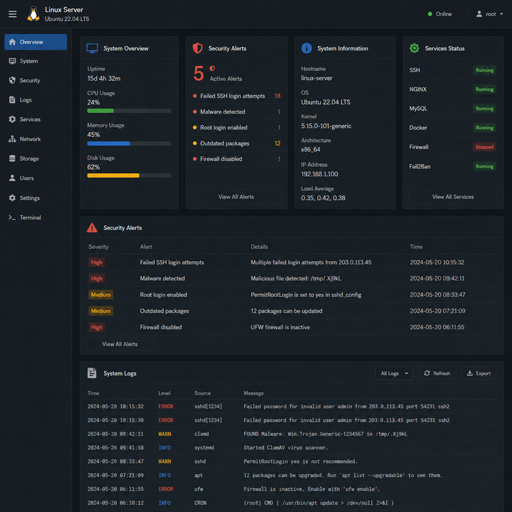
Linux security sensors help you see what is happening across your systems before small issues become serious incidents. A practical linux security sensors configuration brings together logging, file integrity monitoring, intrusion detection, vulnerability scanning, and alerting so administrators can detect suspicious activity, investigate faster, and reduce risk. The goal is not to install every tool available, but to place the right sensors in the right locations and tune them to your environment.
What are Linux security sensors?
Linux security sensors are monitoring components that collect signals from endpoints, networks, applications, and system logs to identify risky or abnormal behavior. They may watch authentication attempts, file changes, process activity, network connections, package updates, or known vulnerabilities. In a strong linux threat detection strategy, these sensors act like early-warning devices: they do not replace secure configuration, patching, or access control, but they make those controls visible and measurable.
Security sensors can be lightweight agents running on each server, network-based monitors observing traffic, or scheduled tools that check systems for weaknesses. Many teams use open source security tools because they are flexible, transparent, and widely supported by Linux administrators. The most effective setup usually combines several types of sensors rather than relying on a single dashboard or scanner.
Core sensor types for Linux environments
A balanced linux security sensors configuration usually includes sensors from several categories. Each one answers a different question: what changed, who logged in, what traffic appeared, and which weaknesses need attention.
Log monitoring sensors
Logs are often the first place an attack leaves evidence. System logs can reveal failed SSH attempts, privilege escalation, service crashes, sudo usage, kernel messages, and suspicious cron activity. Centralizing these logs makes investigations easier because an attacker who compromises one server may also try to delete or alter local evidence.
Common log sources include authentication logs, systemd journal entries, web server access logs, application logs, firewall logs, and audit events. A useful configuration filters routine noise while preserving enough detail for investigation. If alerts are too broad, administrators ignore them; if they are too narrow, important signals are missed.
File integrity monitoring
File integrity monitoring tracks changes to important files and directories. This is especially useful for detecting unauthorized edits to configuration files, web application files, binaries, startup scripts, SSH keys, and system libraries. A sensor records a known-good baseline, then alerts when files are created, modified, deleted, or given unexpected permissions.
For production systems, file integrity rules should focus on high-value paths rather than every temporary directory. Watching too much creates unnecessary noise. Watching too little can allow persistence mechanisms or configuration tampering to go unnoticed.
Intrusion detection sensors
Linux intrusion detection can happen at the host level, the network level, or both. Host-based intrusion detection looks at activity on a specific machine, such as process behavior, root-level changes, authentication patterns, and suspicious commands. Network intrusion detection reviews traffic for known attack patterns, unusual protocols, scans, and command-and-control indicators.
The best placement depends on your architecture. Public-facing web servers, administrative jump hosts, database servers, and systems handling sensitive data usually deserve closer monitoring. Internal sensors are also valuable because many attacks move laterally after the first compromise.
Vulnerability assessment sensors
A linux vulnerability assessment identifies missing patches, insecure services, weak configurations, outdated packages, exposed ports, and known software flaws. Unlike real-time detection, vulnerability assessment is usually periodic. It helps teams prioritize remediation before attackers exploit weaknesses.
These tools should be scheduled carefully. Authenticated scans provide better insight than unauthenticated scans, but they also require secure credential handling. For critical systems, test scanning policies first to avoid performance issues or service interruptions.
How should you plan a Linux security sensors configuration?
Start by deciding what you need to protect, what activity matters most, and how alerts will be handled. A good configuration is driven by risk, not by the number of installed tools. Map your servers by role, identify sensitive assets, define normal behavior, then choose linux security tools that provide useful visibility without overwhelming the team.
A practical planning process looks like this:
- Inventory your systems. List servers, distributions, exposed services, applications, users, and network zones.
- Rank assets by risk. Prioritize internet-facing hosts, privileged access systems, databases, identity services, and production workloads.
- Define required signals. Decide which logs, file paths, processes, ports, and user actions should be monitored.
- Choose sensor categories. Combine logging, file integrity, intrusion detection, vulnerability assessment, and endpoint activity monitoring.
- Set alert ownership. Every alert type should have someone responsible for review, escalation, and closure.
- Document baselines. Record expected services, ports, scheduled jobs, administrators, and normal maintenance windows.
This planning step prevents a common mistake: deploying tools first and asking operational questions later. Sensors only improve security when their findings lead to timely action.
Open source security tools that fit common use cases
Open source security tools are popular in Linux environments because they can be inspected, tuned, automated, and integrated into existing workflows. The right choice depends on your skill level, infrastructure size, and alerting requirements.
For log collection and analysis, teams often use tools that can gather events from Linux hosts and forward them to a central search or SIEM-style platform. For file integrity monitoring, administrators configure rules around sensitive directories and compare changes against a trusted baseline. For linux intrusion detection, host-based and network-based tools can inspect behavior, signatures, and traffic patterns. For linux vulnerability assessment, scanners help identify patch gaps and insecure services.
When evaluating linux security tools, consider:
- Signal quality: Does the tool produce actionable alerts or mostly noise?
- Integration: Can it send events to your existing logging, ticketing, or notification system?
- Performance impact: Will agents or scans affect production workloads?
- Rule tuning: Can you adjust detections for your applications and maintenance cycles?
- Community and documentation: Is the tool actively supported and understandable for your team?
- Access control: Can you limit who can change rules, view findings, or disable sensors?
The best tool is not always the most complex one. A smaller set of well-tuned sensors is usually more valuable than a crowded stack that nobody maintains.
Configuration practices that reduce noise and improve detection
Sensor configuration should start narrow, then expand as you understand normal behavior. Begin with high-value events such as root logins, sudo activity, failed authentication spikes, new listening services, changes to SSH configuration, modifications to web roots, and unexpected package installations. Once those alerts are stable, add more detailed detections.
Use meaningful severity levels. Not every event is an emergency, and treating every alert as critical leads to fatigue. Separate informational events, suspicious behavior, policy violations, and confirmed incident indicators. This helps the team decide what to review immediately and what to analyze during routine checks.
Also, preserve context. An alert that says “file changed” is less useful than one showing the filename, previous hash, new owner, timestamp, user, process, and related login events. Context shortens investigations and makes it easier to distinguish planned maintenance from compromise.
What Linux security best practices support sensor reliability?
Linux security best practices make sensors more trustworthy by reducing blind spots and preventing attackers from easily disabling monitoring. Keep systems patched, restrict administrative access, use strong authentication, minimize exposed services, protect log files, and separate monitoring permissions from everyday user accounts. Sensors work best when the underlying system is already hardened.
Important supporting practices include:
- Use least privilege. Give users and services only the permissions they need.
- Secure SSH. Disable unnecessary remote access, use keys where appropriate, and monitor failed attempts.
- Harden services. Remove unused packages, close unnecessary ports, and review default configurations.
- Protect sensor agents. Limit who can stop services, change rules, or delete collected data.
- Centralize evidence. Forward logs and alerts off-host so they survive local tampering.
- Review regularly. Tune rules after maintenance, application changes, new deployments, and false positives.
These practices do not eliminate the need for monitoring. Instead, they make monitoring more accurate and harder to bypass.
Turning sensor data into security action
Collecting data is only the beginning. To get value from linux threat detection, teams need repeatable response steps. Define what happens when a sensor detects a suspicious login, a changed system binary, a new privileged user, a vulnerable package, or unusual outbound traffic.
A simple workflow can help:
- Validate the alert by checking related logs, users, processes, and recent change records.
- Classify the event as expected activity, misconfiguration, policy violation, or potential incident.
- Contain risk by disabling accounts, blocking traffic, isolating hosts, or rolling back changes when appropriate.
- Remediate the cause through patching, configuration changes, credential rotation, or rule updates.
- Improve detection by adding context, refining thresholds, or expanding monitoring to similar systems.
This turns sensors from passive observers into part of an operational security loop.
Key takeaway
Configuring security sensors in Linux is about building useful visibility, not collecting endless alerts. A strong linux security sensors configuration combines logs, file integrity checks, linux intrusion detection, linux vulnerability assessment, and tuned alerting around the systems that matter most. Start with critical assets, use open source security tools where they fit, follow linux security best practices, and keep refining detections as your environment changes.
