
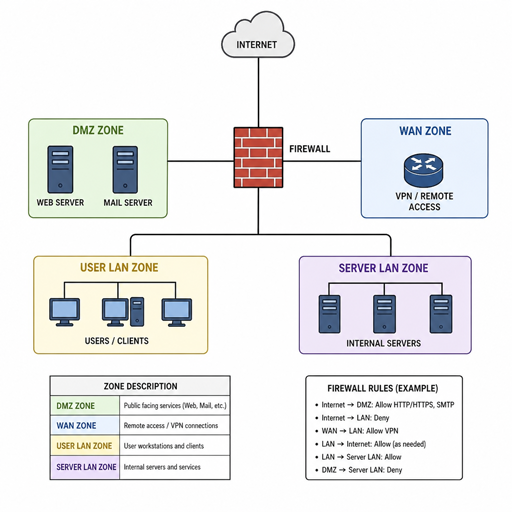
Build, review, and improve firewall setups with practical guidance for open source networking. This site helps teams, homelab builders, administrators, and security-minded developers understand how to configure firewall rules, choose firewall management tools, and apply firewall best practices without relying on vague checklists. Use it as a starting point for cleaner policies, safer defaults, and more maintainable open source security workflows.
What do you need to configure firewall rules with confidence?
You need a clear network goal, a written policy, a reliable open source firewall platform, and a repeatable way to test changes before they affect users. A strong configuration does not begin with a long list of blocked ports; it begins with knowing which systems should communicate, which services must stay reachable, and which traffic should never cross a boundary. From there, open-source firewall configurations become easier to audit, explain, and improve over time.
This homepage connects you to practical resources for common environments: small offices, cloud servers, home labs, segmented internal networks, and service-facing infrastructure. Whether you are setting up a new gateway or cleaning up years of inherited rules, the aim is the same: make access intentional, visible, and manageable.
Practical guidance for open source firewall projects
Open source firewall software gives you control, transparency, and flexibility, but it still needs disciplined planning. A poorly labeled rule set can become risky even when the tool itself is capable. The difference between a fragile configuration and a dependable one is usually process: naming conventions, documentation, change control, logging, and periodic review.
Here, you will find guidance written for real implementation work, not just terminology. Topics are organized around the decisions administrators actually face: how to separate networks, how to expose services safely, how to handle outbound traffic, and how to avoid rules that become too broad over time.
Use these sections to move from “it works” to “it is understandable, testable, and ready to maintain.”
Explore configuration topics
Start with the area that matches your current task. Each topic is designed to help you make a specific firewall decision and understand the tradeoffs behind it.
- Baseline rule design: Build a default-deny approach, allow only needed traffic, and document the reason each rule exists.
- Network segmentation: Separate trusted, guest, server, lab, and management networks so one compromised device does not automatically expose everything else.
- Inbound service exposure: Publish web, VPN, SSH, or application services with narrow source rules, clear logging, and safer administrative access.
- Outbound filtering: Control which systems can reach the internet, reduce unnecessary traffic, and identify unexpected connections.
- Logging and alerts: Decide what to log, what to ignore, and how to make security events useful instead of noisy.
- Rule cleanup: Find duplicates, stale exceptions, temporary access that became permanent, and overly broad ranges.
- Backup and recovery: Keep configuration exports, change notes, and rollback options ready before major firewall updates.
These topics apply across many open source security environments. The details may differ between platforms, but the underlying habits remain consistent: define the purpose, minimize exposure, test the rule, and record the change.
Tools and workflows that make management easier
Firewall management tools are most useful when they reduce ambiguity. A good workflow helps you see what changed, who changed it, why it changed, and whether the result matches the intended policy. That matters for a single administrator, and it becomes essential when more than one person can modify the firewall.
Open source networking environments often combine several layers: a perimeter firewall, host firewalls, VPN rules, VLANs, cloud security rules, and monitoring. Treating those layers separately can create gaps. Treating them as one policy system helps you spot conflicts, missing controls, and exceptions that no longer make sense.
A dependable workflow often includes:
- Plan the rule before adding it. Write the source, destination, protocol, port, purpose, and expected owner.
- Apply the narrowest access that works. Avoid broad networks, wide port ranges, or “any” rules unless there is a documented reason.
- Test from both sides. Confirm that required traffic works and that unrelated traffic is still blocked.
- Log the right events. Capture denied traffic and sensitive allowed traffic where it helps investigation, but avoid collecting noise that no one reviews.
- Schedule review dates. Temporary access should have an expiration point, and permanent rules should still be rechecked.
- Keep backups. Export configurations before changes, after successful updates, and before platform upgrades.
This process turns firewall administration into a repeatable practice instead of a series of emergency edits.
Firewall best practices for safer defaults
Firewall best practices are not about creating the most complex rule set possible. They are about making the secure path the easiest path to maintain. Simple, well-named rules usually beat clever configurations that only one person understands.
Use these principles as a working checklist when you configure firewall policies:
- Start with deny by default. Permit only the traffic that has a defined business, operational, or lab purpose.
- Separate administrative access. Management interfaces should not be exposed broadly, and remote administration should use strong access controls.
- Name rules clearly. A future reviewer should know what a rule does without decoding guesswork.
- Avoid permanent exceptions. If access is temporary, label it that way and set a review date.
- Prefer specific sources and destinations. A rule for one system is safer than a rule for an entire network when only one system needs access.
- Review logs after changes. Testing immediately after a change catches mistakes before they become normal background risk.
- Document dependencies. If an application needs DNS, NTP, database access, or an API endpoint, record those requirements with the rule.
- Audit regularly. Old rules often remain because no one is sure whether they are still needed.
These practices help make open source firewall setups easier to operate, hand off, and troubleshoot. They also reduce the chance that a rushed change creates hidden exposure.
Configuration paths for common environments
Different networks need different levels of control. A small office gateway, a self-hosted server, and a segmented lab do not share the same risk profile. The right configuration path depends on what you are protecting and how much administrative time you can realistically maintain.
For a home lab or learning environment, the priority is visibility and safe experimentation. You might separate guest devices from lab servers, restrict management access, and use logging to understand how services communicate. This helps you learn without turning every test system into a trusted device.
For a small business or office network, the focus is reliability and predictable access. You may need separate networks for staff, guests, printers, point-of-sale systems, cameras, or management devices. Clear firewall rules make troubleshooting easier when something stops working and reduce the chance that one device category can reach another unnecessarily.
For public-facing services, the priority is minimizing exposure. Only required ports should be reachable, administrative access should be tightly controlled, and logs should make suspicious activity visible. If a web application needs a database, the database should not automatically be reachable from every other network.
For hybrid or cloud-connected systems, consistency matters. Open source firewall rules, cloud security groups, VPN policies, and host firewall settings should support the same access model rather than contradict each other.
Build a maintainable rule set
A firewall configuration is not finished when traffic starts passing. It is finished when another qualified person can understand it, verify it, and update it without breaking the network. That is why maintainability belongs at the center of open-source firewall configurations.
A maintainable rule set usually has a visible structure. General blocks and allows are separated from service-specific rules. Management access is grouped and protected. Temporary exceptions are labeled. Logging decisions are intentional. Backups are easy to find.
Before you make your next change, ask whether the configuration will still be clear six months from now. If the answer is no, add notes, simplify the rule, or split broad access into smaller parts. A few extra minutes during setup can prevent hours of confusion later.
Start improving your firewall today
Choose one practical next step and make it visible. Review your current rules, document the purpose of every broad allow, or test whether a sensitive management interface is reachable from places it should not be. Small improvements compound quickly when they are consistent.
Use this site as a navigation hub for open source firewall planning, configuration, and review. Explore the guides, compare management approaches, and build a workflow that supports secure access without making everyday administration harder.
