
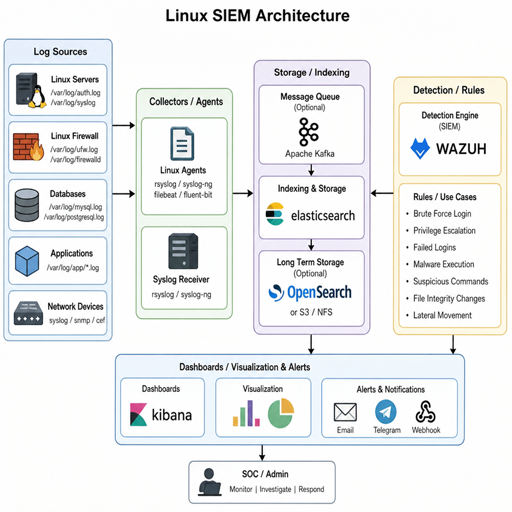
n open-source SIEM on Linux gives teams a practical way to collect logs, detect suspicious activity, investigate incidents, and improve visibility without starting with a large licensing commitment. The goal is not simply to install another dashboard; it is to build a reliable security information management workflow that turns scattered system, network, and application events into useful signals. With the right planning, free SIEM tools can support real monitoring, alerting, and response for labs, small businesses, internal IT teams, and mature security programs that want more control.
What does an open-source SIEM on Linux actually do?
An open-source SIEM on Linux centralizes security data from servers, endpoints, applications, firewalls, cloud services, and identity systems, then helps analysts search, correlate, and act on that data. In practical terms, it receives logs, normalizes them into searchable fields, applies detection rules, triggers alerts, and preserves evidence for later investigation. A strong deployment also supports open-source monitoring needs such as uptime checks, file integrity monitoring, vulnerability visibility, and compliance reporting.
SIEM stands for security information and event management, but many teams also use the phrase security information management when they are focused on log collection, retention, and reporting. The value comes from connecting events that would be hard to interpret in isolation. A failed login on one Linux host might be harmless; failed logins across several hosts, followed by a privileged command and an unexpected outbound connection, deserve attention.
On Linux, SIEM deployments are especially attractive because the operating system already offers rich telemetry. System logs, audit logs, authentication records, package manager events, process activity, cron jobs, kernel messages, and service logs can all help tell the story of what happened. When those signals are collected consistently, a Linux environment becomes much easier to defend.
Linux gives SIEM deployments a strong foundation
Linux is a natural fit for open-source security work because it is flexible, scriptable, well documented, and widely used across servers, containers, cloud workloads, and developer infrastructure. Many open-source monitoring and SIEM components are built to run well on Linux, whether they are installed directly on a virtual machine, deployed in containers, or integrated into an existing operations stack.
A SIEM for Linux can observe both the SIEM server itself and the broader infrastructure around it. This matters because Linux often hosts business-critical services: web applications, databases, API backends, CI/CD systems, file servers, identity components, and container platforms. If monitoring stops at basic availability, teams may know that a server is online while missing signs that it has been misconfigured, abused, or compromised.
Linux also gives administrators strong control over how data is collected. You can forward traditional syslog, enable auditd for detailed system auditing, deploy endpoint agents, ship application logs, or collect container logs from orchestration platforms. This flexibility lets teams start small and expand coverage over time instead of attempting a perfect deployment on day one.
Common use cases for open-source SIEM Linux deployments
Not every organization needs the same SIEM design. A home lab, a small SaaS company, a school, and a regulated enterprise may all use similar free SIEM tools but with very different priorities. The best deployment starts by defining the problems the SIEM must solve.
Useful use cases include:
- Centralized Linux log collection: Bring authentication logs, system logs, audit records, web server logs, and application events into one searchable place.
- Threat detection: Alert on brute-force attempts, suspicious privilege escalation, unexpected service changes, malware indicators, or unusual outbound connections.
- Endpoint visibility: Use agents to monitor file integrity, process activity, configuration drift, and security-relevant system changes.
- Incident investigation: Search across hosts and time ranges to reconstruct what happened before, during, and after an alert.
- Compliance support: Retain evidence of access, administrative activity, policy violations, and security controls.
- Operational insight: Combine security and linux monitoring tools to identify noisy systems, broken services, and recurring authentication problems.
The practical advantage of open-source SIEM Linux projects is that they let teams learn, adapt, and inspect how detection logic works. You can tune rules, write custom parsers, integrate with scripts, and adapt dashboards to your environment. That transparency is one reason open-source security tools remain popular with defenders who want more than a black-box alert stream.
Popular categories of free SIEM tools
The open-source SIEM ecosystem is broad, so it helps to think in categories instead of looking for a single perfect product. Some platforms are more endpoint-focused, some are log analytics platforms that can be shaped into a SIEM, and others bundle many security tools into a distribution.
Agent-based security monitoring platforms
Agent-based platforms install software on endpoints and servers to collect security-relevant events. They may monitor file integrity, system configuration, logs, rootkit indicators, vulnerabilities, and policy compliance. This approach is useful when Linux servers are spread across cloud providers, branch offices, data centers, or remote environments.
Agent-based monitoring can provide context that plain syslog forwarding may miss. For example, an agent can report changes to sensitive files, detect new local users, watch command execution events when configured, and enrich alerts with host metadata. The tradeoff is operational overhead: agents need deployment, upgrades, configuration management, and health checks.
Log analytics stacks used for SIEM workflows
Some teams build SIEM capabilities from log storage, search, and visualization components. These stacks are useful when the organization already has strong operations logging and wants to layer security use cases on top. They can ingest Linux logs, application events, firewall data, and cloud audit records, then support dashboards, queries, and alerting.
This path offers flexibility, but it requires careful design. A log platform is not automatically a SIEM. You still need parsing, field normalization, detection rules, alert triage, retention planning, access control, and response procedures. Without those pieces, the system may become a large searchable archive rather than a reliable security monitoring program.
Security-focused Linux distributions
Some free SIEM tools are packaged as broader security monitoring distributions. These may combine network intrusion detection, endpoint data, log management, dashboards, case management, and threat-hunting features. They are helpful when a team wants a more integrated starting point rather than assembling every component separately.
The benefit is faster time to value. The challenge is learning the architecture, sizing the system correctly, and understanding which bundled tools are responsible for which function. Integrated platforms can be powerful, but they still need tuning to match the environment.
Lightweight log collection and alerting tools
For smaller environments, a lightweight approach may be enough. Syslog servers, log shippers, simple alert rules, and focused dashboards can provide meaningful visibility without the overhead of a large SIEM platform. This can be a sensible first step for teams that need immediate improvement but do not yet have dedicated security staff.
Lightweight does not mean careless. Even a simple deployment should protect log integrity, use time synchronization, define retention periods, and document alert handling. A modest but reliable system is better than a complex one nobody trusts.
How should you choose a SIEM for Linux?
Choose a SIEM for Linux by matching the tool to your data sources, detection goals, operational capacity, and retention needs rather than chasing the longest feature list. The right option should collect the logs you care about, scale to your expected volume, support meaningful alerting, and remain maintainable by the people who will run it. If a platform is too complex for your team to patch, tune, and investigate, it will lose value quickly.
Start with your environment. Count the Linux servers, containers, network devices, cloud services, and applications you want to monitor. Then identify the security questions you need to answer. Are you mainly worried about compromised SSH accounts, unauthorized file changes, exposed services, insider misuse, web attacks, or compliance evidence? Different questions require different logs and rules.
Use this checklist when comparing free siem tools:
- Supported log sources: Can it ingest syslog, auditd, application logs, cloud logs, firewall logs, and endpoint agent data?
- Parsing and normalization: Does it turn raw events into searchable fields such as username, source IP, process, host, action, and outcome?
- Detection capability: Does it include useful default rules, and can you write custom detections?
- Search performance: Can analysts search recent and historical data without painful delays?
- Storage model: Can you afford the disk, memory, and compute needed for the retention period you want?
- Alert workflow: Does it support routing, severity, suppression, enrichment, and escalation?
- Access control: Can you limit who sees sensitive logs and who can change rules?
- Documentation and community: Are setup guides, troubleshooting advice, and community examples easy to find?
- Integration options: Can it work with ticketing, chat, automation scripts, threat intelligence, or backup systems?
- Maintenance burden: Can your team update, back up, and monitor the SIEM itself?
A useful decision rule is to favor clarity over novelty. The best open-source siem linux setup is the one your team can operate every week, not the one that looks most impressive during a demo.
Core architecture of an open-source SIEM on Linux
A SIEM deployment usually has five major layers: data sources, collection, transport, storage, and detection or presentation. Each layer affects reliability. If collection is inconsistent, dashboards are misleading. If storage is undersized, searches become slow. If detections are noisy, analysts ignore alerts.
Data sources
Linux data sources include /var/log files, journald, auditd, authentication logs, web server logs, database logs, sudo activity, package manager history, cron activity, DNS logs, container logs, and endpoint agent telemetry. Network devices, identity providers, cloud platforms, and security tools can add important context.
Prioritize data sources that support your highest-risk use cases. For SSH brute-force detection, authentication logs are essential. For privilege misuse, sudo logs and audit policies matter. For web compromise investigations, web server access logs, application logs, and process activity may be more useful.
Collection and forwarding
Collection can happen through agents, syslog forwarding, log shippers, APIs, or scheduled imports. Agents often provide richer endpoint visibility, while syslog is simple and widely supported. Log shippers can tail files, add metadata, and forward events to a central pipeline.
Reliability is the key concern. Collectors should handle network interruptions, avoid data duplication where possible, and report when they stop sending events. A silent collector failure can create dangerous blind spots.
Storage and indexing
Security logs grow quickly. Even modest Linux environments can generate large volumes when audit policies, web logs, and application debug logs are included. Storage planning should account for daily ingest, retention, compression, replication, and search performance.
Index only what you need to search frequently. Keep retention aligned with your investigation and compliance needs, but avoid collecting high-volume low-value logs without a purpose. Data hoarding can make an open-source monitoring stack expensive to run even when the software license is free.
Detection and alerting
Detection rules turn events into security signals. They may look for known patterns, thresholds, sequences, anomalies, or specific indicators. Good rules are specific enough to be actionable but flexible enough to catch realistic variations.
Alerting should include context. An alert that says “multiple failed logins” is less useful than one that includes host, username, source address, time window, prior successful logins, and recommended next steps. Context shortens investigation time and helps less experienced responders make better decisions.
Dashboards and reporting
Dashboards are useful when they answer operational questions. A good Linux SIEM dashboard might show authentication failures, privileged commands, new user creation, service restarts, file integrity alerts, top noisy hosts, and critical alerts by severity. Avoid building dashboards only because the charts look impressive.
Reports should support decisions. Weekly trends can reveal repeated misconfigurations, exposed services, or systems that need attention. Compliance reports should be clear enough for review without forcing the reader to understand every raw log field.
A practical deployment path
Deploying an open-source SIEM on Linux is easier when you treat it as a phased project. Trying to ingest every log and enable every rule at once usually creates noise, storage pressure, and confusion. A staged rollout gives you time to validate each layer before expanding.
1. Define the first monitoring objective
Pick one or two initial goals. For example, you might start with SSH monitoring, sudo activity, and file integrity on critical Linux servers. This keeps the project concrete and gives you a way to measure whether the SIEM is working.
Write down the questions the system should answer. Which accounts are logging in? Which hosts see repeated failures? Who used sudo? Were sensitive configuration files changed? These questions determine which logs you need.
2. Prepare the Linux host
Use a dedicated server or virtual machine sized for your expected workload. Keep the operating system minimal, patched, and restricted to necessary services. Configure time synchronization, secure administrative access, firewall rules, backups, and disk monitoring before installing the SIEM components.
The SIEM server is itself a sensitive asset. It may contain authentication records, internal hostnames, usernames, IP addresses, application errors, and evidence related to incidents. Protect it with strong access controls and avoid treating it like an ordinary utility box.
3. Install the SIEM components
Follow the official installation path for the platform you choose, whether that means packages, containers, or a prebuilt distribution. Keep notes on configuration choices, credentials, ports, certificates, storage paths, and service dependencies. Documentation saves time when you need to troubleshoot or rebuild.
After installation, verify that core services start automatically, logs are being written, and the management interface is reachable only from approved networks. Do not move to broad ingestion until the base platform is stable.
4. Connect a small group of log sources
Begin with a few representative Linux systems. Include at least one critical server and one lower-risk server so you can compare event patterns. Confirm that logs arrive with correct timestamps, hostnames, source addresses, usernames, and event types.
This is where many deployments uncover basic problems. Time zones may be inconsistent. Hostnames may be unclear. Application logs may lack useful fields. Fix these issues early because poor data quality becomes harder to clean up later.
5. Enable and tune rules
Turn on a small set of detections tied to your first use cases. Watch the alerts for several days and identify false positives, missing context, and noisy systems. Tuning is not a sign of failure; it is how a SIEM becomes useful.
Document what each alert means and what a responder should do. A simple runbook can include where to check, which commands to run, how to confirm impact, and when to escalate. This turns alerts into repeatable action.
6. Expand coverage gradually
Once the first systems are stable, add more servers, applications, and network sources. Expand by priority rather than convenience. Critical systems, internet-facing services, identity components, and administrative jump hosts usually deserve early attention.
As coverage grows, revisit storage, indexing, and retention. The architecture that works for ten hosts may need adjustment for hundreds. Growth planning prevents the SIEM from becoming slow or unreliable just when it becomes important.
Linux logs worth collecting first
A strong SIEM for Linux does not require collecting everything immediately. Start with logs that provide high security value and are likely to support investigations. Then add more detail as your use cases mature.
High-value Linux sources include:
- Authentication logs: SSH logins, failed attempts, password changes, account lockouts, and session events.
- Sudo and privilege activity: Commands run with elevated privileges, administrative group changes, and unusual escalation patterns.
- Audit events: File access, command execution, kernel-level events, and policy-defined security actions when auditd is configured.
- System service logs: Service starts, stops, crashes, reloads, and configuration errors.
- Package management logs: New installations, removals, upgrades, and repository changes.
- Web and application logs: HTTP requests, errors, authentication events, API activity, and application exceptions.
- Firewall and network logs: Denied connections, accepted administrative access, unexpected outbound traffic, and scanning patterns.
- File integrity events: Changes to sensitive files such as SSH configuration, system binaries, scheduled tasks, and application secrets.
Collecting these sources supports both open-source security and operational troubleshooting. The same event that indicates a possible attack may also reveal a broken deployment, misconfigured access control, or forgotten service.
Reducing noise without missing real threats
Noise is one of the biggest reasons SIEM projects lose momentum. If alerts are too broad, responders burn time on harmless events. If rules are too strict, real incidents may pass unnoticed. The balance comes from tuning detections against normal behavior while preserving visibility into meaningful change.
Start by labeling known administrative activity. Backup jobs, vulnerability scanners, deployment systems, and configuration management tools often trigger alerts because they touch many files or services. Instead of ignoring these events entirely, tag them as expected sources and alert only when they behave outside their normal pattern.
Use severity levels carefully. Not every failed login is critical. A single failure from a known user may be informational, while failures across many accounts from an unfamiliar network may be high priority. Severity should reflect risk, confidence, and required response.
Helpful tuning practices include:
- Create allowlists for trusted automation, but review them regularly.
- Suppress repeated identical alerts for a short window while preserving the underlying events.
- Add asset context so alerts on critical servers rank higher than alerts on test systems.
- Correlate weak signals, such as failed logins plus a later success from the same source.
- Review closed alerts to identify rules that need better thresholds or clearer descriptions.
- Keep a record of tuning decisions so future administrators understand why a rule behaves a certain way.
Good tuning makes analysts faster. It also builds trust. When people believe alerts are meaningful, they are more likely to respond promptly.
Security and maintenance matter after installation
An open-source SIEM is not a one-time installation. It needs patching, backups, health monitoring, rule updates, access reviews, and capacity checks. The system should be treated as production security infrastructure even if it began as a small project.
Access control deserves special attention. SIEM data may reveal sensitive business operations, employee activity, internal architecture, and incident details. Use role-based access where possible, require strong authentication, and restrict administrative privileges. If the SIEM supports audit logs for its own interface, collect and review them.
Backups should include configuration, detection rules, dashboards, and any data required for your recovery goals. Test restoration before an incident forces you to rely on it. A backup that has never been restored is only an assumption.
Also monitor the SIEM itself. Track disk usage, ingestion rates, dropped events, service health, queue backlogs, certificate expiration, and agent connectivity. A SIEM that quietly stops collecting logs can create false confidence.
Common deployment mistakes to avoid
Many SIEM problems are predictable. Avoiding them early saves time and keeps the project credible.
Common mistakes include:
- Collecting too much too soon: High-volume logs can overwhelm storage and hide useful signals.
- Ignoring time synchronization: Inconsistent timestamps make investigations confusing and correlation unreliable.
- Skipping data validation: Logs that arrive without correct hostnames, fields, or source context are harder to use.
- Relying only on default rules: Default detections are a starting point, not a complete security strategy.
- Failing to assign ownership: Someone must maintain rules, review alerts, patch components, and respond to issues.
- Treating dashboards as outcomes: Charts are helpful only when they support decisions or action.
- Not documenting response steps: Alerts without runbooks create delays and inconsistent handling.
The best way to avoid these issues is to keep the deployment grounded in real workflows. Ask what the team will do when an alert fires, who will do it, and what information they need in the first few minutes.
Building a SIEM program, not just a server
The technology is only one part of successful security information management. A useful SIEM program includes people, process, and continuous improvement. Even the best linux monitoring tools cannot replace clear ownership and disciplined review.
Set a regular cadence for reviewing alerts, tuning rules, adding log sources, and improving documentation. Track recurring findings, such as repeated failed logins, outdated agents, misconfigured services, or systems that never send logs. These trends can guide hardening work and reduce future alert volume.
It also helps to connect SIEM findings with operational teams. If a detection reveals a weak SSH policy, missing patch, exposed admin panel, or unstable service, the fix may belong to system administrators or application owners. The SIEM should create feedback loops that make the environment safer over time.
The practical takeaway
Deploying open-source SIEM on Linux is less about installing a single tool and more about creating a dependable visibility and response workflow. Start with clear use cases, collect high-value logs, validate data quality, tune alerts, and protect the SIEM as a critical system. Free SIEM tools can deliver meaningful security value when they are sized realistically, maintained consistently, and connected to real response procedures.
For teams exploring open-source siem linux options, the smartest path is gradual and deliberate. Build a small deployment that answers important questions, prove that alerts lead to action, then expand coverage as confidence grows. That approach keeps the project manageable while turning open-source monitoring into a practical security advantage.
