
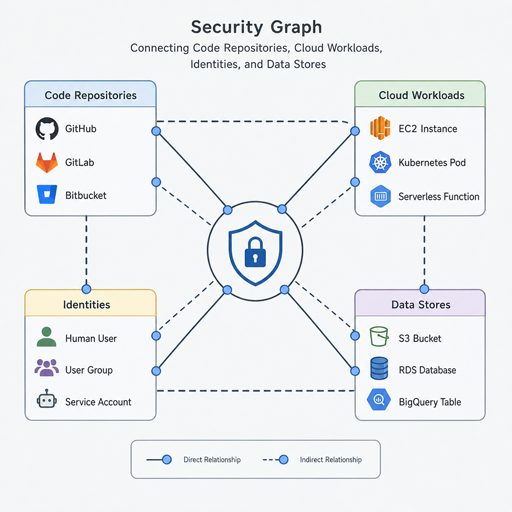
Modern software risk rarely lives in one place. A vulnerable dependency, an over-permissioned workload, a misconfigured storage bucket, and an exposed API can all be part of the same attack path. Bringing AppSec and CloudSec together on one security graph gives teams a shared way to see how application code, cloud infrastructure, identities, data, and runtime exposure connect — so they can prioritize the risks that actually matter.
For teams practicing devsecops cloud delivery, this shift is more than a tooling upgrade. It is a practical move from isolated alerts to connected context, helping security, engineering, and cloud teams fix the right problems faster.
Why does AppSec and CloudSec integration matter now?
AppSec and CloudSec integration matters because applications no longer stop at the codebase. Most modern applications depend on cloud services, containers, APIs, infrastructure-as-code, third-party packages, secrets, identities, and data stores. If each layer is reviewed separately, teams may see hundreds of findings without understanding which ones combine into a real path to compromise.
Traditional application security cloud workflows often focus on code scanning, dependency risk, secrets, and application vulnerabilities. Cloud security programs often focus on posture, permissions, network exposure, workload configuration, and compliance. Both are necessary, but neither gives the full picture alone.
A unified security graph connects these signals. Instead of treating a critical package vulnerability and a public cloud workload as unrelated tickets, the graph can show whether that vulnerable component is deployed, internet-facing, connected to sensitive data, or running under a powerful identity. That context turns security work from a queue of findings into a risk-based decision process.
Separate tools create fragmented risk decisions
Security teams often have plenty of data, but not enough context. Code scanners, cloud posture tools, vulnerability platforms, CI/CD checks, identity systems, and ticketing workflows each tell part of the story. The challenge is that attackers do not respect those organizational boundaries.
When tools remain siloed, different teams may optimize for different priorities. AppSec may push developers to patch a library because of severity. CloudSec may escalate a public resource because of exposure. Platform teams may focus on deployment reliability. Without a common model, every team can be technically correct while still missing the connected path that creates the highest business risk.
This fragmentation also slows remediation. Engineers may receive vague tickets that do not explain where the affected asset runs, whether it is reachable, who owns it, or what data it can access. Security teams then spend time chasing ownership and impact rather than reducing exposure.
A security graph helps resolve that friction by mapping relationships across environments. It can connect repositories to builds, builds to deployed workloads, workloads to cloud accounts, cloud accounts to identities, identities to permissions, and workloads to data. That relationship model is what makes cloud security integration actionable instead of merely informational.
What a unified security graph actually connects
A useful graph is not just a dashboard with more icons. It is a living model of how application and cloud assets relate to one another. The value comes from linking technical facts in a way that supports investigation, prioritization, and remediation.
Key relationships may include:
- Code to deployment: Which repositories, packages, containers, and services are actually running in cloud environments.
- Vulnerabilities to exposure: Whether a vulnerable component is reachable from the internet, internal networks, partner systems, or only isolated environments.
- Workloads to identities: Which service accounts, roles, permissions, and access paths a workload can use.
- Infrastructure to data: Which databases, object stores, queues, and secrets an application can reach.
- Findings to ownership: Which team, service, repository, or deployment pipeline is responsible for fixing the issue.
- Controls to risk paths: Which compensating controls reduce exploitability, and which gaps make exploitation easier.
This connected view supports cloud app security by making the “so what?” behind each alert clearer. A medium-severity weakness in a deeply isolated test service may be less urgent than a lower-severity issue on a production workload with broad permissions and access to sensitive data.
Prioritization improves when context is shared
The strongest benefit of a unified graph is better prioritization. Severity scores are useful, but they are not the same as risk. Real risk depends on exploitability, exposure, asset importance, privileges, data access, and whether the issue exists in production.
With connected context, teams can ask better questions before opening or escalating a ticket. Is the vulnerable service deployed? Is it externally reachable? Does it hold secrets? Can it assume a privileged role? Is there sensitive data nearby? Is there already a control that limits impact?
This approach also reduces alert fatigue. Security teams can focus attention on toxic combinations: a vulnerable internet-facing service, a misconfigured identity, an exposed administrative interface, or a path from a low-trust workload to high-value data. Developers get fewer but better tickets, with clearer evidence and more practical remediation guidance.
In practice, the goal is not to ignore lower-priority findings forever. The goal is to sequence work intelligently so limited engineering time goes first to the issues most likely to reduce meaningful risk.
How can teams apply a graph-based model in daily workflows?
Teams can apply a graph-based model by embedding connected risk context into the workflows they already use: pull requests, CI/CD pipelines, cloud posture reviews, vulnerability triage, incident response, and backlog planning. The graph should help people make faster decisions, not become another place where alerts accumulate.
A practical rollout can start small:
- Map critical services first. Begin with production applications, internet-facing systems, and workloads that touch sensitive data.
- Connect code and cloud ownership. Link repositories, services, cloud accounts, environments, and responsible teams so remediation routes are clear.
- Define risk paths that matter. Focus on combinations such as public exposure plus known vulnerability, excessive permissions plus sensitive data access, or leaked secret plus active deployment.
- Tune ticket creation. Create issues when context justifies action, and include why the issue matters, where it exists, who owns it, and what fix is recommended.
- Measure remediation quality. Track whether teams are reducing exploitable paths, not just closing individual alerts.
This is where devsecops cloud practices become more mature. Security moves closer to engineering decisions, while engineering receives context that is specific enough to act on.
Cloud security best practices become stronger with application context
Cloud security best practices often include least privilege, secure configuration, encryption, network segmentation, continuous monitoring, and rapid remediation. Those practices remain important, but they become more effective when paired with application context.
For example, least privilege is easier to enforce when teams know which application actually uses a role and what data it needs. Network exposure reviews are more meaningful when they include whether the exposed service contains exploitable code. Vulnerability management improves when findings are tied to active deployments rather than dormant packages in an unused repository.
A graph-based approach also supports cloud application protection across the software lifecycle. During design, teams can identify risky architecture patterns. During development, they can catch dangerous changes before deployment. During runtime, they can monitor whether real environments drift away from intended controls.
The result is a security program that is less reactive. Instead of discovering risk only after an audit, incident, or urgent scan, teams can continuously understand how application and cloud changes affect the attack surface.
Building alignment across security, engineering, and cloud teams
Technology alone will not unify security work. Teams also need shared language, ownership, and operating habits. A security graph can support that alignment because it gives every team a common model of the environment.
AppSec teams can see whether code findings are deployed and exposed. CloudSec teams can understand which applications are affected by misconfigurations. Engineers can see why a ticket matters and how their service connects to broader risk. Leaders can make more informed decisions about where to invest remediation time.
To make the model stick, organizations should agree on a few operating principles:
- Prioritize connected risk over isolated severity.
- Route findings to the team that can actually fix them.
- Include asset context in every high-priority ticket.
- Review recurring attack paths, not just recurring alert types.
- Use automation to enrich decisions, while keeping humans accountable for risk acceptance.
This balance keeps the graph useful. It becomes a decision engine for cloud security integration, not a static inventory.
A connected view leads to better security outcomes
Unifying AppSec and CloudSec on one security graph helps teams understand how modern risk really forms: through relationships between code, cloud assets, identities, exposure, and data. It gives security teams sharper prioritization, gives engineers clearer remediation context, and helps organizations move from scattered alerts to connected risk reduction.
The path forward does not require solving everything at once. Start with critical applications, connect them to the cloud environments where they run, and focus on the attack paths that would matter most if exploited. Over time, that shared graph can become the foundation for stronger cloud app security, better application security cloud decisions, and a more practical approach to protecting what matters.
