
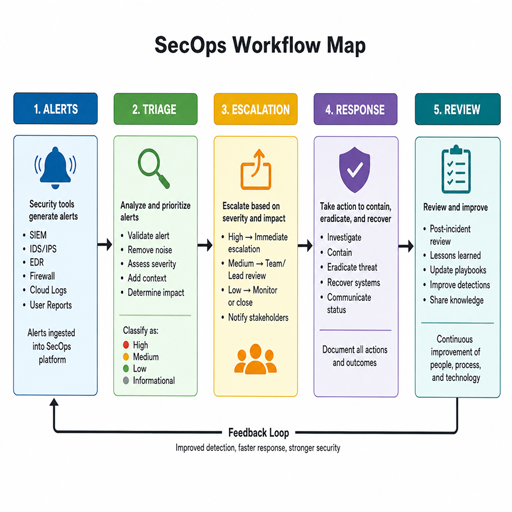
SecOps workflow optimization is the practice of making security operations faster, clearer, and more consistent without weakening judgment or control. It brings together workflow automation, process improvement, incident response discipline, risk mitigation, and team collaboration so security teams can move from reactive firefighting to operational excellence. This guide explains how to examine a SecOps workflow, improve it in practical steps, and build a repeatable operating model that supports both speed and accountability.
What does SecOps workflow optimization actually mean?
SecOps workflow optimization means improving the way security work moves from detection to decision to resolution. It is not simply adding more tools or automating every task; it is the deliberate redesign of processes, handoffs, documentation, responsibilities, and escalation paths so the team can act with less friction and fewer avoidable delays.
In a typical security operations environment, analysts handle alerts, investigate suspicious activity, coordinate with IT or engineering, escalate incidents, document findings, and close the loop with lessons learned. If each of those steps depends on tribal knowledge, scattered communication, or manual copying between systems, the workflow becomes fragile. Optimization turns that fragile chain into a structured operating model.
A mature approach focuses on three outcomes: faster decisions, better consistency, and reduced operational risk. Speed matters because threats can develop quickly. Consistency matters because different analysts should not handle the same type of event in completely different ways. Risk mitigation matters because missed steps, unclear ownership, or poor documentation can create exposure even when the technical response is strong.
The business case for better SecOps workflows
Security operations often sit at the intersection of technology, risk, compliance, and business continuity. When workflows are slow or inconsistent, the impact spreads beyond the security team. Incidents take longer to understand, stakeholders wait for updates, engineering teams receive unclear requests, and leaders lack reliable visibility into risk.
SecOps workflow optimization helps the organization use its existing people, tools, and information more effectively. A team does not need to be large to operate well, but it does need a clear way to prioritize work and coordinate response. Process improvement is especially important when alert volume is high, staffing is limited, or multiple teams share responsibility for remediation.
Better workflows also support operational excellence because they make security work measurable and repeatable. Leaders can see where time is being spent, which categories of incidents create the most effort, where automation can help, and which processes need redesign. Instead of relying only on heroic effort, the team can build an operating rhythm that improves over time.
Common friction points in SecOps environments
Most SecOps workflow problems are not caused by a single failure. They come from small inefficiencies that compound under pressure. A few minutes lost during triage may not seem serious, but when it happens across hundreds of alerts, the cost becomes significant.
Common friction points include:
- Unclear ownership: Analysts may not know who should approve containment, contact a system owner, or declare an incident.
- Manual data gathering: Teams repeatedly copy indicators, user details, asset context, and log excerpts from one tool to another.
- Inconsistent triage: Similar alerts may be handled differently depending on who is on shift or which documentation they remember.
- Noisy escalation paths: Too many events are escalated, or serious events are delayed because severity criteria are vague.
- Fragmented communication: Key decisions may happen across chat, tickets, email, and meetings without a single reliable record.
- Weak feedback loops: The team closes incidents but does not update detection logic, playbooks, training, or controls.
These issues make incident response harder than it needs to be. They also create fatigue. When analysts spend too much time on repetitive administrative work, they have less capacity for investigation, threat analysis, and higher-value risk reduction.
Core principles of SecOps process improvement
Process improvement in SecOps should begin with clarity before automation. If a workflow is unclear, automating it can simply make confusion move faster. The strongest optimization efforts start by documenting the current process, identifying bottlenecks, and separating valuable human judgment from repetitive coordination work.
Standardize before you scale
Standardization gives the team a shared operating language. This includes alert categories, severity levels, escalation criteria, evidence requirements, communication templates, and closure rules. Standardization does not mean every investigation becomes rigid. It means analysts have a reliable baseline and know when an exception requires human judgment.
For example, an account compromise workflow might define the required checks for recent login behavior, MFA status, privileged access, endpoint activity, and business impact. Analysts can still investigate creatively, but the essential steps are not left to memory.
Automate repetitive and low-judgment tasks
Workflow automation is most effective when it removes predictable manual effort. Enriching alerts with user, device, asset, and threat intelligence context is a common example. Creating tickets, assigning tasks, sending standard notifications, collecting routine artifacts, and updating case status can also be automated when rules are clear.
The goal is not to remove analysts from the process. The goal is to give them better information sooner, reduce copy-and-paste work, and make sure important steps are not missed. Automation should support decision-making, not hide uncertainty.
Build workflows around risk
Not every alert deserves the same response. Risk-based workflows help teams focus on events that matter most to the organization. A failed login from a known device may require a different response than unusual authentication to a privileged account from an unfamiliar location.
Risk-based SecOps workflow optimization uses context to prioritize effort. Asset criticality, user privilege, data sensitivity, threat behavior, exploitability, and business impact should influence triage and escalation. This keeps the team from treating all signals equally when the actual risk is not equal.
How should a SecOps team decide what to optimize first?
A SecOps team should optimize the workflows that create the most delay, risk, analyst effort, or stakeholder confusion. The best starting point is usually not the most complex process; it is the high-volume or high-impact workflow where improvement will be visible quickly and will create momentum for broader change.
Begin by reviewing recent alerts, incidents, tickets, and post-incident notes. Look for patterns. Which workflows require the most manual enrichment? Which incidents wait the longest for approval or system owner response? Where do analysts ask the same questions repeatedly? Which handoffs generate rework?
A practical prioritization checklist can help:
- Volume: Does this workflow happen often enough that small improvements matter?
- Risk: Could delay or inconsistency create meaningful exposure?
- Manual effort: Are analysts spending time on repeatable tasks that tools could support?
- Decision clarity: Are severity, escalation, or containment decisions inconsistent?
- Cross-team dependency: Does the process depend on IT, engineering, legal, compliance, or business owners?
- Measurability: Can the team track before-and-after performance in a credible way?
Good first candidates often include phishing triage, endpoint malware alerts, account compromise investigation, vulnerability exception handling, privileged access reviews, and cloud security alerts. These workflows tend to involve repeatable steps, clear evidence needs, and frequent coordination.
A practical model for optimizing the SecOps workflow
A structured model keeps optimization from becoming a one-time cleanup project. It also helps the team avoid the trap of buying or configuring tools before defining the process they need those tools to support.
1. Map the current workflow
Document how work actually happens, not how the process is supposed to happen. Start with the trigger: an alert, user report, vulnerability finding, threat intelligence lead, or compliance request. Then trace each step through triage, enrichment, escalation, containment, remediation, communication, closure, and review.
Include the systems used, the people involved, the decisions made, and the points where work waits. This map should reveal duplicate effort, missing ownership, unnecessary approvals, and manual tasks that appear in every case.
2. Define the desired outcome
Every optimized workflow needs a clear purpose. For an incident response workflow, the desired outcome may be rapid containment with reliable documentation and stakeholder updates. For vulnerability handling, it may be risk-based prioritization and timely remediation coordination. For alert triage, it may be consistent severity decisions and fewer unnecessary escalations.
Defining the outcome prevents the team from optimizing for speed alone. A fast process that skips evidence, ignores business impact, or leaves no audit trail is not operational excellence. The goal is balanced improvement: faster where possible, more controlled where necessary.
3. Remove waste and ambiguity
Before adding automation, simplify the process. Remove duplicate fields, unnecessary approval steps, unclear status categories, and handoffs that do not add value. Clarify who owns each decision and what information they need.
This step is often where the biggest process improvement occurs. A team may discover that analysts are waiting for approvals that are not actually required, or that two groups are collecting the same evidence in different systems. Simplification makes the later automation cleaner and easier to govern.
4. Add workflow automation carefully
Once the process is clear, identify automation opportunities. Start with low-risk actions that save time without making irreversible security decisions. Examples include alert enrichment, case creation, duplicate detection, notification routing, evidence collection, SLA reminders, and status updates.
For higher-impact actions such as account suspension, endpoint isolation, or firewall changes, use controlled automation with approval gates, clear rollback steps, and logging. The more disruptive the action, the more important it is to preserve human oversight and accountability.
5. Measure and refine
Optimization is not finished when a playbook goes live. Track how the workflow performs and review exceptions. If analysts repeatedly bypass a step, the step may be unclear, unnecessary, or poorly supported by tools. If escalations are still slow, the issue may be ownership rather than automation.
Useful metrics may include time to triage, time to contain, false positive handling effort, escalation volume, reopened cases, overdue remediation tasks, and stakeholder response time. Metrics should be interpreted carefully. A number is useful only when it helps the team understand behavior and make better decisions.
Workflow automation that strengthens incident response
Incident response benefits from automation when the automation improves context, coordination, and consistency. During an active incident, teams need to know what happened, what is affected, who is involved, what has been done, and what decision comes next. Automation can reduce the time required to assemble that picture.
Strong incident response automation often includes:
- Alert enrichment: Adding identity, asset, network, endpoint, cloud, and threat intelligence context to the case.
- Case routing: Assigning incidents based on severity, technology area, business unit, or on-call schedule.
- Evidence collection: Gathering relevant logs, process data, file details, authentication history, or configuration snapshots.
- Communication templates: Sending consistent notifications to stakeholders without forcing analysts to rewrite routine updates.
- Task orchestration: Creating remediation tasks for IT, engineering, or application owners and tracking their completion.
- Post-incident prompts: Reminding the team to update detections, playbooks, documentation, and preventive controls.
The practical benefit is not only speed. Automation also creates a more complete record of what happened. That record helps with review, compliance support, lessons learned, and future training.
Team collaboration as a workflow capability
SecOps is rarely a single-team activity. Even when the security operations team owns triage and coordination, remediation may require endpoint administrators, network engineers, cloud teams, developers, identity teams, legal, communications, or business leaders. Workflow optimization must therefore improve collaboration, not just internal analyst tasks.
Good collaboration starts with clear roles. During an incident, everyone should understand who is leading the response, who approves containment, who communicates with stakeholders, who performs technical remediation, and who documents decisions. Ambiguity creates delay, especially when pressure is high.
Shared workspaces, integrated tickets, standard incident channels, and concise update templates can all help. However, tools alone do not create collaboration. Teams also need agreed expectations for response times, escalation paths, handoff quality, and closure criteria. A vague message such as “please investigate” is less useful than a task that includes the affected asset, observed behavior, urgency, requested action, and deadline.
Governance, control, and risk mitigation
Optimized workflows should make security operations more controlled, not more careless. Governance ensures that process changes, automation rules, and response actions are documented, reviewed, and aligned with the organization’s risk tolerance.
Risk mitigation depends on knowing where automation should stop. A workflow may automatically enrich an alert and open a case, but require analyst approval before disabling a user account. Another workflow may automatically isolate a device when confidence is high and the potential impact is limited, but escalate first when the asset supports a critical business process.
Important controls include:
- Approval gates for disruptive containment or remediation actions.
- Audit logs that show who or what performed each action.
- Version control for playbooks, scripts, and workflow rules.
- Exception handling for unusual cases that do not fit the standard path.
- Periodic reviews to confirm workflows still match business needs and threat conditions.
This balance is central to operational excellence. The team gains speed where repeatability is safe, while preserving oversight where judgment is essential.
Measuring operational excellence in SecOps
Operational excellence is not a single dashboard score. It is the ability to deliver reliable security outcomes through disciplined, adaptable processes. Measurement should show whether the workflow is improving both efficiency and risk management.
Useful measurement areas include:
|
Measurement area |
What it can reveal |
|---|---|
|
Triage speed |
Whether alerts are being reviewed promptly and consistently |
|
Containment time |
Whether incident response steps move quickly after confirmation |
|
Escalation quality |
Whether the right issues reach the right owners with enough context |
|
Automation effectiveness |
Whether automation reduces manual effort without increasing errors |
|
Case completeness |
Whether documentation supports review, reporting, and learning |
|
Remediation follow-through |
Whether assigned actions are completed and verified |
Metrics should lead to action. If case completeness is poor, improve templates and required evidence fields. If escalation quality is weak, refine severity definitions and handoff requirements. If automation creates too many exceptions, review the logic and add better context or approval steps.
Building a continuous improvement cycle
SecOps workflow optimization works best as an ongoing cycle, not a one-time project. Threats change, tools change, business systems change, and team capacity changes. A workflow that was effective last year may become slow or incomplete as the environment grows.
A practical continuous improvement cycle includes:
- Review recent work: Examine incidents, alerts, escalations, and stakeholder feedback.
- Identify friction: Look for delays, repeated manual tasks, unclear decisions, and recurring errors.
- Prioritize improvements: Focus on changes with clear risk reduction or efficiency value.
- Update the workflow: Revise playbooks, automation, templates, ownership, or tooling.
- Test the change: Use tabletop exercises, simulations, or controlled rollout where appropriate.
- Measure results: Compare workflow behavior before and after the change.
- Document lessons: Make improvements visible so the process does not depend on memory.
This cycle turns everyday security work into a source of learning. Each incident and alert category becomes an opportunity to strengthen the operating model.
A practical checklist for SecOps workflow optimization
Use this checklist to evaluate whether a workflow is ready for improvement, automation, or broader rollout:
- The trigger for the workflow is clearly defined.
- Severity levels and escalation criteria are documented.
- Required evidence is known and easy to collect.
- Ownership is assigned for triage, response, remediation, and closure.
- Stakeholder communication uses consistent templates or expectations.
- Manual steps have been reviewed for automation potential.
- High-impact actions include approval gates or rollback guidance.
- Cases produce a useful record for reporting and review.
- Metrics show whether the workflow is performing as intended.
- Lessons learned feed back into detections, playbooks, and controls.
If several items are missing, the workflow may need process improvement before automation. If most items are in place, workflow automation can usually be introduced with less risk and more predictable value.
Turning optimization into a durable SecOps habit
The best SecOps workflow optimization efforts are practical, visible, and iterative. They do not try to perfect every process at once. They choose a meaningful workflow, clarify the desired outcome, remove avoidable friction, automate carefully, measure results, and repeat.
This approach helps security teams improve incident response, strengthen risk mitigation, and support team collaboration without losing the judgment that security work requires. Over time, the organization gains more than faster workflows. It gains a more resilient operating model where people, processes, and automation work together with purpose.
