
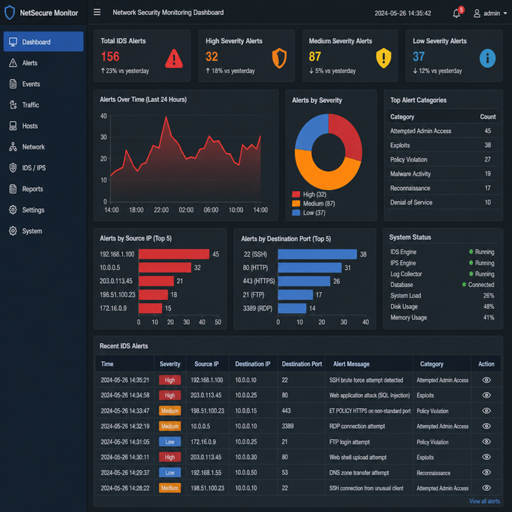
An intrusion detection system, or IDS, is a security monitoring tool that watches network traffic, systems, or applications for signs of suspicious activity. In practical terms, IDS setup means placing the right sensors, defining what should be monitored, tuning alerts, and creating a response process so potential threats are noticed before they become bigger incidents. A well-planned IDS supports network security and data protection by giving teams visibility into attempted intrusions, policy violations, malware behavior, and unusual activity patterns.
What is an intrusion detection system?
An intrusion detection system is a security system designed to identify activity that may indicate unauthorized access, misuse, compromise, or attack. It does not usually block traffic by itself; instead, it detects and alerts, giving security teams the information they need to investigate and respond. That distinction matters because an IDS is primarily a visibility and alerting layer, not a complete defense on its own.
In a network security program, intrusion detection sits between prevention and response. Firewalls, access controls, endpoint protection, and secure configuration reduce the chance of an attack. IDS tools help reveal what still gets through, what is being tested by attackers, and what abnormal behavior may already be happening inside the environment.
The value of intrusion detection comes from context. A single failed login may be normal. Repeated failures from an unusual location, followed by a successful login and unexpected database access, may deserve immediate review. IDS setup is the process of creating enough visibility and logic to tell the difference.
Defining characteristics of IDS
Intrusion detection systems vary by product and environment, but most share a few core characteristics. These features help explain what an IDS includes, what it does not include, and how it contributes to security monitoring.
Key IDS characteristics include:
- Continuous observation: The system monitors selected network segments, hosts, logs, or application activity over time.
- Detection logic: It uses signatures, rules, anomaly detection, behavioral patterns, or a combination of methods to identify suspicious events.
- Alert generation: When activity matches a detection condition, the IDS creates an alert with supporting details.
- Investigation context: Alerts often include source and destination information, timestamps, protocols, usernames, affected systems, or matched rules.
- Tuning capability: Rules and thresholds can be adjusted so the system fits the real environment instead of overwhelming teams with noise.
- Integration potential: IDS alerts may feed into a SIEM, ticketing workflow, incident response platform, or broader security systems.
- Detection focus: Unlike an intrusion prevention system, an IDS is typically designed to observe and report rather than automatically stop the activity.
These characteristics make IDS useful, but they also show why setup matters. A tool that sees the wrong traffic, lacks useful rules, or sends alerts to no one is not a meaningful security control. IDS performance depends on planning, placement, tuning, and follow-through.
How does an IDS work?
An IDS works by collecting activity data, comparing that data against detection criteria, and producing alerts when something appears suspicious. The monitored data may come from packets crossing a network, activity on servers, endpoint logs, authentication events, file changes, or application behavior. The better the data source and detection logic, the more useful the alerts become.
There are two common detection approaches. Signature-based detection looks for known indicators, such as patterns associated with malware, exploit attempts, scanning tools, or command-and-control activity. Anomaly detection looks for behavior that differs from an expected baseline, such as a workstation suddenly sending large volumes of traffic to unfamiliar systems or a service account logging in at unusual times.
Many modern deployments use both methods. Signature detection is useful for known threats because it can be precise when the pattern is reliable. Anomaly detection is valuable because attackers often change techniques, use legitimate credentials, or blend into normal traffic. Together, they help improve visibility across known and unknown risks.
A simplified IDS workflow looks like this:
- Collect activity: Sensors, agents, or log sources observe traffic and system behavior.
- Normalize data: Events are formatted so they can be compared and searched consistently.
- Analyze behavior: Rules, signatures, policies, or anomaly models evaluate the activity.
- Create alerts: Suspicious events are prioritized and sent to a console, SIEM, or response workflow.
- Investigate: Analysts review the alert, validate whether it is malicious, and determine impact.
- Tune and improve: False positives, missed detections, and new risks are used to refine the setup.
This workflow is not a one-time task. Intrusion detection improves as teams learn which alerts matter, which systems are critical, and which behaviors are normal for the organization.
Main types of intrusion detection systems
IDS tools are often grouped by where they observe activity. Choosing the right type is one of the most important parts of intrusion detection systems setup because different placements answer different security questions.
Network-based IDS
A network-based IDS, often called NIDS, monitors traffic moving across a network segment. It may be placed near internet gateways, internal network boundaries, cloud network traffic inspection points, or sensitive application zones. Its main benefit is broad visibility into communication between systems.
NIDS can help identify port scanning, exploit attempts, suspicious outbound connections, unusual protocols, lateral movement, and traffic to known malicious destinations. It is especially useful when the goal is to understand how systems communicate and whether attackers are moving through the environment. However, encrypted traffic, high network volume, and limited placement can reduce what it sees.
Host-based IDS
A host-based IDS, or HIDS, monitors activity on individual systems. It may inspect logins, file integrity, process behavior, configuration changes, privilege escalation attempts, and local system logs. This type is useful for servers, critical endpoints, database systems, and workloads where detailed host visibility is required.
HIDS can detect activity that network monitoring may miss, especially when traffic is encrypted or when suspicious behavior happens locally on a machine. The tradeoff is management complexity. Agents must be deployed, maintained, and tuned across systems without creating excessive overhead or alert noise.
Hybrid IDS
A hybrid IDS combines network, host, cloud, and log-based monitoring. This approach is common because no single view is complete. Network sensors may show suspicious communication, while host agents reveal which process created it and which user account was involved.
For many organizations, a hybrid model provides the strongest security monitoring foundation. It allows alerts to be correlated across layers, which helps teams understand whether an event is a harmless anomaly or part of a real intrusion.
IDS setup as a practical security process
Intrusion detection systems setup is not simply installing software and turning on every rule. It is a practical process of deciding what needs protection, where visibility is needed, how alerts should be prioritized, and who is responsible for responding. Poor setup can create two opposite problems: missed threats or too many alerts to handle.
A useful setup usually starts with asset and risk awareness. Critical databases, identity systems, payment environments, administrative tools, cloud workloads, and public-facing applications often deserve more focused monitoring than low-risk systems. The goal is not to monitor everything equally; it is to monitor intelligently.
A practical IDS setup plan includes:
- Define objectives: Decide whether the priority is external attack detection, insider misuse, compliance support, malware visibility, lateral movement detection, or critical asset monitoring.
- Map the environment: Identify key networks, hosts, applications, users, data flows, and trust boundaries.
- Choose IDS type and placement: Select network sensors, host agents, or hybrid monitoring based on visibility needs.
- Establish baselines: Learn what normal traffic, access, and system behavior look like before treating every deviation as malicious.
- Enable relevant rules: Start with detection content that matches your technology stack, exposed services, operating systems, and threat model.
- Set alert priorities: Separate informational events from high-confidence signs of compromise.
- Create response procedures: Define who receives alerts, how they triage them, and when incidents are escalated.
- Review regularly: Update rules, remove stale exceptions, and adjust monitoring when systems change.
This process turns IDS from a passive tool into an operational security control. The setup should reflect how the organization actually works, not just a vendor default configuration.
Why IDS matters for data protection
IDS supports data protection by helping organizations detect activity that may threaten sensitive information. Data loss often begins with earlier warning signs: credential abuse, scanning, privilege escalation, unusual database queries, unexpected outbound traffic, or access from systems that normally should not connect. Intrusion detection helps surface those warning signs.
For example, if a user account begins accessing file shares it has never used before, anomaly detection may flag the behavior for review. If a server starts communicating with an unfamiliar external destination, a network-based IDS may alert security teams before large-scale data movement occurs. If a critical configuration file changes unexpectedly, a host-based IDS may provide evidence for investigation.
IDS also strengthens accountability. Alerts and logs can help reconstruct what happened, which systems were involved, and when suspicious activity began. That record is important for containment, recovery, and improving future controls.
Common IDS setup mistakes
Many IDS projects struggle not because the technology is weak, but because the setup is incomplete. A system that generates thousands of low-value alerts will quickly be ignored. A system that monitors only easy locations may miss the assets that matter most.
Common mistakes include:
- Using default rules without tuning: Default rules may not match the organization’s real risks, systems, or traffic patterns.
- Monitoring too broadly too soon: Wide coverage without prioritization can overwhelm teams before useful workflows exist.
- Ignoring encrypted traffic realities: IDS visibility may be limited when traffic is encrypted unless supported by appropriate logging, endpoint visibility, or inspection architecture.
- Treating every anomaly as an incident: Anomaly detection needs context and baselines to avoid excessive false positives.
- Failing to assign alert ownership: Alerts must go to people or workflows that can investigate and act.
- Not documenting exceptions: Temporary suppressions and ignored alerts can become permanent blind spots.
- Skipping regular review: Networks, applications, users, and threats change; IDS tuning must change with them.
Avoiding these mistakes makes the system more credible. When analysts trust the alerts, they are more likely to respond quickly and consistently.
When should an organization use IDS?
An organization should use IDS when it needs better visibility into suspicious activity across networks, systems, or critical applications. IDS is especially useful when sensitive data, regulated environments, remote access, cloud workloads, or complex internal networks make it important to detect threats that preventive controls may not stop.
IDS is not limited to large enterprises. Smaller organizations can also benefit when they have public-facing systems, valuable customer data, intellectual property, or operational systems that cannot afford unnoticed compromise. The setup can be scaled to the environment, starting with the most critical assets and expanding as monitoring maturity improves.
IDS is most valuable when paired with clear response procedures. If nobody reviews alerts, investigates events, or tunes detections, the tool becomes background noise. If alerts are routed, prioritized, and acted on, IDS becomes a practical part of daily security operations.
Practical examples and misconceptions
IDS concepts become easier to understand when connected to real security situations. The following examples show where intrusion detection can provide useful visibility and where expectations should be realistic.
Practical IDS use cases include:
- Detecting reconnaissance: A network IDS may flag repeated scanning across internal systems or exposed services.
- Spotting brute-force attempts: Authentication-related alerts may reveal repeated login failures followed by unusual access.
- Identifying lateral movement: Suspicious connections between workstations and servers may indicate an attacker moving through the environment.
- Monitoring critical file changes: A host-based IDS may alert when sensitive configuration files or system binaries change unexpectedly.
- Finding unusual outbound traffic: Security monitoring may detect systems connecting to unfamiliar external infrastructure.
- Supporting incident investigation: IDS alerts can provide timelines, source systems, destination systems, and related activity.
Common misconceptions include:
- “IDS blocks attacks automatically.” Most IDS tools alert; blocking is usually handled by firewalls, endpoint tools, or intrusion prevention systems.
- “More alerts mean better security.” Useful alerts matter more than alert volume.
- “Anomaly detection removes the need for rules.” Anomaly detection helps find unusual behavior, but rules and signatures still provide valuable precision.
- “IDS setup is finished after installation.” Effective intrusion detection requires tuning, review, and adaptation.
- “Network IDS sees everything.” Encrypted traffic, cloud architecture, segmentation, and sensor placement all affect visibility.
These examples show why IDS should be viewed as a detection capability, not a magic layer that guarantees safety.
IDS and related security systems
IDS often works alongside other security systems. Understanding the differences helps teams assign the right job to each tool and avoid unrealistic expectations.
|
Security control |
Main purpose |
How it relates to IDS |
|---|---|---|
|
Firewall |
Allows or blocks traffic based on policy |
IDS can alert on suspicious traffic that passes or attempts to pass network controls |
|
Intrusion prevention system |
Detects and may block suspicious activity |
IDS focuses on detection and alerting, while IPS adds inline prevention |
|
SIEM |
Collects and correlates security events |
IDS alerts can feed into SIEM for broader analysis and reporting |
|
Endpoint protection |
Protects individual devices from malware and abuse |
Host IDS or endpoint data can add deeper context to network alerts |
|
Vulnerability scanning |
Finds weaknesses before attack |
IDS may detect attempts to exploit those weaknesses |
IDS is strongest when it complements these controls. It provides a detection layer that helps teams see suspicious activity across the environment and connect events that might otherwise appear isolated.
A clear starting checklist for IDS setup
A successful IDS deployment begins with focus. Before buying tools or enabling every rule, identify what you need to see and what you are prepared to do when an alert appears.
Use this checklist as a starting point:
- Identify critical assets and sensitive data locations.
- Document major network segments, cloud environments, and remote access paths.
- Choose network-based, host-based, or hybrid monitoring based on visibility gaps.
- Place sensors where they can observe meaningful traffic or system activity.
- Start with high-value detection rules related to your actual systems.
- Establish normal behavior baselines for users, services, and traffic flows.
- Define alert severity levels and escalation paths.
- Connect IDS alerts to security monitoring workflows or a SIEM where appropriate.
- Review false positives and tune rules on a regular schedule.
- Test response procedures with realistic scenarios.
This checklist keeps intrusion detection systems setup grounded in outcomes. The goal is not just to deploy technology; it is to create a reliable way to notice, investigate, and respond to suspicious activity.
The practical meaning of IDS setup
IDS setup is the work of turning intrusion detection from a concept into a usable security capability. It combines visibility, detection logic, alert routing, tuning, and response planning so suspicious activity does not go unnoticed. When done well, it improves network security, supports data protection, and gives teams a clearer picture of what is happening across their environment.
The most effective IDS deployments are focused, maintained, and connected to action. They start with critical risks, use both known-threat and anomaly detection methods where appropriate, and evolve as systems and threats change. IDS cannot replace strong prevention or disciplined incident response, but it can provide the early warning and investigative context that modern security programs need.
