
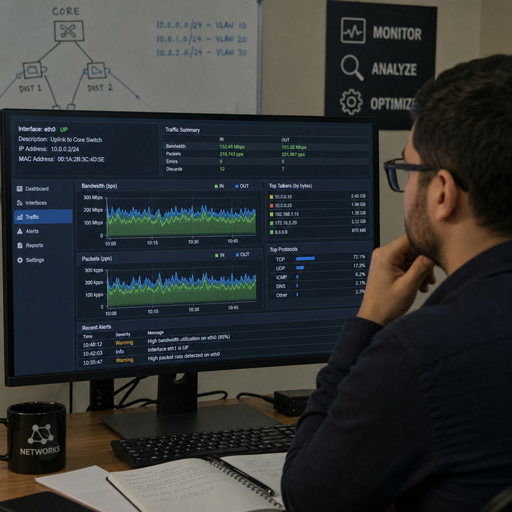
Packet sniffing and traffic analysis help teams understand what is happening inside a network by inspecting the data packets moving between devices, applications, and services. Used responsibly, these techniques support network monitoring, troubleshooting, performance tuning, and stronger network security. The key is to treat packet capture as a controlled, authorized activity that turns raw traffic into practical insight.
What is packet sniffing?
Packet sniffing is the process of capturing and inspecting network packets as they travel across a network. Each packet contains technical details such as source and destination addresses, protocols, ports, timing, and sometimes payload data, depending on encryption and configuration. In legitimate environments, packet sniffing is used by administrators, security analysts, and engineers to diagnose problems, verify configurations, investigate suspicious activity, and understand how systems communicate.
The term can sound suspicious because the same basic concept can be misused. That is why context matters. Ethical network sniffing should only happen on networks, systems, and traffic you are authorized to monitor, with clear policies around privacy, data retention, and access control.
Why packet capture matters in modern networks
Modern networks are busy, layered, and often distributed across offices, cloud platforms, remote devices, and third-party services. Logs are useful, but they do not always show the full conversation between systems. Packet capture gives teams a closer view of those conversations, making it easier to separate guesswork from evidence.
For example, an application may appear slow to users, but the cause could be DNS delays, repeated retransmissions, overloaded servers, misconfigured routing, or a security device interrupting traffic. Packet analysis helps narrow the cause by showing what is actually happening on the wire or virtual network path.
Packet-level visibility is especially useful when different teams own different parts of the environment. A server team, application team, and network team may each see only part of the issue. Traffic analysis creates a shared source of technical truth that can speed up troubleshooting and reduce finger-pointing.
Packet sniffing, network monitoring, and traffic analysis work together
Packet sniffing is the capture method. Network monitoring is the ongoing practice of watching network health, availability, performance, and risk. Traffic analysis is the interpretation layer that turns captured packets and flow data into conclusions.
Think of it this way:
- Packet sniffing collects the raw evidence.
- Packet capture stores a slice of that evidence for review.
- Packet analysis examines protocols, timing, errors, and behavior.
- Traffic analysis looks for patterns, trends, anomalies, and relationships.
- Network monitoring uses these insights continuously to support operations and security.
A strong monitoring program does not rely on packets alone. It combines packet data with logs, endpoint telemetry, firewall events, identity signals, cloud metrics, and alerts. Packet data is powerful because it can confirm what other tools suggest, but it works best as part of a broader observability and security strategy.
What can traffic analysis reveal?
Traffic analysis can reveal how systems communicate, where performance breaks down, and whether activity looks normal or suspicious. It does not always require reading packet contents; even metadata such as timing, volume, protocol use, and connection patterns can be highly informative. This is important because much modern traffic is encrypted, but encrypted traffic can still provide operational and security clues.
Common findings include unusual spikes in bandwidth, repeated failed connection attempts, unexpected protocols, misrouted traffic, excessive retries, and devices communicating with unfamiliar destinations. In a security context, these signs may help analysts investigate malware behavior, data movement, command-and-control patterns, or policy violations.
In a performance context, the same data can point to latency, congestion, packet loss, or application design issues. For instance, if packet analysis shows repeated retransmissions between a client and server, the problem may involve network reliability rather than application code. If it shows many short connections where one persistent session would be more efficient, the application architecture may need review.
Practical uses for packet analysis
Packet analysis becomes most valuable when it is tied to a specific question. Capturing everything without a purpose creates storage, privacy, and review challenges. A focused investigation starts with a hypothesis, captures the right traffic, and ends with an action.
Useful scenarios include:
- Troubleshooting slow applications Analysts can review connection setup, DNS resolution, response timing, retransmissions, and protocol behavior to identify where delays occur.
- Validating firewall or routing changes After a configuration update, packet capture can confirm whether traffic is taking the expected path and whether required ports and protocols are working.
- Investigating suspicious activity Security teams can examine unusual destinations, traffic bursts, beacon-like patterns, or unexpected lateral movement within a network.
- Checking protocol behavior Engineers can verify whether applications are using approved protocols, negotiating secure connections properly, or sending unnecessary traffic.
- Supporting incident response During an investigation, packet data can help reconstruct timelines and clarify which systems communicated, when they communicated, and how much data moved.
The goal is not to collect packets for their own sake. The goal is to answer operational and security questions with confidence.
The role of packet sniffing in network security
Packet sniffing supports network security by giving defenders visibility into activity that may not be obvious from device logs alone. Attackers often try to blend into normal traffic, so defenders need ways to compare current behavior against expected patterns. Network sniffing, when used ethically, can help identify anomalies before they become larger incidents.
Security teams often use packet data to investigate alerts from intrusion detection systems, firewalls, endpoint tools, or SIEM platforms. If an alert says a device contacted a suspicious destination, packet capture can help confirm the connection details. If a system is suspected of scanning internal hosts, traffic analysis can show the frequency, scope, and direction of those attempts.
However, packet data may contain sensitive information. Even when payloads are encrypted, metadata can reveal user behavior, system relationships, and business processes. Good governance is essential. Access should be limited, captures should be scoped, and retention should match business and compliance needs.
Responsible packet capture starts with scope
Before capturing traffic, define the reason, the boundaries, and the handling process. This protects users, reduces noise, and makes analysis more efficient. A broad capture across an entire environment may seem thorough, but it can quickly become unmanageable.
A responsible packet capture plan should clarify:
- Authorization: Who approved the capture, and which systems or network segments are included?
- Objective: What question are you trying to answer?
- Duration: How long does the capture need to run?
- Data sensitivity: Could the capture include credentials, personal data, customer information, or confidential business activity?
- Storage and access: Where will the capture be stored, who can view it, and how will it be protected?
- Retention: When will the data be deleted or archived?
- Communication: Which teams need to know that monitoring is taking place?
This planning step makes packet analysis more defensible and more useful. It also helps avoid the common mistake of collecting too much data and not knowing what to do with it.
How do teams analyze packet data effectively?
Teams analyze packet data effectively by filtering aggressively, comparing traffic against a known baseline, and focusing on patterns that answer the original question. Raw packet captures can be overwhelming, so analysts usually narrow the view by host, protocol, port, time range, session, or error type. From there, they look for evidence that confirms or disproves a theory.
A practical workflow often looks like this:
- Start with the symptom or alert Define what changed, who is affected, and when the issue began.
- Capture the relevant traffic Focus on the affected system, service, subnet, or time window rather than collecting unrelated data.
- Filter and categorize Separate normal background traffic from the flows that matter to the investigation.
- Review timing and sequence Look at connection setup, response times, retries, resets, and gaps between packets.
- Compare against expected behavior Use known-good baselines, documentation, or previous captures to identify what is unusual.
- Turn findings into action Update configurations, tune monitoring, escalate a security case, or document the root cause.
This approach keeps analysis grounded. Instead of chasing every odd packet, the team follows evidence toward a decision.
Common challenges in network sniffing
Packet sniffing is powerful, but it has limits. Encrypted traffic can hide payload details, high-speed networks can generate more data than tools can easily store, and switched or cloud-based environments may require specific collection points. Analysts also need enough protocol knowledge to avoid misreading normal behavior as a problem.
Another challenge is visibility. In hybrid environments, traffic may move between on-premises networks, cloud services, remote users, and SaaS platforms. No single capture point sees everything. Teams may need a mix of endpoint telemetry, virtual network taps, firewall logs, flow records, and selective packet capture to build a complete picture.
Finally, packet data can be noisy. Many devices constantly check for updates, discover services, maintain sessions, or retry failed requests. Effective traffic analysis depends on understanding what is normal for your environment before treating something as suspicious.
Best practices for safer, cleaner analysis
A thoughtful process helps teams get better results while reducing privacy and operational risk.
- Capture only what you need. Smaller, targeted captures are easier to protect and analyze.
- Use filters early. Narrow by host, subnet, protocol, port, or time period to reduce noise.
- Protect capture files. Treat packet capture data as sensitive, especially if payloads may be visible.
- Document the context. Record the reason for capture, affected systems, time zone, and related changes.
- Correlate with other sources. Combine packet analysis with logs, alerts, configuration records, and user reports.
- Build baselines. Knowing normal traffic patterns makes abnormal behavior easier to recognize.
- Review permissions regularly. Only authorized personnel should perform captures or access stored data.
These practices make packet sniffing more precise and more trustworthy. They also support repeatable investigations instead of one-off technical experiments.
Packet visibility is a foundation, not the whole strategy
Packet sniffing and traffic analysis are essential tools for understanding network behavior, but they are not a complete security or monitoring program by themselves. They work best alongside strong logging, endpoint protection, identity controls, vulnerability management, and clear incident response procedures. Packet data can show what happened between systems; the broader program explains why it matters and what to do next.
For organizations building better network monitoring, the best starting point is not to capture everything. Start with the questions that matter most: Which applications are critical? What traffic should never occur? Where do outages usually begin? Which systems handle sensitive data? From there, packet capture and packet analysis can be applied with purpose.
The takeaway is simple: when used with authorization, focus, and care, packet sniffing turns invisible network activity into useful evidence. It helps teams troubleshoot faster, strengthen network security, and make smarter decisions about the systems they depend on every day.
