
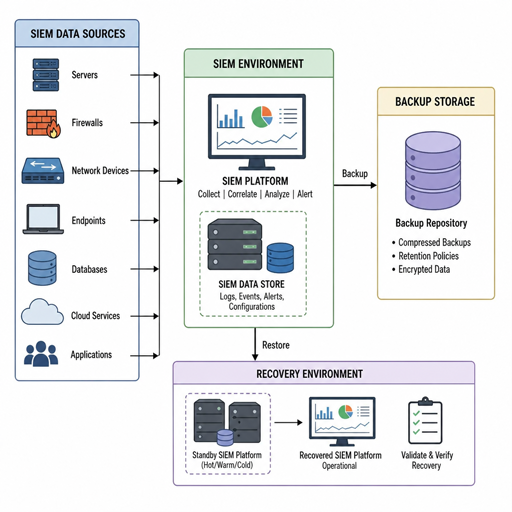
A SIEM is only as useful as the security data, rules, dashboards, and evidence it can preserve when something goes wrong. A strong backup and disaster recovery plan protects that information from hardware failure, ransomware, cloud outages, accidental deletion, and configuration mistakes. This guide explains what to back up, how often to back it up, how to restore it, and how to make sure your SIEM can keep supporting investigations when normal operations are disrupted.
What does backup and disaster recovery for SIEM actually involve?
Backup and disaster recovery for SIEM means protecting both the SIEM platform and the security operations it supports. It is not just a database copy or a snapshot of a server. A SIEM environment includes event data, detection rules, correlation logic, dashboards, alert histories, user roles, integrations, parsing configurations, enrichment sources, and sometimes compliance records that must remain usable after an incident.
Backups preserve copies of important SIEM components so they can be recovered later. Disaster recovery defines how the organization restores service, resumes log collection, validates data integrity, and gives analysts access to the tools they need during or after a disruption. The two disciplines work together: backups are the raw materials, while disaster recovery is the tested process that turns those materials into a working SIEM again.
For security teams, the stakes are higher than ordinary application recovery. If the SIEM is down during an attack, defenders may lose visibility at exactly the wrong time. If old logs cannot be restored, investigators may lose the evidence needed to understand scope, prove compliance, or support legal review.
Why SIEM recovery needs special planning
A SIEM has several traits that make recovery planning more complex than a typical business system. It receives high volumes of time-sensitive data from many sources, stores information in formats that must remain searchable, and depends on integrations that can break when credentials, certificates, network paths, or schemas change.
Many organizations focus on protecting indexed event data but overlook the operational layer around it. Detection content, saved searches, dashboards, asset lists, threat intelligence feeds, custom parsers, suppression rules, and case workflows can represent years of security knowledge. Losing those configurations can delay recovery even if the raw logs survive.
There is also a chain-of-custody concern. SIEM records may be used for incident response, audit evidence, insurance claims, or regulatory reporting. A recovery plan should therefore preserve integrity, access controls, timestamps, and retention expectations. Restoring data is not enough if analysts cannot trust it or demonstrate that it has not been altered.
The core components that should be protected
A practical SIEM backup plan starts by identifying everything needed to rebuild both visibility and workflow. The exact list depends on the SIEM architecture, but most environments should account for the following categories.
Security event and log data
Event data is the foundation of the SIEM. It may include authentication events, endpoint alerts, firewall logs, cloud activity, DNS queries, identity events, application logs, vulnerability context, and audit trails. Some SIEMs store data in hot, warm, and cold tiers, each with different performance and retention characteristics.
Backup decisions should reflect how the data is used. Recent data may need fast recovery for active investigations, while older data may be retained primarily for compliance or historical analysis. Security teams should define which data must be restored immediately and which can be recovered more slowly from archive storage.
SIEM configuration and detection content
Configuration backups should include correlation rules, detection logic, saved queries, dashboards, reports, watchlists, field mappings, custom parsers, ingestion pipelines, alert routing, notification settings, and enrichment configurations. These elements determine how the SIEM turns raw events into usable security intelligence.
They are also frequently changed. Analysts tune rules, engineers adjust parsers, and administrators add new integrations. Because configuration drift happens quickly, backup best practices should include versioning and regular exports of detection content, not only occasional full-system snapshots.
Identity, access, and administrative settings
SIEM access controls are part of the security model. Role definitions, user groups, service accounts, API tokens, single sign-on settings, and administrative policies should be documented and recoverable. After a disaster, teams need to restore access quickly without weakening security controls.
Secrets require special treatment. API keys, certificates, private keys, and passwords should not be stored casually inside backup files. Use approved secret management processes, encrypt sensitive backups, and ensure recovery personnel know how to re-establish integrations without exposing credentials.
Integrations and data source connections
A recovered SIEM is incomplete if it cannot receive data. Collectors, forwarders, agents, cloud connectors, syslog destinations, queue configurations, firewall rules, and network routes may all need to be recreated or validated. These dependencies should be mapped before an outage occurs.
Documenting integrations is especially important in hybrid and multi-cloud environments. A SIEM may depend on identity providers, endpoint platforms, cloud audit APIs, ticketing systems, threat intelligence services, and notification tools. The recovery plan should explain how each critical connection is restored and tested.
How should you set SIEM backup priorities?
Set SIEM backup priorities by ranking data and configurations according to operational value, recovery urgency, compliance need, and rebuild difficulty. Not every component needs the same backup frequency or recovery speed. The goal is to protect what would most damage visibility, investigations, and compliance if it were unavailable.
A useful prioritization model separates SIEM assets into tiers:
- Critical operational visibility: Current log ingestion, active detection rules, alerting workflows, dashboards used by analysts, identity integrations, and recent event data.
- Investigation and compliance evidence: Historical logs, audit records, case notes, alert history, reporting outputs, and retained data needed for policy or regulatory obligations.
- Platform rebuild materials: Infrastructure templates, deployment scripts, collector configurations, network diagrams, parser libraries, and recovery documentation.
- Enhancement and convenience assets: Custom views, nonessential reports, experimental rules, and low-priority integrations that improve productivity but are not required for immediate recovery.
This ranking helps determine backup frequency, storage cost, and recovery sequence. For example, recent alerts and detection content may need near-immediate restoration, while older archived logs may be restored only if an investigation requires them. The priority model should be reviewed whenever the SIEM architecture, compliance environment, or threat model changes.
Backup architecture options for SIEM environments
There is no single backup architecture that fits every SIEM. The right design depends on data volume, deployment model, retention needs, recovery objectives, and budget. Most organizations use a combination of approaches rather than relying on one method.
Full, incremental, and differential backups
Full backups capture an entire protected dataset or system state. They simplify restoration but can require significant storage and time, especially for large SIEM indexes. Incremental backups capture changes since the last backup, reducing storage use and backup windows. Differential backups capture changes since the last full backup, creating a middle ground between speed and simplicity.
For SIEMs, these methods may apply differently to platform components and log data. Configuration files may be small enough for frequent full exports. Event indexes may require incremental or tiered approaches because of volume. The backup strategy should be designed around realistic restore performance, not only backup convenience.
Snapshots and replicated storage
Snapshots can help recover quickly from corruption, failed upgrades, or accidental changes. They are useful for virtual machines, storage volumes, and cloud-based infrastructure. However, snapshots are not always a complete substitute for independent backups, especially if they depend on the same platform, account, or region that could be affected by the disaster.
Replication can improve availability by copying data to another node, cluster, zone, or region. It supports continuity, but it can also replicate mistakes or malicious changes. For example, if an attacker deletes data and the deletion replicates, the replica may not solve the problem. Replication should be paired with immutable or isolated backups where possible.
Immutable and offline backups
Immutable backups cannot be changed or deleted for a defined period. Offline backups are disconnected from production systems. Both approaches help protect SIEM evidence from ransomware, insider threats, and compromised administrator accounts.
These protections are especially valuable for security logs because attackers often try to hide their activity. If the SIEM is targeted directly, recoverable and tamper-resistant backups may be the difference between a partial investigation and a defensible timeline of events.
Infrastructure-as-code and configuration repositories
For cloud or modern on-premises deployments, infrastructure-as-code can make SIEM recovery faster and more consistent. Templates, scripts, and configuration repositories help rebuild collectors, storage, networking, access policies, and supporting services. Version control also provides change history and rollback options.
This approach does not replace data backups, but it reduces guesswork. When the platform must be rebuilt under pressure, tested automation is usually more reliable than manual reconstruction from memory.
Recovery objectives that guide the plan
Two recovery objectives shape most disaster recovery decisions: recovery time objective and recovery point objective. Recovery time objective defines how long the SIEM can be unavailable before the impact becomes unacceptable. Recovery point objective defines how much data loss is tolerable, measured as the gap between the last recoverable backup and the disruption.
For SIEMs, these targets may differ by component. An organization may need alerting and ingestion restored within hours, while archived logs can take longer. Similarly, configuration changes may need daily or even more frequent protection, while certain historical datasets may already be preserved in long-term storage.
A recovery plan should also define service levels for degraded operations. If the primary SIEM is unavailable, analysts may still need temporary access to endpoint consoles, cloud logs, firewall tools, or identity logs. The disaster recovery strategy should explain how security monitoring continues while the SIEM is being restored.
Backup best practices for SIEM resilience
Backup best practices are most effective when they are specific, tested, and owned by named teams or roles. A policy that says “back up the SIEM regularly” is not enough. The plan should define what is backed up, where it is stored, who can access it, how it is restored, and how success is verified.
Use this checklist as a practical baseline:
- Classify SIEM assets by recovery priority. Separate recent operational data, long-term evidence, configuration, credentials, integrations, and documentation.
- Back up configurations frequently. Detection rules, parsers, dashboards, and integration settings often change faster than teams realize.
- Protect backups from the production environment. Use isolation, separate permissions, immutable storage, or offline copies to reduce the risk of shared compromise.
- Encrypt backups in transit and at rest. SIEM data can contain sensitive user, system, and security information.
- Control and monitor backup access. Treat backup repositories as high-value security assets, not passive storage.
- Document restore procedures clearly. Include prerequisites, owners, dependencies, validation steps, and escalation paths.
- Test restores on a schedule. A backup that has never been restored is only an assumption.
- Validate data integrity and searchability. Confirm not only that files exist, but that logs, fields, rules, and dashboards work after restoration.
- Align retention with policy and regulation. Keep data long enough to meet obligations, but avoid retaining unnecessary sensitive data without purpose.
- Review after major changes. New data sources, SIEM upgrades, cloud migrations, and rule changes can all affect backup requirements.
The most important principle is recoverability. A backup strategy is successful only if the organization can restore the right SIEM capability within the time required and with confidence in the recovered data.
How do you build a SIEM disaster recovery workflow?
Build a SIEM disaster recovery workflow by defining the sequence of decisions and actions that restore visibility, protect evidence, and return analysts to normal operations. The workflow should be simple enough to follow during a stressful incident, yet detailed enough to prevent missed dependencies.
A practical workflow usually includes these stages:
- Declare the incident and assess impact. Determine whether the problem affects the SIEM interface, ingestion, storage, search, alerting, integrations, or the underlying infrastructure.
- Preserve available evidence. Before rebuilding or restoring, capture relevant system states, logs, access records, and error messages when safe to do so.
- Stop further damage. Isolate compromised systems, disable risky access, pause destructive jobs, or prevent corrupted data from spreading to replicas.
- Select the recovery path. Decide whether to fail over, restore from snapshot, rebuild from infrastructure code, recover from backup, or operate temporarily from alternate tools.
- Restore core platform services. Bring back authentication, storage, indexing, search, management services, and analyst access in the planned order.
- Restore configurations and detection content. Reapply rules, parsers, dashboards, watchlists, enrichment settings, and alert workflows.
- Reconnect data sources. Validate collectors, agents, cloud connectors, API permissions, syslog flows, queues, and network paths.
- Verify operation. Confirm that new logs are arriving, old logs are searchable, alerts are firing appropriately, dashboards load, and access controls are correct.
- Communicate status. Keep security leadership, IT operations, compliance stakeholders, and incident responders informed about visibility gaps and recovery progress.
- Perform post-recovery review. Identify what worked, what failed, what data was lost, and what the backup and recovery plan must improve.
This workflow should be practiced before it is needed. Tabletop exercises are useful, but technical restore tests are essential because they reveal hidden assumptions about storage, credentials, network access, and data compatibility.
Common mistakes that weaken SIEM recovery
Many SIEM recovery failures come from overlooked dependencies rather than lack of backup storage. Teams may have copies of log data but no working parsers, or a restored platform without the credentials needed to reconnect cloud accounts. These gaps are preventable with better documentation and testing.
Common mistakes include backing up only event data, storing backups with the same administrator permissions as production, failing to test restores, ignoring detection content, and assuming replication is the same as recovery. Another frequent issue is unclear ownership. If security, infrastructure, cloud, and compliance teams all assume someone else owns SIEM recovery, the plan may not be executable when time matters.
Organizations should also avoid treating retention as the same thing as resilience. Long-term archive storage may satisfy a recordkeeping requirement, but it may not support fast investigation or operational recovery. Disaster recovery planning must consider both the age of the data and the speed at which it can be searched and used.
Operational readiness and ongoing maintenance
SIEM backup and disaster recovery is not a one-time project. It should be maintained as the environment changes. New log sources, new detection logic, platform upgrades, policy changes, and cloud architecture updates can all create recovery gaps if the plan is not revised.
Regular readiness reviews should check whether backup schedules still match business needs, whether restore documentation reflects the current architecture, and whether recovery roles are still accurate. If employees change roles or vendors change APIs, the recovery process may need adjustment. The plan should also account for seasonal risk, major releases, mergers, migrations, and other events that alter the security monitoring landscape.
Metrics can help keep the program honest. Track restore test results, time to recover core functions, failed backup jobs, unprotected configurations, outdated documentation, and unresolved recovery issues. These measures do not need to be complicated; they simply need to show whether the organization can recover the SIEM in practice, not just in theory.
A practical planning template
Use the following structure to turn the guidance into an actionable plan. Each item should have an owner, a review cycle, and a clear location where documentation is stored.
|
Planning area |
What to define |
Why it matters |
|---|---|---|
|
Scope |
SIEM components, data sources, storage tiers, integrations, and environments |
Prevents critical assets from being missed |
|
Priorities |
Recovery order for ingestion, search, alerting, dashboards, and archives |
Guides decisions during limited-time recovery |
|
Backup schedule |
Frequency by data type and configuration type |
Aligns protection with acceptable data loss |
|
Storage protection |
Encryption, access control, immutability, isolation, and retention |
Reduces tampering and unauthorized exposure |
|
Restore process |
Step-by-step technical procedures and validation checks |
Makes recovery repeatable under pressure |
|
Dependency map |
Identity systems, collectors, APIs, networks, queues, and ticketing tools |
Reveals what must be restored beyond the SIEM itself |
|
Testing |
Restore drills, failover exercises, and evidence integrity checks |
Confirms the plan works before a crisis |
|
Governance |
Owners, approvals, audit requirements, and review cadence |
Keeps the program current and accountable |
This template should be adapted to the specific SIEM platform and operating model. A small team with a managed SIEM may need a lighter version, while a large enterprise with distributed collectors and strict retention obligations will need more detail.
Turning SIEM recovery into security resilience
A resilient SIEM recovery plan protects visibility, evidence, and analyst workflows at the same time. It recognizes that security monitoring is itself a critical service, especially during ransomware, cloud outages, insider activity, failed upgrades, and infrastructure incidents. The plan should make it clear which data matters most, how it is protected, how it is restored, and how the organization proves the restored environment can be trusted.
The best approach is practical and repeatable: classify SIEM assets, back up both data and configuration, isolate backup storage, document dependencies, test restores, and improve the plan after every exercise or incident. When backup and disaster recovery for SIEM is treated as part of the security program rather than a storage task, the organization is better prepared to investigate, respond, and recover with confidence.
