
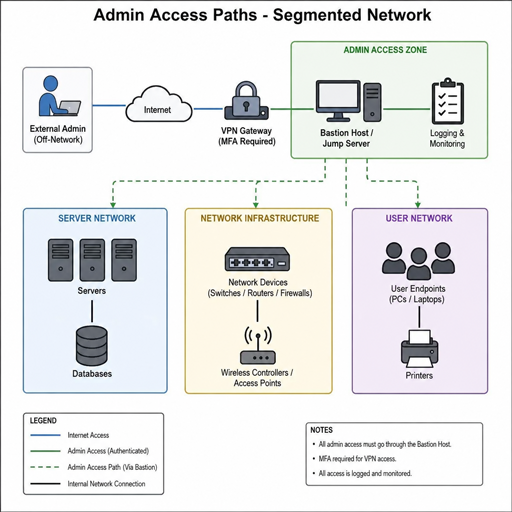
A secure organization starts with disciplined administration. System administrators hold the keys to identity, infrastructure, configuration, and recovery, so their everyday habits can either reduce risk or quietly create it. This handbook brings together practical network security tips for administrators who need to protect systems without slowing down legitimate work.
What should a system administrator secure first?
A system administrator should secure privileged access first, because administrator accounts can change settings, create or remove users, install software, access sensitive systems, and disable protections. If an attacker compromises one privileged account, they may not need to “hack” deeper; they can simply use trusted tools with stolen authority. Start by tightening identity, access, logging, patching, and recovery before expanding into more advanced controls.
The goal is not to make administration impossible. The goal is to make powerful actions deliberate, traceable, and limited to the people and systems that truly need them. Good system administrator security creates guardrails: administrators can still do their work, but risky shortcuts become harder to take and suspicious activity becomes easier to notice.
A practical priority order looks like this:
- Privileged accounts: Remove shared logins, enforce multifactor authentication, and separate admin accounts from everyday accounts.
- Access rights: Apply least privilege and review group membership regularly.
- Patching and configuration: Keep operating systems, applications, firmware, and network devices current.
- Network boundaries: Segment sensitive systems and restrict management access.
- Monitoring: Log privileged activity, authentication events, configuration changes, and unusual access.
- Recovery: Maintain tested backups and clear incident response steps.
Privileged accounts are the highest-value target
Attackers often look for administrator credentials because they provide leverage. Phishing, password reuse, keylogging malware, password spraying, pass-the-hash techniques, and vulnerable endpoints can all lead to privileged access. Insider misuse is also a concern when broad permissions are granted without oversight.
The most dangerous habits are familiar: using an admin account for email and browsing, sharing a single administrator login among a team, storing passwords in insecure notes, leaving old admin accounts active, or granting full rights “just in case.” These practices may feel convenient during busy operations, but they make investigations harder and increase the blast radius of a mistake or compromise.
A system security administrator should treat privileged access as temporary, accountable, and specific. Create named accounts for each administrator, use separate accounts for daily work and elevated tasks, and require stronger controls for higher-risk systems. When possible, use privileged access management workflows so access can be approved, time-limited, recorded, and revoked.
Strong privileged account controls include:
- Named admin accounts instead of shared administrator logins.
- Multifactor authentication for administrative access, remote access, cloud consoles, and identity platforms.
- Role-based access so help desk, server, database, cloud, and network teams receive only the rights they need.
- Just-in-time elevation for sensitive tasks rather than standing privileges.
- Session logging for critical systems so changes can be reviewed after an incident.
- Immediate deprovisioning when an administrator changes roles or leaves the organization.
These steps also make daily work cleaner. When every action is tied to a named person and a specific role, troubleshooting becomes easier, audits become less painful, and unusual behavior stands out sooner.
Least privilege keeps authority under control
Least privilege means users and systems receive only the access required to perform their current responsibilities. For administrators, this principle is especially important because excessive rights can turn a small error into a major outage or breach.
Begin with a plain inventory. List privileged groups, service accounts, local administrators, domain administrators, cloud administrators, database administrators, and emergency accounts. Then identify what each account is for, who owns it, when it was last used, and whether its permissions still match a real business need.
Role separation is also essential. A person may need administrative rights, but not everywhere. A server administrator may not need database owner rights. A cloud administrator may not need full access to finance applications. A help desk technician may need password reset permissions but not the ability to change security policies.
Use this checklist during access reviews:
- Does this account belong to a real person, service, or emergency process?
- Is the account still needed?
- Are the permissions broader than the role requires?
- Can access be limited by time, location, device, or approval?
- Are privileged actions logged and reviewed?
- Is there a documented owner for service accounts?
- Are inactive accounts disabled or removed?
Least privilege is not a one-time cleanup. Teams change, projects end, vendors rotate, and temporary permissions become permanent unless someone removes them. Schedule recurring reviews and make access cleanup part of normal operations.
Network defenses should support real administrator workflows
The best network security tips are the ones administrators can actually maintain. A control that blocks routine work without a clear process will be bypassed. A control that fits the workflow becomes part of the culture.
Network segmentation is a good example. Sensitive systems should not sit on the same flat network as general user devices. Domain controllers, backup infrastructure, security tools, production servers, management interfaces, and critical databases deserve tighter boundaries. Administrators should connect through approved management paths rather than from any workstation on the network.
Firewalls and access control lists should be reviewed for purpose, not just existence. Rules that say “any to any” or allow broad administrative ports from large network ranges deserve scrutiny. Restrict management protocols to known admin workstations, jump hosts, VPN ranges, or privileged access gateways.
For practical protection, focus on these areas:
- Segment critical assets: Separate user networks, server networks, management networks, backups, and cloud-connected environments.
- Harden admin workstations: Use dedicated, patched devices for privileged work when possible.
- Control remote access: Require MFA, device health checks, and logging for VPNs and remote administration tools.
- Limit exposed services: Disable unused ports and services, especially on internet-facing systems.
- Protect backups: Keep backup systems isolated, access-controlled, and regularly tested.
- Document exceptions: Every exception should have an owner, reason, review date, and compensating control.
Security should reduce uncertainty. When approved paths are documented, administrators know where to connect, which account to use, and what logging is expected. That clarity helps both operations and incident response.
How should administrators manage patches and vulnerabilities?
Administrators should manage patches through a repeatable process that prioritizes risk, tests changes where practical, and confirms deployment. Patching is not just a monthly task; it is an ongoing program covering operating systems, applications, network devices, cloud services, endpoint tools, firmware, and third-party software. The most important part is consistency: know what you own, know what is vulnerable, and know when fixes are applied.
Start with asset visibility. You cannot patch what you do not know exists. Maintain inventories for servers, endpoints, applications, network appliances, cloud resources, and externally exposed services. Include ownership information so the right team can respond quickly when a vulnerability matters.
Next, define patch categories. Emergency fixes for actively exploited vulnerabilities should move faster than routine updates. Internet-facing systems, identity infrastructure, remote access tools, and security platforms often deserve higher priority because compromise there can open paths into the rest of the environment.
A balanced patch workflow includes:
- Inventory: Confirm affected systems and business owners.
- Prioritization: Rank by exposure, exploitability, business impact, and available mitigations.
- Testing: Validate updates for critical applications when feasible.
- Deployment: Apply patches using controlled maintenance windows or emergency procedures.
- Verification: Confirm installation and check for failed updates.
- Documentation: Record exceptions, delays, and compensating controls.
Configuration management matters too. A fully patched system can still be weak if insecure defaults remain in place. Baseline builds, secure templates, and configuration drift monitoring help administrators keep systems aligned with policy over time.
Logging turns security from guesswork into evidence
Security teams cannot respond to what they cannot see. For a cyber security system administrator, logs provide the timeline: who signed in, from where, what changed, which system was touched, and whether the activity fits normal behavior.
At minimum, capture authentication events, privilege changes, group membership updates, firewall events, endpoint alerts, administrative commands, remote access sessions, and changes to critical configurations. Logs should be centralized so attackers cannot easily erase local evidence after gaining access to a machine.
Monitoring should focus on useful signals rather than noise. Too many low-value alerts can overwhelm teams and cause real threats to be missed. Tune alerts around high-risk behavior such as impossible travel, repeated failed logins, new privileged accounts, unexpected service account activity, administrative access from unusual devices, or changes to logging and security controls.
Good monitoring practices include:
- Define which logs are required for each system type.
- Protect log integrity and restrict who can modify retention settings.
- Create alerts for privileged account activity outside normal patterns.
- Review administrative changes on critical systems.
- Correlate identity, endpoint, network, and cloud events where possible.
- Test whether alerts actually reach the right people.
Monitoring is not about distrusting administrators. It is about protecting them and the organization. If an admin account is compromised, clear logs can show what happened, limit speculation, and guide recovery.
Incident response starts before the incident
A compromised administrator account is not the time to decide who is responsible for containment. Prepare the plan before pressure is high. The plan should define how to disable or isolate accounts, rotate credentials, revoke sessions, preserve evidence, communicate internally, and restore safe operations.
Create playbooks for likely scenarios: stolen admin credentials, suspicious remote access, ransomware on a server, unauthorized firewall changes, compromised service accounts, and unexpected privilege escalation. Each playbook should name the technical steps and the decision points. For example, disabling an account may be obvious, but shutting down a production server may require coordination.
Administrators should also know where recovery materials live. Backups, emergency credentials, network diagrams, vendor contacts, configuration exports, and build documentation must be available when primary systems are degraded. Store critical recovery information securely, but not only inside the environment that may be unavailable during an incident.
A basic compromised-admin response checklist:
- Disable or lock the suspected account.
- Revoke active sessions and tokens where possible.
- Preserve relevant logs before systems are rebuilt or wiped.
- Identify systems accessed by the account.
- Rotate affected passwords, keys, and service credentials.
- Check for new accounts, scheduled tasks, persistence mechanisms, and policy changes.
- Restore from known-good backups if needed.
- Document lessons learned and close control gaps.
Testing matters. Run tabletop exercises and technical drills so the first use of the plan is not during a crisis.
Cloud, SaaS, and Dataverse require the same discipline
Administrative security does not stop at the data center. Cloud consoles, SaaS platforms, identity providers, and business applications often hold sensitive data and powerful configuration options. Treat these environments with the same seriousness as on-premises infrastructure.
For example, the dataverse system administrator security role is powerful in Microsoft Dataverse environments because it is designed for broad administrative management within that platform. Organizations should assign such roles carefully, review membership regularly, and avoid using high-privilege roles for routine business activity. The principle is the same everywhere: powerful roles should be limited, monitored, and justified.
Cloud and SaaS administration also introduce new operational habits. Administrators need to understand conditional access, tenant-wide settings, API permissions, application consent, audit logs, and integration risks. A small configuration change can affect many users or expose data through connected applications.
When administrators or users see a message like “for your security some settings are managed by system administrator,” it usually signals that organizational policy is controlling a device, browser, or application setting. From a security perspective, that can be useful because it prevents risky local changes. From a support perspective, administrators should document which policies are intentional so teams can distinguish managed protection from misconfiguration.
Cyber security vs system administrator responsibilities
The phrase cyber security vs system administrator often suggests two separate worlds, but in practice the roles overlap. System administrators build, configure, maintain, and troubleshoot the systems that security teams depend on. Cybersecurity specialists focus more directly on risk, detection, response, governance, and threat analysis.
The strongest organizations treat the relationship as a partnership. Security teams define controls and investigate threats; administrators implement those controls, maintain uptime, and provide deep knowledge of how systems actually work. When the two groups collaborate early, security requirements become more realistic and operational changes become safer.
A helpful division of responsibilities might look like this:
|
Area |
System administrator focus |
Cybersecurity focus |
|---|---|---|
|
Access |
Create roles, manage accounts, support users |
Define access policy and review risk |
|
Patching |
Deploy updates and verify systems |
Prioritize vulnerabilities and track exposure |
|
Logging |
Enable and maintain log sources |
Analyze alerts and investigate incidents |
|
Recovery |
Restore services and validate backups |
Guide containment and evidence preservation |
|
Configuration |
Build and maintain platforms |
Define secure baselines and monitor drift |
Many professionals grow from administration into security because they already understand systems, networks, identity, and troubleshooting. Certifications and formal training can help, but practical discipline is just as important: document changes, question broad access, patch consistently, and learn from incidents.
Daily habits that improve administrator security
Strong security is often the result of small actions repeated consistently. A system administrator does not need to rebuild the entire environment in one week to make progress. Start with the habits that reduce common risks and create visibility.
Use a daily account for normal work and a separate privileged account only when needed. Lock sessions when stepping away. Verify URLs before entering credentials. Avoid logging into administrative portals from unmanaged devices. Use approved password managers or privileged access tools rather than personal storage methods. Review failed automation jobs, backup status, and security alerts as part of routine operations.
Weekly or monthly, administrators should review privileged groups, stale accounts, failed patch deployments, firewall rule changes, backup test results, certificate expirations, and unresolved vulnerabilities. These reviews do not need to be dramatic; they need to be consistent.
The best network security tips are not always the most complex. Often, the biggest improvements come from removing old access, closing unused services, documenting exceptions, and making sure someone is accountable for every critical system.
A practical security checklist for administrators
Use this checklist as a starting point for improving system administrator security across your environment:
- Separate daily user accounts from administrative accounts.
- Require MFA for privileged access.
- Remove shared administrator accounts wherever possible.
- Review privileged group membership on a schedule.
- Restrict administrative access to approved devices and networks.
- Patch critical systems consistently and verify completion.
- Segment sensitive systems from general user networks.
- Centralize logs from identity, servers, endpoints, network devices, and cloud platforms.
- Alert on unusual privileged activity and security policy changes.
- Protect and test backups.
- Document emergency access procedures.
- Create incident response playbooks for administrator account compromise.
- Review cloud, SaaS, and Dataverse roles with the same care as local admin rights.
- Keep configuration baselines current.
- Make exceptions temporary, owned, and reviewed.
This checklist is not a finish line. It is a working rhythm. As systems, teams, and threats change, administrators should revisit these controls and adjust them to match the environment.
The takeaway
System administrators are central to organizational defense because they control the systems attackers want to control. Strong security comes from limiting privileged access, hardening administrator workflows, monitoring important activity, patching consistently, and preparing for incidents before they happen.
Whether your title is system security administrator, cyber security system administrator, or infrastructure administrator with security responsibilities, the core principle is the same: make powerful access intentional, limited, and visible. When administrators combine operational skill with security discipline, they become one of the strongest defenses an organization has.
