
Open-source port scanning utilities help security teams, administrators, and curious learners understand which services are reachable on a network. Used responsibly, they turn unknown exposure into a clear inventory: open ports, likely services, and the next questions to investigate. This guide explains how common open-source port scanning tools fit into a practical security workflow, where they differ, and how to choose the right utility without treating every scanner as interchangeable.
Which open-source port scanning utilities are worth knowing?
The most useful open-source port scanning tools are the ones that match your scope: Nmap for detailed host and service discovery, Masscan and ZMap for very large-scale surveys, RustScan and Naabu for fast developer-friendly workflows, and OpenVAS or OWASP Amass when port data needs to feed broader exposure management. Nmap remains the reference point because its official documentation covers host discovery, port scanning techniques, version detection, timing, performance, and usage examples, while newer utilities often focus on speed, automation, or attack-surface discovery around it.
That said, “open source” is not a substitute for permission. Port scanning tools can create noise, trigger alerts, or violate policy when used on networks you do not own or administer. Treat open-source security like any other professional process: define scope, document authorization, control scan rate, and make sure results lead to remediation rather than curiosity-driven probing.
What port scanning actually tells you
Port scanning answers a narrow but important question: which network ports appear reachable from the scanner’s point of view? A port can be open because a legitimate service is listening, exposed because of a firewall or cloud rule, filtered by a control that blocks a clear response, or closed because no service is available. That distinction matters because port scanning is not the same thing as vulnerability validation.
Think of port scanning as the front door of network discovery. If TCP 443 is open, you have found an HTTPS-facing surface; you have not yet proven the web service is secure or vulnerable. If SSH is exposed to the internet, the finding may be acceptable for a hardened bastion host but risky for an unmanaged server. This is why port scanning tools often sit beside security scanning tools, network vulnerability tools, configuration review, asset management, and log analysis.
A useful scan result usually includes:
- Target context: hostnames, IP ranges, cloud accounts, or business owners tied to the asset.
- Port and protocol: TCP and UDP behave differently, and UDP scanning often requires more interpretation.
- Service hints: banners, protocol probes, or version detection when appropriate.
- Exposure path: whether the service is reachable internally, externally, through VPN, or from a specific segment.
- Follow-up action: validate ownership, remove unnecessary exposure, restrict access, or send the asset into vulnerability scanning.
The major tools serve different jobs
The strongest network scanning software stacks usually combine more than one utility. A fast scanner can identify candidates, a deeper scanner can enrich service details, and a vulnerability platform can test known issues or policy failures. Choosing between port scanning tools is less about finding a universal winner and more about placing each tool in the right part of the workflow.
Nmap for detailed discovery
Nmap is the default starting point for many defenders because it balances flexibility, documentation, and depth. The project describes documentation across areas such as port scanning techniques, host discovery, service/version detection, OS detection, timing, and performance, which makes it useful for both one-off investigation and repeatable internal procedures.
Its strength is not simply “finding open ports.” Nmap can help an analyst understand what a service might be, how a host responds under different scan types, and which checks are appropriate for the environment. That makes it valuable for internal audits, lab learning, incident response scoping, and controlled external reviews. Review licensing before embedding it into commercial products or derivative systems; Nmap is distributed under the Nmap Public Source License, which the project says is based on GPLv2 with additional terms and exceptions.
Masscan and ZMap for large-scale discovery
Masscan and ZMap are built for speed and scale. Masscan’s project describes it as an Internet-scale TCP port scanner that uses asynchronous transmission and supports arbitrary port and address ranges, while also noting that it uses its own TCP/IP stack and may require careful network configuration. ZMap is described by its project as a fast stateless single-packet network scanner designed for Internet-wide network surveys.
These tools are powerful when a team needs to understand broad exposure across large address space, but they demand discipline. High-rate scans can overwhelm weak systems, create misleading data when packets are dropped, and attract attention from monitoring teams. For enterprise work, they are best treated as discovery engines: collect a broad list of responsive services, then pass a smaller target set into deeper validation.
RustScan and Naabu for fast workflows
RustScan and Naabu are popular in modern reconnaissance pipelines because they emphasize speed and ease of integration. RustScan presents itself as a modern port scanner, while ProjectDiscovery lists Naabu among its open-source tools and describes it as returning open host-and-port pairs, making it convenient for automation-friendly output.
The practical benefit is workflow fit. If your team already uses scripts, CI checks, bug bounty tooling, or ProjectDiscovery-style pipelines, a simple scanner that produces clean output can reduce friction. These tools may not replace the richness of Nmap, but they can help identify what deserves closer inspection.
OpenVAS and Amass for broader exposure management
OpenVAS and OWASP Amass are not merely “faster port scanners.” OpenVAS, from Greenbone, belongs in the vulnerability management category; Greenbone states that its Community Edition includes the actual source code of the Greenbone Vulnerability Management software stack, also known as OpenVAS. OWASP Amass focuses on attack surface mapping and external asset discovery using open-source information gathering and active reconnaissance techniques.
These tools show where port scanning fits into a larger picture. Amass can help identify assets you may not have in inventory, while OpenVAS can evaluate systems for known vulnerability conditions. When paired with port scanning, they help move from “what is open?” to “what does this exposure mean for risk?”
A practical comparison of common utilities
|
Utility |
Best fit |
Strength |
Watch-out |
|---|---|---|---|
|
Nmap |
Detailed host and service discovery |
Mature options, rich documentation, service detection |
Can be slower when used deeply across large ranges |
|
Masscan |
High-speed TCP discovery |
Broad scans across large address ranges |
Requires rate control and careful network handling |
|
ZMap |
Internet-scale research surveys |
Stateless single-packet scanning model |
Better for survey-style discovery than deep service analysis |
|
RustScan |
Fast local or workflow-friendly scanning |
Quick results and modern tooling feel |
Usually needs follow-up enrichment |
|
Naabu |
Automation pipelines |
Clean host:port output for recon workflows |
Service detection may depend on external data or follow-up tools |
|
OpenVAS |
Vulnerability management |
Connects exposure to vulnerability checks |
Heavier to deploy and maintain than a simple scanner |
|
OWASP Amass |
Asset discovery and attack surface mapping |
Finds assets before port scanning begins |
Not a replacement for service-level validation |
How should you choose the right tool?
Choose the tool by deciding what decision you need to make after the scan. If you need to troubleshoot one subnet, Nmap may be enough. If you need to map thousands of addresses quickly, Masscan or ZMap may be a better front-end discovery layer. If you need recurring vulnerability evidence, OpenVAS or another vulnerability platform should sit downstream from your port findings.
A simple selection checklist helps keep the choice grounded:
- Define scope first. List approved IP ranges, domains, cloud accounts, and excluded systems.
- Decide the output you need. Human-readable reports, JSON, host:port pairs, or vulnerability tickets all point to different tools.
- Match scan depth to risk. A basic port sweep is safer and faster; version detection and scriptable checks need more caution.
- Control timing and rate. Production networks, fragile legacy systems, and shared environments need conservative settings.
- Plan enrichment. Open ports need asset ownership, service purpose, and business context.
- Create a remediation path. Scanning without follow-up becomes noise.
This is where open-source networking can shine. You can assemble small, transparent workflows that match your environment instead of buying a large platform before you understand your own exposure model. At the same time, open-source security still needs ownership: someone must maintain tool versions, review licenses, tune scans, and validate results.
Responsible scanning makes results more trustworthy
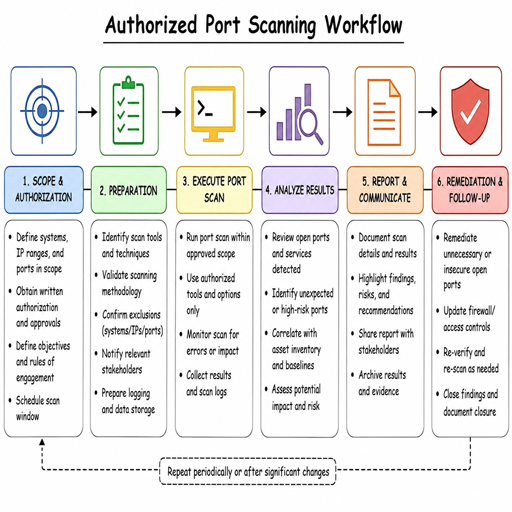
Good scanning etiquette improves both security and data quality. Start with written authorization, especially for third-party environments, cloud ranges, subsidiaries, or customer-connected networks. Make sure operations, network, and security teams know what will be scanned, when it will happen, and who to contact if monitoring systems alert.
A responsible internal workflow might look like this:
- Inventory the target set from CMDB, cloud exports, DNS, or asset discovery.
- Run low-impact discovery to identify live hosts and reachable ports.
- Enrich interesting services with service detection or banner collection where allowed.
- Send relevant targets to vulnerability validation, configuration review, or owner review.
- Prioritize findings by exposure, sensitivity, compensating controls, and business purpose.
- Rescan after remediation to confirm that unnecessary services are closed or restricted.
Avoid turning every scan into the most aggressive possible scan. In many environments, the right answer is not “scan harder,” but “scan predictably.” Repeatable, well-scoped scanning builds trend data, reduces false alarms, and makes it easier to prove that remediation actually happened.
Turning open ports into security decisions
The value of port scanning is not the port list; it is the decision that follows. An exposed database port may require immediate restriction. An internal admin interface may need network segmentation. A forgotten development server may need ownership assigned before any technical fix is possible. The scanner provides evidence, but people and process convert that evidence into risk reduction.
For most teams, the best approach is layered. Use open-source port scanning tools for visibility, network vulnerability tools for validation, and asset processes for accountability. Keep raw results, but translate them into plain-language actions: remove, restrict, patch, monitor, or accept with documented justification.
Open-source port scanning utilities are valuable because they make network exposure visible without hiding the mechanics. Nmap, Masscan, ZMap, RustScan, Naabu, OpenVAS, and Amass each solve a different part of the discovery-to-remediation chain. Pick the utility that fits your scope, scan only what you are authorized to test, and make every finding lead to a practical security decision.
