
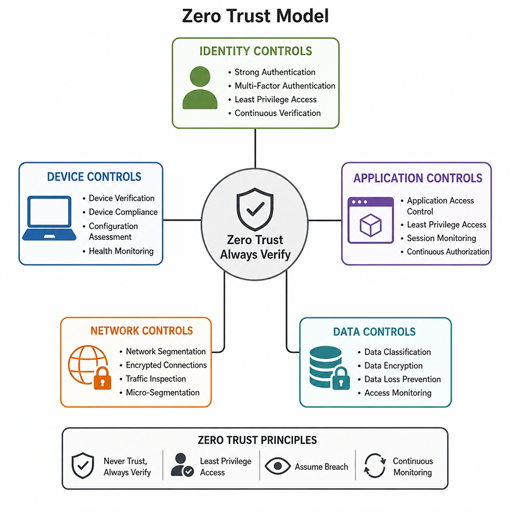
Zero trust is a security model built around a simple rule: never assume a user, device, application, or network connection is safe by default. A practical Zero trust architecture implementation combines risk assessment, identity verification, network segmentation, least privilege access, continuous monitoring, and data protection into one operating approach. The goal is not to buy a single product, but to reduce unnecessary trust across the environment and make every access decision intentional.
What does zero trust architecture actually mean?
Zero trust architecture means every request for access must be evaluated based on context, identity, device health, policy, and risk rather than location alone. In older security models, users inside the corporate network were often treated as more trustworthy than outsiders. Zero trust removes that assumption and applies the idea of “trust no one” in a practical, policy-driven way.
This does not mean every employee is treated with suspicion or that work becomes harder. It means access is granted only when the organization has enough confidence that the person, device, session, and requested action are appropriate. A user may be allowed to read one system, blocked from downloading sensitive records, and challenged with stronger authentication when risk increases.
A strong zero trust strategy usually includes several connected controls:
- Identity verification: Confirming that users, services, and devices are who or what they claim to be.
- Least privilege: Giving each identity only the access it needs, for only as long as it needs it.
- Network segmentation: Limiting how far an attacker can move if one account, endpoint, or workload is compromised.
- Data protection: Classifying, encrypting, monitoring, and controlling sensitive information wherever it lives.
- Continuous monitoring: Rechecking access decisions as conditions change, instead of approving once and forgetting.
Start with a practical risk assessment
Every zero trust program should begin with a risk assessment because you cannot protect everything equally at the same time. The assessment helps identify the systems, identities, applications, and data that matter most, then maps where existing controls are weak or inconsistent. Without this step, teams often spend money on tools before understanding which risks they are actually trying to reduce.
Begin by documenting the assets that support critical operations. This includes cloud platforms, internal applications, SaaS tools, databases, endpoints, privileged accounts, third-party connections, and unmanaged devices. Then identify the most likely ways those assets could be misused, exposed, or disrupted.
A useful risk assessment should answer questions such as:
- What data is most sensitive? Customer records, financial information, intellectual property, credentials, and regulated data need stronger controls.
- Who can access it today? Include employees, contractors, service accounts, administrators, vendors, and automated workflows.
- Where is access overbroad? Look for shared accounts, standing admin rights, inactive users, excessive permissions, and unmonitored remote access.
- How does traffic move? Understand which applications talk to each other and whether internal systems are unnecessarily reachable.
- What visibility is missing? Identify gaps in logging, alerting, endpoint status, data movement, and identity events.
This stage should produce a prioritized roadmap. For example, an organization may decide to secure privileged accounts first, then segment high-value applications, then apply stricter data controls to sensitive repositories. The order will vary, but the principle is the same: reduce the highest-impact risk before optimizing lower-priority areas.
Build identity verification into every access decision
Identity is one of the central control points in a zero trust model. If an attacker can use a valid account without challenge, the rest of the security stack becomes much less effective. Strong identity verification reduces that risk by making access conditional on more than a username and password.
Multi-factor authentication is a common starting point, but it should not be the only identity control. Organizations also need lifecycle management, device checks, role-based access, adaptive policies, and monitoring for suspicious behavior. A login from a managed laptop during normal working hours may be handled differently from a login attempt from an unfamiliar location on an unmanaged device.
For stronger identity verification, focus on these practices:
- Use phishing-resistant authentication where possible for administrators, executives, finance users, and other high-risk groups.
- Remove stale accounts quickly when employees leave, contractors finish work, or service accounts are no longer needed.
- Centralize identity policy so access rules are consistent across cloud, SaaS, and internal applications.
- Review privileged access frequently because administrator permissions create outsized risk.
- Monitor identity signals such as impossible travel, repeated failed logins, unusual privilege changes, and unexpected access to sensitive systems.
Identity should also apply to machines and services, not only people. APIs, workloads, containers, scripts, and automation tools often communicate using credentials or tokens. A mature zero trust program verifies these non-human identities, limits their permissions, and rotates or revokes secrets when necessary.
How should network segmentation support zero trust?
Network segmentation supports zero trust by reducing unnecessary connectivity between users, devices, applications, and workloads. Instead of relying on a broad internal network where many systems can reach each other, segmentation creates smaller zones with controlled pathways. If a threat actor compromises one endpoint, segmentation can limit lateral movement and make abnormal activity easier to detect.
Traditional segmentation often used large network zones, such as separating the office network from the data center. Zero trust pushes this idea further by aligning access with application needs, sensitivity, and identity. A finance application, for example, should not be broadly reachable by unrelated devices simply because they are on the same corporate network.
Effective segmentation usually includes three layers:
Application-aware access
Access should be based on the application a user needs, not blanket connectivity to an entire network range. This reduces exposure and makes policy easier to understand. When users only connect to approved applications, there are fewer paths for attackers to probe.
Workload and environment separation
Production, development, testing, and administrative environments should not freely communicate unless there is a documented business reason. Sensitive workloads deserve tighter boundaries and stronger monitoring. Cloud security groups, firewalls, software-defined networking, and policy engines can all support this approach.
Continuous traffic visibility
Segmentation works best when teams can see actual traffic patterns before enforcing restrictions. Mapping dependencies helps prevent outages and avoids blocking legitimate business processes. Once policies are in place, traffic logs can reveal attempts to access systems that should not be contacted.
Apply least privilege without slowing the business
Least privilege means users and systems receive only the permissions required to perform their work. It is one of the most important zero trust principles because excessive access turns ordinary accounts into high-value targets. The challenge is to reduce access carefully so security improves without creating unnecessary friction.
Start with access reviews for critical systems and sensitive data. Identify users with permissions they no longer need, groups that are too broad, and roles that combine unrelated duties. Then replace permanent access with time-bound, request-based, or approval-based access where appropriate.
A practical least privilege checklist includes:
- Define roles based on actual job responsibilities, not convenience.
- Remove default access that is granted automatically but rarely used.
- Separate administrator accounts from everyday user accounts.
- Require stronger controls for privileged actions, such as approvals or step-up authentication.
- Use just-in-time access for sensitive administrative tasks when feasible.
- Audit permissions regularly and investigate unusual privilege increases.
- Document exceptions so temporary access does not become permanent.
The best least privilege programs are collaborative. Security teams should work with business units to understand workflows before removing access. When users can request needed permissions through a clear process, they are less likely to seek workarounds.
Data protection ties the strategy together
Zero trust is not complete if it focuses only on users and networks. The ultimate objective is usually to protect data: where it is stored, how it moves, who can use it, and what happens if it is exposed. Data protection gives zero trust a clear business purpose.
Begin by classifying data into practical categories. Not every file needs the same level of control, but sensitive records should be easier to identify and harder to misuse. Classification can guide encryption, retention, sharing restrictions, monitoring, and incident response.
Important data protection controls include encryption for data at rest and in transit, access controls on repositories, data loss prevention for risky transfers, and monitoring for unusual download or sharing behavior. Backups also matter because ransomware and destructive attacks can turn weak recovery planning into a business crisis.
Data protection policies should follow information across environments. If sensitive files move from an internal repository to a cloud platform, collaboration tool, or endpoint, the organization still needs visibility and control. This is where zero trust becomes more than a perimeter strategy; it becomes a consistent way to manage risk wherever work happens.
A phased implementation roadmap
A successful Zero trust architecture implementation is usually incremental. Trying to redesign identity, networks, applications, endpoints, and data controls all at once can overwhelm teams and create avoidable disruption. A phased roadmap makes progress measurable and sustainable.
Consider this sequence:
- Define the scope and business drivers. Clarify whether the immediate priority is ransomware resilience, remote access, cloud security, regulatory pressure, third-party risk, or protection of critical data.
- Complete the initial risk assessment. Identify high-value assets, exposed paths, weak identity controls, and excessive permissions.
- Strengthen identity foundations. Improve multi-factor authentication, account lifecycle management, privileged access, and centralized policy enforcement.
- Map applications and traffic flows. Understand how users, devices, and workloads actually interact before applying segmentation.
- Enforce least privilege. Reduce standing access, remove unused permissions, and introduce just-in-time access for sensitive tasks.
- Segment critical systems. Start with high-risk or high-value environments, then expand once policies are tested.
- Improve data protection. Classify sensitive information, apply encryption and access controls, and monitor risky movement.
- Measure and refine. Track policy exceptions, blocked attempts, access review findings, incident trends, and user friction.
This roadmap should not be treated as a one-time project. Zero trust is an operating model that evolves as users, devices, applications, threats, and business priorities change.
Common mistakes to avoid
Many zero trust initiatives struggle because organizations treat the concept as a product purchase instead of a security discipline. Tools can help, but they cannot define risk tolerance, clean up permissions, classify data, or align teams by themselves. The strategy needs governance, ownership, and ongoing maintenance.
Avoid these common mistakes:
- Skipping discovery: Enforcing policies before understanding dependencies can break legitimate workflows.
- Overcomplicating the first phase: Starting too broadly may delay visible progress and reduce support.
- Ignoring user experience: Security controls that are confusing or disruptive often lead to workarounds.
- Leaving service accounts unmanaged: Non-human identities can carry powerful permissions and are often overlooked.
- Assuming the internal network is safe: Zero trust requires verification regardless of location.
- Failing to revisit policies: Access needs change, so reviews and adjustments must be routine.
Good implementation balances control with usability. The more context a security system has, the more precisely it can apply friction only when risk justifies it.
Zero trust becomes stronger through continuous improvement
Zero trust works best when it becomes part of everyday security operations, not a separate initiative that fades after deployment. Teams should regularly review identity events, access exceptions, segmentation rules, data movement, and incident findings. Each review provides evidence for where policies should become stricter, simpler, or more automated.
The most practical way to begin is to choose a high-value area and improve it deliberately. Strengthen identity verification, remove unnecessary access, segment a critical application, and protect the data that matters most. From there, expand the model step by step until “trust no one” becomes a clear, manageable security practice rather than a slogan.
